Best YouTube summarizer extension in 2026: four compared
Find the best YouTube summarizer extension for your workflow. Compare Glasp, Eightify, NoteGPT and Glarity on transcripts, free limits, privacy and study tools.
You have a 90-minute lecture or interview open. You need the argument, the useful moments, and perhaps a transcript you can search later. Which is the best YouTube summarizer extension for that job? Some give you a quick verdict; others turn the video into a notebook, and the free limits are surprisingly different.
I compared four Chrome extensions present in the Extenshi catalog: Glasp's YouTube Summary, Eightify, NoteGPT, and Glarity. They target students, researchers, and anyone deciding whether a long video deserves their time. I tested their actual YouTube interfaces before and after signing in, using separate browser profiles. The screenshots below come from those sessions, not the developers' promotional images.
The main test used 3Blue1Brown's introduction to neural networks. Glasp, Eightify, and Glarity produced summaries of that video after sign-in. NoteGPT did not retrieve its captions in my session, so I also tested the next episode, about gradient descent; that produced a detailed NoteGPT summary.
I checked the catalog, official listings, pricing, and policies on September 27, 2026. This is a practical workflow comparison with a small sample, not an accuracy benchmark.
Quick verdict
- Start with Glasp for study notes. The transcript worked before sign-in; the summary worked after it. The free plan lists three basic summaries a day. Free highlights are public by default.
- Pick Eightify to decide what to watch. Its full summary and timestamp jumps worked after sign-in. The listing offers a seven-day trial; this sample completed without starting it.
- Try NoteGPT for a detailed study outline. The second video used one quota and produced notes. The first led to a paid transcription prompt. Test your own video before paying.
- Consider Glarity if you also need translation. Summary and transcript worked after sign-in. Translation is advertised but was not tested here. Check its broad website access.
If you only want to read what was said, try YouTube's own Show transcript first. It works on videos with captions, lets you jump to a line, and requires no extension.
YouTube summarizer extensions compared
| What matters | Glasp YouTube Summary | Eightify | NoteGPT | Glarity |
|---|---|---|---|---|
| Core job | Summary plus transcript and highlights | Quick key points and timestamped navigation | Summary plus transcript and study outputs | Summary plus cross-language reading |
| Transcript | Copy, highlight, and export available captions | Transcript access advertised | Copy/download TXT or SRT; claims transcription without captions | Subtitles, translation, and video highlights advertised |
| Beyond the summary | Notion, Obsidian, Markdown export | Top-comments overview; shareable summary | AI chat, mind map, slides, podcast | Bilingual subtitles, webpages, PDFs, email assistance |
| What happened in the test | Transcript before sign-in; built-in overview generated after Google sign-in | Preview before sign-in; full summary, transcript, and working timestamp jumps after Google sign-in | First video led to an upgrade prompt; second video produced an outline after sign-in, using one quota | Initial transcription failure; summary and transcript populated after sign-in and another load |
| Free access | Three basic summaries/day on current pricing page; sign-in needed for built-in Summary | Seven-day trial on current Chrome listing | Sign-in panel offered 15 free quotas/month; AI actions draw on quotas or credits | Free install; some AI modes may incur token charges |
| Permissions and data disclosures to check | Store disclosure lists website content and personal information | Store disclosure lists personal information | Catalog snapshot lists webRequest and identity |
Tested Chrome package requests <all_urls> plus cookies, tabs, and scripting |
The feature rows describe published capabilities; the test row reports the observed account and video conditions. It is not a quality score. A tool with more features does not necessarily write a more faithful summary. A permission describes what an extension can access, not proof of what its developer does with your data.
Glasp: readable study notes, with a public-highlights catch
Glasp's product page brings the summary and transcript beside a video, with timestamps you can click to verify a point. You can highlight lines and export notes to Notion, Obsidian, or Markdown. If a video is part of a larger reading project, that is more useful than a summary you read once and forget. Its Chrome listing also covers articles and PDFs, so the extension isn't restricted to YouTube.
What happened in use
Opening the Transcript tab displayed the English transcript without a Glasp account. The Summary tab initially showed Google and Apple sign-in buttons. After Google sign-in, it generated an overview of ten points with time labels, without a payment step in this session.
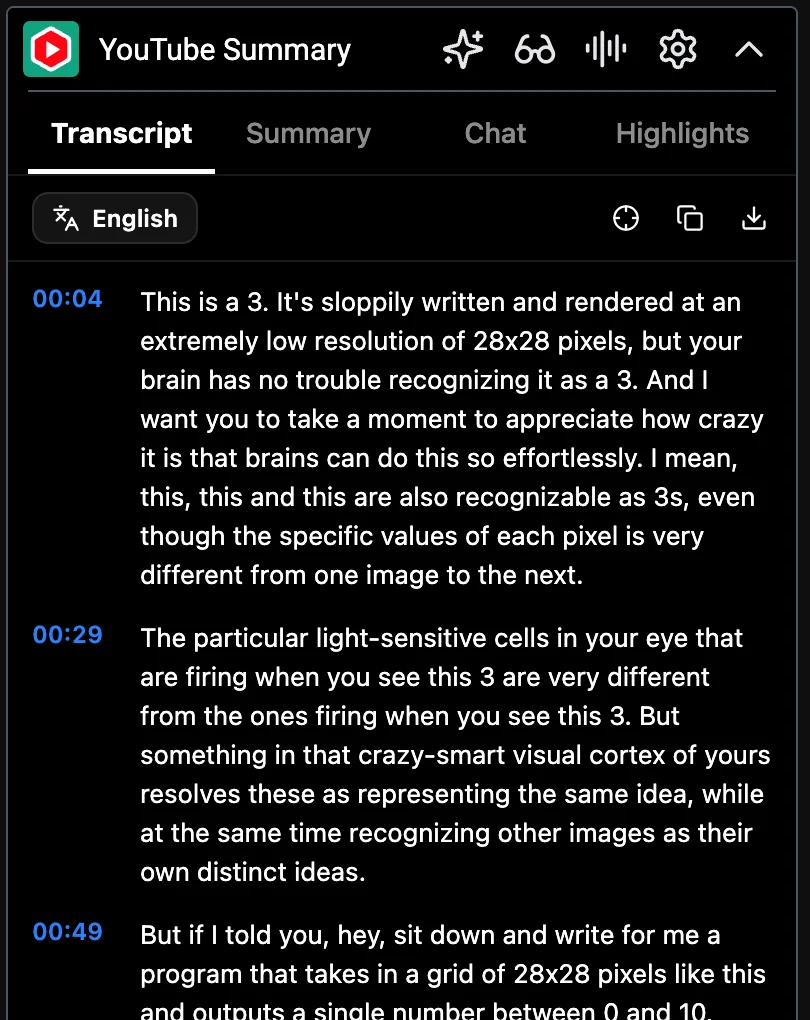 Glasp 2.4.0: the transcript was available before sign-in. This is a crop of the real YouTube sidebar.
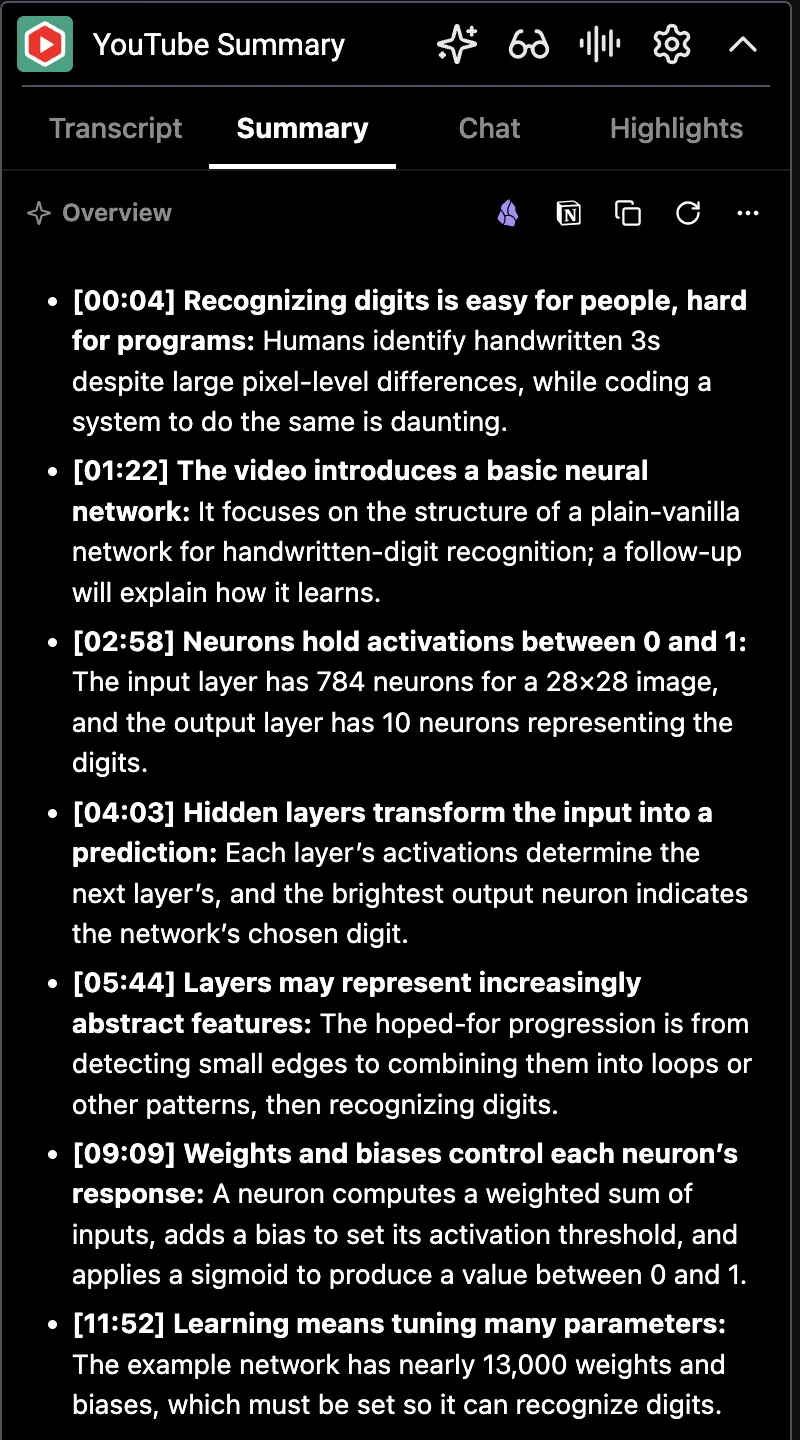 The same video after signing in. The built-in overview now replaces the login prompt.
One useful detail in this sample: Glasp explicitly preserved the video's distinction between explaining the network's structure now and explaining how it learns in a follow-up. It also described the progression from edges to shapes as a hoped-for interpretation. Those qualifications make the notes more useful for study, although one result cannot establish a general accuracy ranking.
Free limits and privacy
The current plan table gives the free tier three basic YouTube summaries per day. Advanced summaries and private highlights sit on paid plans. Glasp's marketing page describes a free summary beside the video, while its pricing page draws a basic-versus-advanced distinction.
I'd check the plan and the exact button in the extension before planning a daily study workflow around the free tier.
Glasp's privacy policy describes two AI processing paths: some content goes through its infrastructure and AI providers; another path opens an AI service you choose and places page content there under your account. Its pricing page says public highlights are the default on the free plan. That is fine for public research clips.
For private coursework, client material, or work notes, check the save and visibility settings before highlighting. The Chrome Web Store declares website content and personally identifiable information among the data types it handles.
Pick Glasp if you want a useful transcript and a place to keep what you learned, and the free limit fits your day.
Eightify: a quick answer before you watch
Eightify's product description is narrower: key ideas, timestamped jumps, a quick look at top comments, and summaries in many languages. I can see the appeal when you are triaging a queue of podcasts or interviews. You get a reading list of moments rather than a second notebook to maintain.
The Chrome listing currently says the free trial lasts seven days. It advertises configurable insight focus, format, and length, as well as transcript generation. Don't mistake the trial for a permanent free tier.
What happened in use
The initial preview showed only part of the result. After Google sign-in, the panel displayed properly and offered Insightful, List, and Auto controls. Clicking Make a full summary produced sections about the network structure, its components, and learning. A separate tab showed a timestamped outline; clicking 02:43 moved the player to approximately 163 seconds.
The transcript tab also populated. That is a useful workflow for deciding which part of a video to watch.
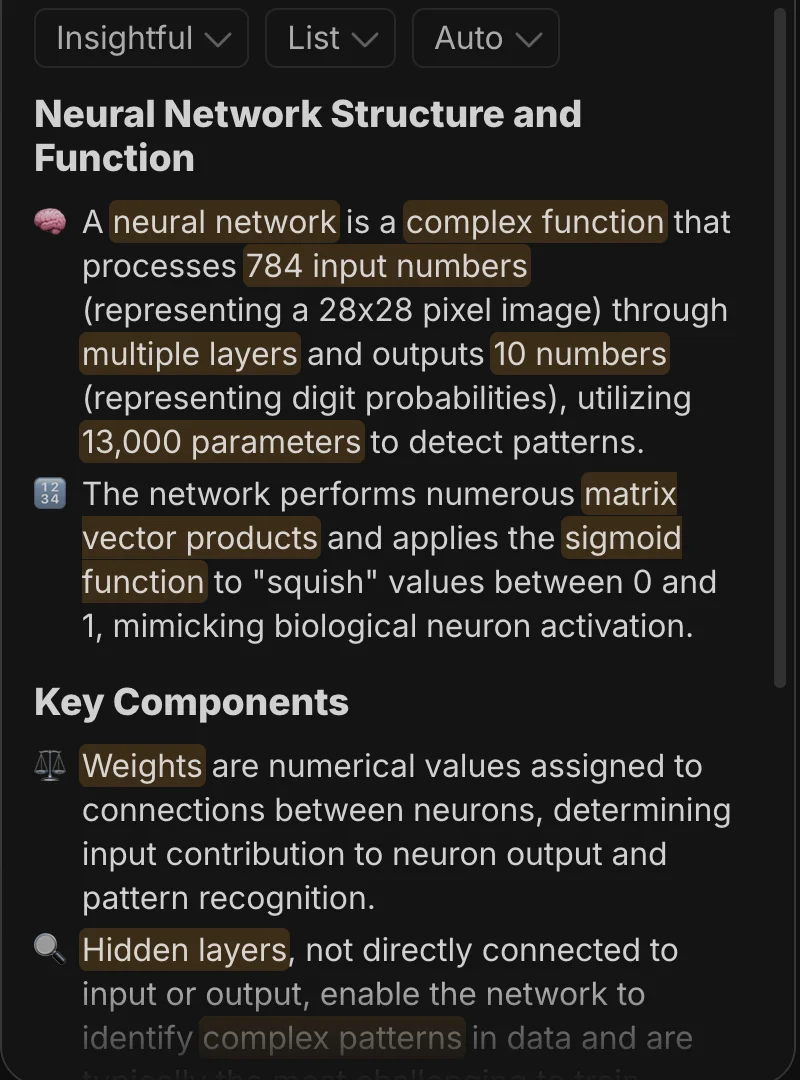 Actual Eightify 1.643 panel after sign-in and full-summary generation. Cropped below the account toolbar; the highlighted phrases are part of Eightify's interface.
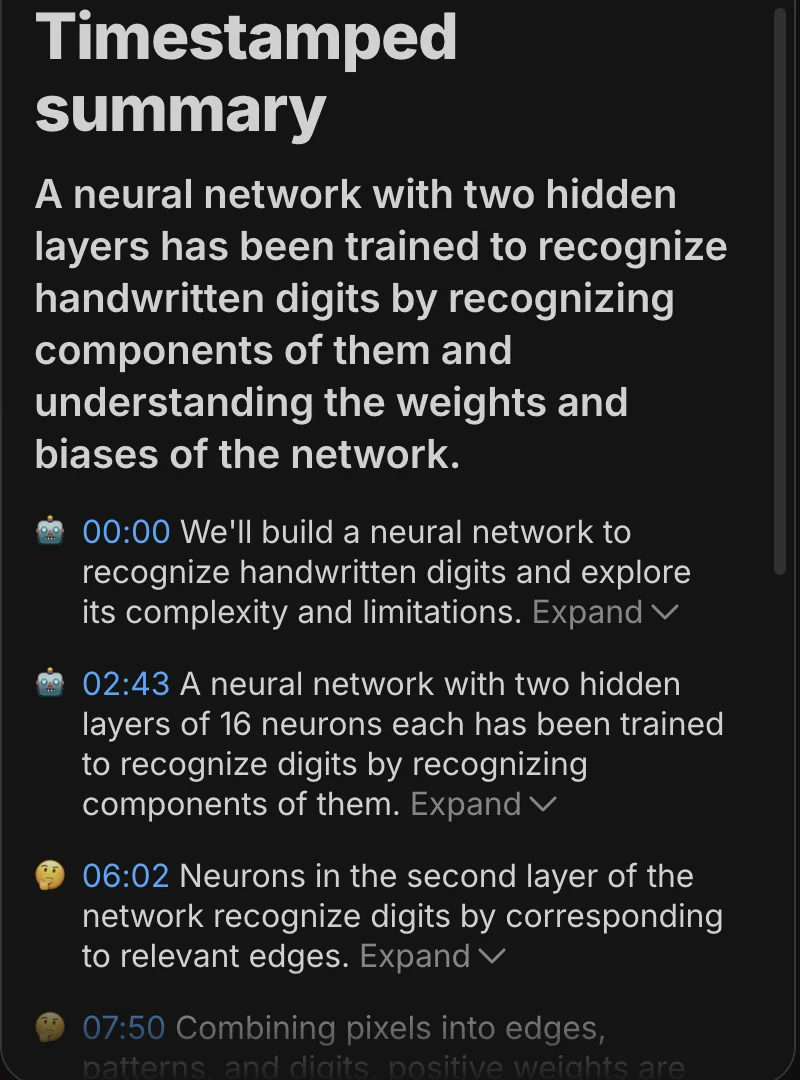 The timestamped view separates navigation from the thematic summary. The 02:43 link was tested against the video player.
Trial, pricing, and privacy
The onboarding page offered a seven-day trial followed by $4.99/month billed annually, or $9.99 monthly, in this session. I did not start that trial or enter payment details. The sample summary still completed, which verifies this particular account's access at test time, not a permanent free allowance.
Eightify's privacy policy covers the extension and says it collects account information when you register, along with technical and usage data. Its store disclosure lists personally identifiable information. So the shorter feature list does not mean local processing. If the video contains material you would not send to a remote AI service, don't assume any of these products keeps it on your machine.
Pick Eightify if short, timestamped key points are what you need and the trial convinces you the subscription is worth it.
NoteGPT: detailed study notes, with a caption and quota catch
NoteGPT's Chrome listing goes well beyond a recap. It advertises transcript translation and download in TXT or SRT, questions about the video, mind maps, presentations, and podcasts. It also claims it can transcribe videos without existing captions, up to two hours long.
That is the clearest stated fallback in this group for a video where YouTube's own transcript button is absent. Treat the length and availability as a product claim until you've checked your particular video.
What happened in use
Signing in gave the test account 15 quotas. On the main video, NoteGPT reported no subtitles, even though Glasp, Eightify, and later Glarity retrieved a transcript for it. Confirming Generate Transcript led to Upgrade Now. NoteGPT's failure was specific to this session; its fallback required payment.
I then opened the next episode, Gradient descent, how neural networks learn. Generate Summary worked and the counter changed from 15 to 14 quotas. The result was a long study outline: summary, core concepts, key insights, a table, and limitations. This is more material to review than a short watch-or-skip recap.
Clicking AI Mind Map opened NoteGPT's website in a separate tab; I did not complete a mind-map export.
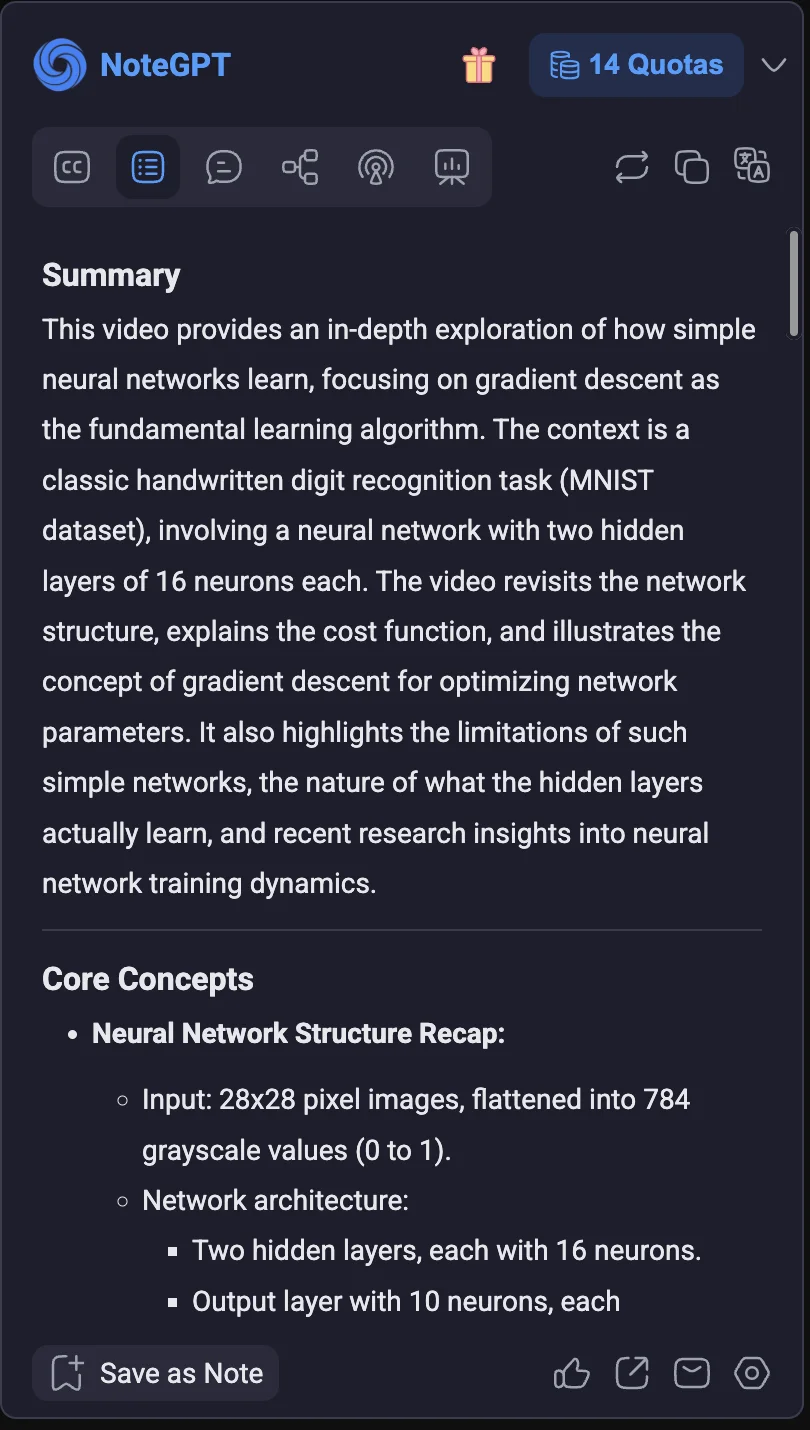 Actual NoteGPT 2.0.2.19 result on the second test video. The toolbar includes transcript, summary, chat, mind-map, podcast, and presentation entry points; their presence does not mean every output is included in the free allowance.
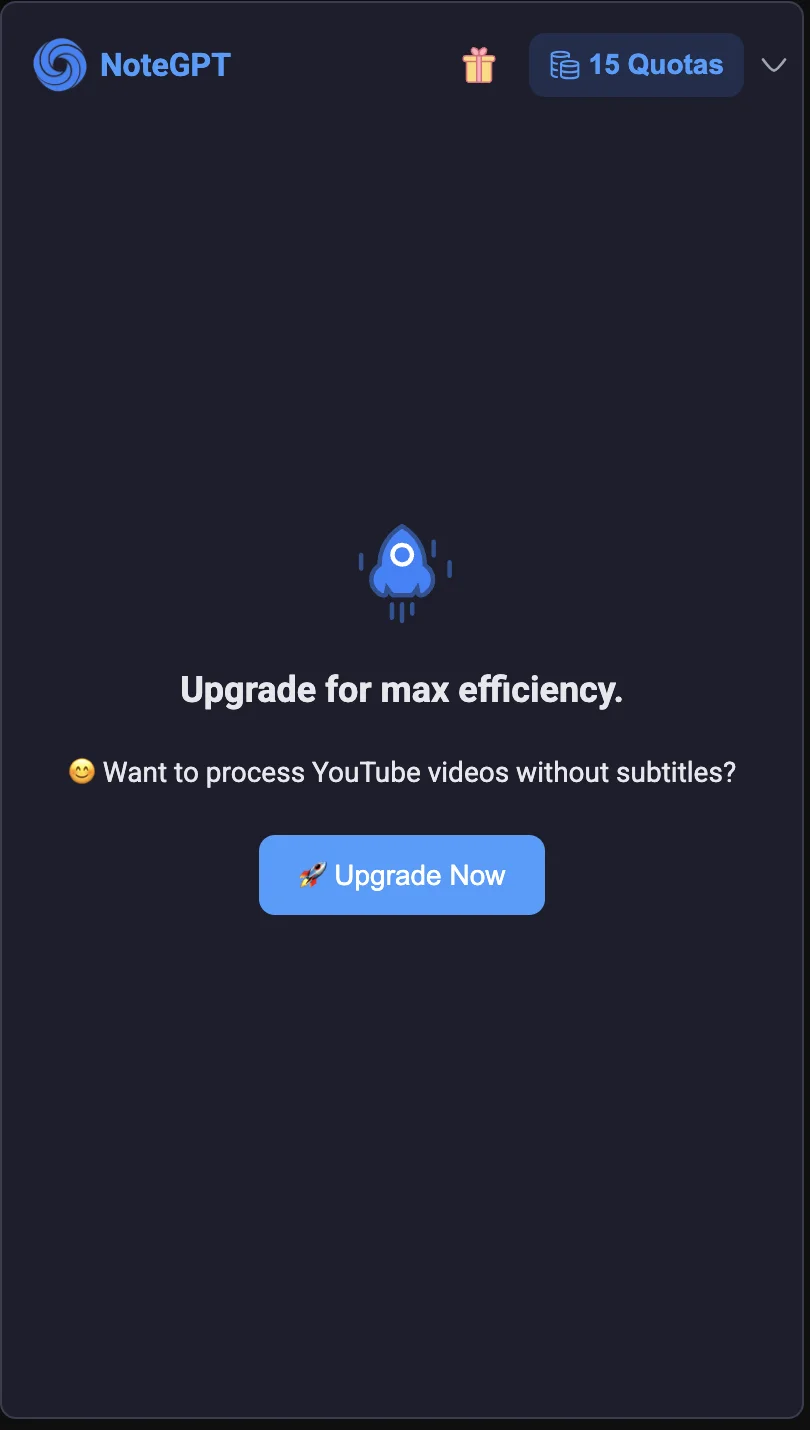 On the first video, the transcript fallback required an upgrade. The visible 15 quotas did not unlock this action.
Quotas and privacy
The cost model takes more reading than the feature list. NoteGPT's quota policy assigns different credits to transcription, chat, and other outputs. Its pricing page lists paid plans alongside a free plan, with different limits.
If you only summarize the occasional lecture, try the free allowance. If you want slides and podcasts every week, calculate the credits those actions use before choosing a plan.
For privacy, don't reduce the product to one store badge. Its service privacy policy says content submitted for AI features may be sent to third-party AI processors. Its extension policy says summaries and settings are stored locally by default and cloud saving or sharing is user-triggered.
These are separate steps: processing content and saving the result. Local history does not mean the AI runs offline.
The Chrome catalog snapshot lists webRequest and identity among requested permissions. If those capabilities matter to you, inspect the exact listing and current site access before installing.
Pick NoteGPT if the transcript is an input to studying or producing notes, and you will actually use the extra outputs.
Glarity: translation first, summary second
Glarity's product page and Chrome listing advertise YouTube highlights and questions alongside bilingual subtitles, full-page translation, PDF chat, and writing help. For a multilingual researcher who already wants those tools, one extension may be simpler than several. The project also publishes source code, which gives technically inclined readers another way to inspect it.
What happened in use
The initial signed-out panel reported No Transcription Available. After signing in through Glarity's Felo account page and loading the video again, the default mode produced a summary paragraph, emoji-led highlights, and keywords. Expanding Transcript also displayed timestamped text. The first failure was therefore not the final result of the test.
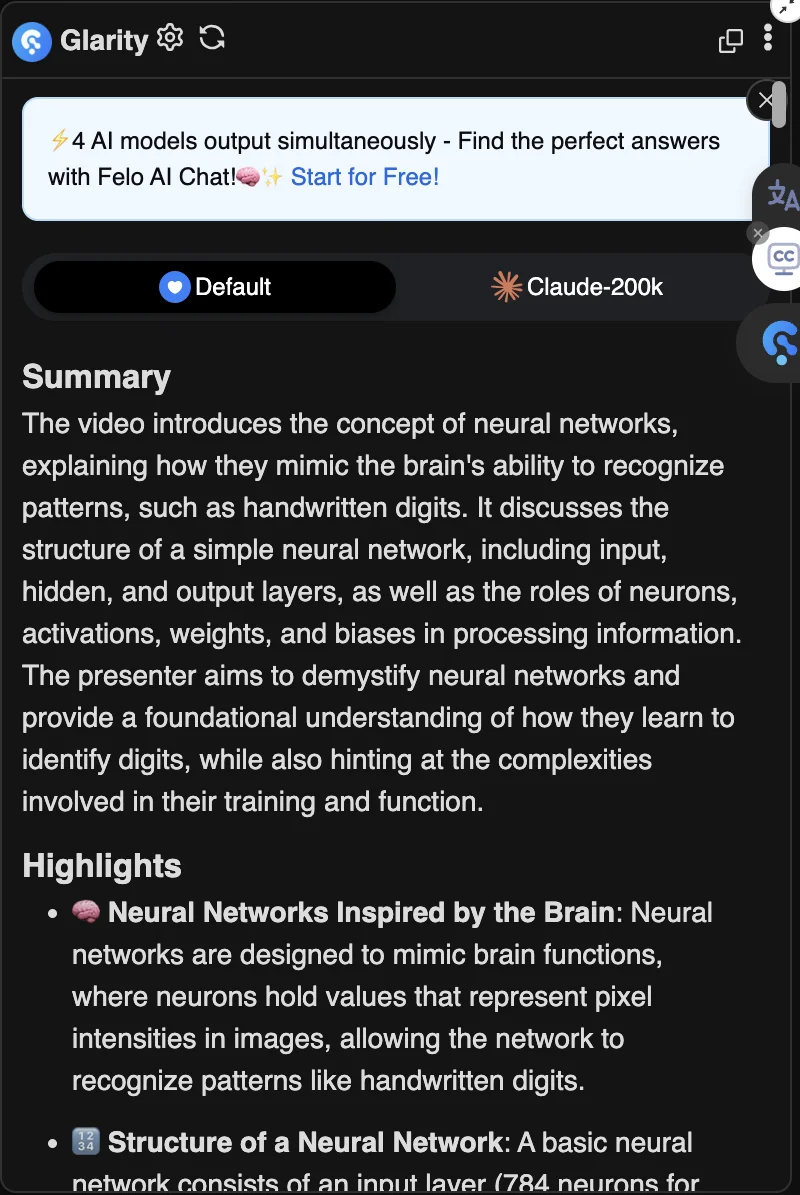 Actual Glarity 4.46.7 interface after sign-in. The promotion, model selector, and floating translation/subtitle controls are part of the interface shown in this session.
The panel is busier than Glasp's: it combines a product promotion, model choices, summary content, and expandable sections for questions, key moments, and the transcript. That may suit someone who wants several tools together. I verified summary and transcript display here, but did not benchmark bilingual subtitles, page translation, or the alternative AI providers.
Website access and AI modes
The tested Chrome package, version 4.46.7, requests cookies, tabs, and scripting, and its manifest includes the broad <all_urls> host permission. The catalog snapshot lists several service hosts, but that shorter list is not the full host-access picture.
Chrome's cookies API documentation explains that cookie access also depends on host permissions; the word cookies is not proof it reads every site's cookies. Still, this is a broader tool than a YouTube-only summarizer. Glarity's own store description says page content and prompts are exchanged when you use AI actions, even though the store privacy panel uses a simpler "will not collect or use your data" declaration. I would review the current disclosure and the mode I planned to use before treating it as a privacy-first choice.
The listing calls the extension free, then says some AI modes can carry token charges. Check the mode, not just the install button.
Pick Glarity if translation across YouTube and webpages is your main need. If summarizing videos is the only job, the extra reach buys you little.
Which is the best YouTube summarizer extension for you?
Start with a video that has captions. Open YouTube's transcript, then try the free Glasp allowance on that same video. Compare three things: whether the summary preserves the speaker's qualification, whether its timestamps lead to the right claim, and whether you can find the note a week later. That small check is more useful than a star rating.
Move to Eightify when you mainly need a quick watch-or-skip decision; to NoteGPT when you need transcripts, questions, and reusable study materials; and to Glarity when translation is the work. If captions are missing or an extension cannot retrieve them, NoteGPT advertises a transcription fallback, but my fallback attempt required an upgrade even with free quotas remaining. Test the exact video before paying.
None of the four is a substitute for checking the source. AI summaries can omit the exception that changes a speaker's whole point. Click the timestamp and listen, especially for legal, medical, financial, or quoted claims.
My YouTube extension comparison covers a different job: controlling playback and the YouTube interface. And if you want to understand what broad website access means before adding another tool, read the host-permission guide.
Before installing, open the Extenshi catalog and check the exact store listing, requested permissions, and latest scan. An automated score is a screening signal, not a guarantee of safety; Chrome, Firefox, and Edge builds can have different permissions and scan results.
FAQ
What is the best free YouTube summarizer extension? Glasp is my starting pick for occasional use: its current free plan allows three basic YouTube summaries a day. Check what the extension calls an advanced summary before assuming that feature is included.
Can an extension summarize a video without captions? YouTube's built-in transcript needs captions. NoteGPT advertises a transcription fallback, but it showed an upgrade prompt when I tried that path. Also distinguish a video without captions from an extension failing to retrieve them: NoteGPT reported no subtitles on a video whose transcript the other tools displayed.
Do any of these work in Firefox? Glasp's official product page links a Firefox version. Glarity's site also links Firefox. The permission and listing comparison above uses their Chrome builds, so check the Firefox listing separately.
Methodology
Sources and versions
I selected four established Chrome listings returned by the Extenshi catalog for YouTube summary queries, then compared the official listings, product pages, pricing, and privacy policies linked above. Catalog Chrome listing IDs and snapshots checked on September 27, 2026: Glasp 204956 (fetched September 24), Eightify 219690 (September 25), NoteGPT 116390 (September 23), and Glarity 221237 (September 25). The catalog groups matching listings across stores, so a product link may open a representative Firefox or Edge record; the permission comparison here concerns Chrome.
I loaded packages from Google's extension update service into separate macOS profiles, keeping their official extension IDs.
Final signed-in tests used Chrome for Testing 153.0.8010.52 with Glasp 2.4.0, Eightify 1.643, NoteGPT 2.0.2.19, and Glarity 4.46.7.
These were unpacked test installations. I did not test the Chrome Web Store installation prompts or other browser setups.
Test coverage and limits
All four were tried on the same 18:40 neural-network introduction. NoteGPT was also tried on the 20:33 gradient-descent episode after the first video's caption retrieval failed. Accounts were signed in with the owner's assistance. I did not activate a paid plan or trial.
I checked generated summary display, available transcript views, one Eightify timestamp jump, NoteGPT's quota change and transcription fallback, and its mind-map entry point.
I did not benchmark generation speed, all output formats, translation quality, exports, paid features, or network privacy. In particular, NoteGPT's successful screenshot uses a different video, so it cannot support a direct accuracy ranking against the other three.
Screenshots are real browser captures cropped to the relevant interface and compressed as WebP. Account details and unrelated YouTube advertising sit outside the published crops. Interface text and generated output were not reconstructed.
The Glarity host-access finding comes from the tested package manifest, including <all_urls>; a catalog permission list alone is not a complete map of host access or runtime behavior. Account allowances, prices, versions, and AI output can change. I did not contact the developers for comment; the observations above describe these test sessions.
Before you choose, view Eightify in the Extenshi catalog or open the other three reports linked above. Check the current permissions and scan for your browser.
Sources
-
Test videos: Neural networks and Gradient descent, 3Blue1Brown.
-
YouTube Summary with ChatGPT & Claude — Chrome Web Store, Google, checked September 27, 2026.
-
Glasp YouTube Summary, pricing, and privacy policy, Glasp, checked September 27, 2026.
-
Eightify — Chrome Web Store, Google; product page and privacy policy, Eightify, checked September 27, 2026.
-
NoteGPT — Chrome Web Store, Google; pricing, quota policy, service privacy policy, and extension privacy policy, NoteGPT, checked September 27, 2026.
-
Glarity — Chrome Web Store, Google; product page and source repository, Glarity, checked September 27, 2026.
-
View video transcripts, YouTube Help; Chrome cookies API, Chrome for Developers, checked September 27, 2026.
This comparison is based on public catalog data and the cited developers' listings and policies. The browser checks described above cover only the sampled workflows; other third-party feature and policy claims have not all been independently verified. References to specific companies do not imply intentional wrongdoing. If you believe anything is inaccurate, contact [email protected] and I will review it.
Related Articles

Are YouTube extensions safe? SponsorBlock, Return YouTube Dislike & Enhancer for YouTube reviewed
SponsorBlock, Return YouTube Dislike and Enhancer for YouTube checked on permissions, privacy, and how to spot risky clones.
Host permissions explained: what 'read and change all your data on all websites' really means
Browser extension host permissions let extensions read and change every website you visit. Here's what that warning actually means and when to be concerned.

Web clipper extensions reviewed: Evernote, Notion, Raindrop & Obsidian permissions compared
I compared four web clipper extensions on permissions and data flow. Which read every page you visit, which stay local, and which one I'd actually trust.