chrome.alarms in Manifest V3: background jobs that outlive the service worker
MV3 kills setInterval. Build a Chrome extension background job with chrome.alarms that survives service worker termination — full runnable code, ~20 min.

Here's the bug report I've seen more than any other from people porting an extension to Manifest V3: "my sync worked fine for a couple of minutes after install, then it just… stopped." No error. No red badge in chrome://extensions. Nothing in the console. It simply never ran again.
The culprit is almost always a setInterval in the background script. In MV2 that was fine — the background page ran as long as the browser did. In MV3 the background is a service worker, the browser shuts it down when it looks idle, and every pending timer goes down with it. Quietly. That's the whole failure mode: your code isn't broken, it's just dead.
The fix is chrome.alarms, and it's small once you see why it exists. In this tutorial you'll build a working extension from an empty folder — a tab-count nudge that checks in on a schedule, keeps its state between wakes, and keeps running after Chrome has killed the worker a hundred times.
What you'll build: "Tab Curfew" — a background job that counts your open tabs on a timer and badges your toolbar when you're over your own limit. Difficulty: beginner — you need Chrome and a text editor, nothing else. Time: ~20 minutes.
Why your setInterval dies and chrome.alarms doesn't
The difference is who holds the schedule.
A setTimeout or setInterval lives inside your service worker's JavaScript context. When Chrome decides the worker is idle, it tears that context down — in-memory variables, open connections, pending timers, all of it. Nothing tells you. As Matt Frisbie puts it in Building Browser Extensions (Apress, 2025), those methods still exist in MV3, they just stop being reliable: if the worker terminates before your callback is due, the callback is silently skipped.
An alarm is held by the browser, not by your worker. When it elapses, Chrome wakes the worker up and fires onAlarm at it. The worker can be terminated a thousand times in between and the schedule doesn't care.
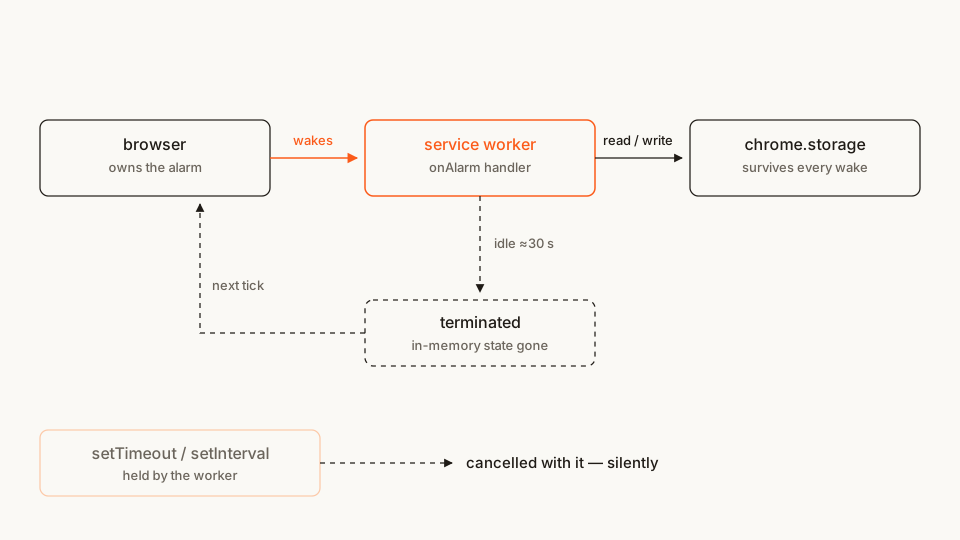
That one-way relationship drives every design decision below. Your handler gets woken into an empty room each time, so it has to be self-contained.
The file tree
Four files, no build step, no dependencies:
tab-curfew/
├── manifest.json        # permissions + the background service worker
├── service-worker.js    # creates the alarm, handles onAlarm
├── popup.html           # a tiny settings UI
└── popup.js             # reads/writes the threshold
Rather clone than type? The finished extension lives in our public samples repo — load it, then read on with this tutorial as the guided tour.
Make a folder called tab-curfew and let's fill it in.
Step 1: the manifest
Two keys matter here. background.service_worker points at the script Chrome wakes up, and "alarms" in permissions unlocks the API. Without that permission chrome.alarms is simply undefined — no exception at load, just a TypeError the first time you touch it.
manifest.json
{
  "manifest_version": 3,
  "name": "Tab Curfew",
  "version": "1.0",
  "description": "Counts your open tabs on a schedule and badges the toolbar when you're over your limit.",
  "permissions": ["alarms"],
  "background": {
    "service_worker": "service-worker.js"
  },
  "action": {
    "default_title": "Tab Curfew",
    "default_popup": "popup.html"
  }
}
"alarms" is one of the quiet permissions — it shows the user no warning string at install time, which is worth knowing when you're weighing what to ask for. If you write manifests often, our free in-browser Manifest V3 generator scaffolds this block without a sign-up.
Notice what's not in there: no "tabs". We're going to count tabs, and counting doesn't require it — more on that in Step 3.
Step 2: create the alarm (and keep making sure it's there)
The obvious place to create an alarm is chrome.runtime.onInstalled, which fires on install and on update. That's correct, and it's what Google's own alarms sample does (Apache-2.0):
chrome.runtime.onInstalled.addListener(() => {
  chrome.alarms.create("tab-curfew-check", { periodInMinutes: 15 });
});
It's also not enough on its own. Alarm persistence across browser restarts is controlled by the persistAcrossSessions flag, and that flag isn't supported outside Chrome — it's still an open cross-browser issue — and Chrome versions before 150 reject it outright as an unknown property. The official chrome.alarms reference is blunt about the consequence: make sure important alarms exist every time your service worker starts.
So the robust pattern is get-or-create, run on every worker startup, with onInstalled as the belt-and-braces. Set persistAcrossSessions explicitly where it's supported — but guard the call, because handing the flag to an older Chrome throws. It's the get-or-create guard, not the flag, that makes the same code hold up in Edge and Firefox.
Step 3: handle the alarm
Now the part that catches people out even after they've adopted alarms.
Chrome wakes the worker, runs one turn of the event loop, and then dispatches the queued event. If your listener isn't registered by the end of that turn, the event sails past unhandled. Frisbie flags this as the structural rule for MV3 background scripts: attach handlers at the top level, synchronously, always. The official service-worker events tutorial says the same thing from the other direction — listeners go in the global scope, not inside a callback or an await.
In practice that means the shape below: addListener calls sit at the top level; anything asynchronous happens inside the handler.
Counting tabs, meanwhile, needs no permission at all. The "tabs" permission doesn't grant access to the chrome.tabs namespace — it only unlocks four sensitive properties on the Tab object (url, pendingUrl, title, favIconUrl). chrome.tabs.query({}) and .length work without it. Since we only want a number, we don't ask for the permission, and the user never sees the "read your browsing history" warning. Ask for what your code uses and nothing else.
Here's the worker so far:
service-worker.js
// Tab Curfew — background service worker.
// Every listener is registered at the TOP LEVEL. Chrome wakes this worker,
// runs one turn of the event loop, then fires the queued event — a listener
// attached inside a callback or after an `await` may simply be missed.

const ALARM_NAME = "tab-curfew-check";
const PERIOD_MINUTES = 15;

async function createAlarm() {
  const alarmInfo = { periodInMinutes: PERIOD_MINUTES };
  try {
    // Explicit on purpose: Chrome defaults this to true, and Chrome 150+
    // finally lets you set it yourself. Never rely on the default.
    await chrome.alarms.create(ALARM_NAME, {
      ...alarmInfo,
      persistAcrossSessions: true
    });
  } catch {
    // Older Chrome and every other browser reject the flag as an unknown
    // property. Chrome still persists the plain create; the get-or-create
    // guard below covers the browsers where even that doesn't hold.
    await chrome.alarms.create(ALARM_NAME, alarmInfo);
  }
}

// Belt: create it when the extension is installed or updated.
chrome.runtime.onInstalled.addListener(createAlarm);

// Braces: on every worker startup, make sure it's still there.
async function ensureAlarm() {
  const existing = await chrome.alarms.get(ALARM_NAME);
  if (!existing) await createAlarm();
}

async function checkTabs() {
  // No "tabs" permission needed — we only read the array length.
  const tabs = await chrome.tabs.query({});
  await chrome.action.setBadgeText({ text: String(tabs.length) });
}

chrome.alarms.onAlarm.addListener(async (alarm) => {
  if (alarm.name !== ALARM_NAME) return;
  await checkTabs();
});

ensureAlarm();
checkTabs();
The if (alarm.name !== ALARM_NAME) return; guard looks like paranoia in a four-file extension. It isn't: onAlarm is a single event for all your alarms, so the moment you add a second one — a daily cleanup, a token refresh — an unguarded handler starts running the wrong job.
The same listener rule applies when a right-click wakes the worker. The context-menu clip saver shows how to register onClicked and save selected text without reading the page.
Step 4: state that survives the wake
Right now the job is stateless, which is why it works. Make it stateful the obvious way — a module-level let threshold = 20 — and it breaks the first time Chrome terminates the worker, because the next wake re-evaluates the script from the top and the value is back to its default.
Anything that has to outlive a wake goes in chrome.storage. Add the permission:
"permissions": ["alarms", "storage"]storage is another quiet one — no install-time warning — and it's the difference between a background job that accumulates state and one with amnesia. (This is the same lifecycle wall you hit elsewhere in MV3; I ran into a sharper version of it when a disabled extension couldn't clean up after itself.)
Now the real version of the worker. Note chrome.storage.local.get() taking an object — that's how you supply defaults in one call instead of null-checking every read:
service-worker.js (replacing Step 3)
const ALARM_NAME = "tab-curfew-check";
const PERIOD_MINUTES = 15;
const DEFAULTS = { threshold: 20, nudges: 0 };

async function createAlarm() {
  const alarmInfo = { periodInMinutes: PERIOD_MINUTES };
  try {
    await chrome.alarms.create(ALARM_NAME, {
      ...alarmInfo,
      persistAcrossSessions: true
    });
  } catch {
    // Chrome < 150 and other browsers reject the flag; the plain create
    // still persists in Chrome, and ensureAlarm() covers the rest.
    await chrome.alarms.create(ALARM_NAME, alarmInfo);
  }
}

chrome.runtime.onInstalled.addListener(createAlarm);

async function ensureAlarm() {
  const existing = await chrome.alarms.get(ALARM_NAME);
  if (!existing) await createAlarm();
}

async function checkTabs() {
  // Read settings fresh on every wake. There is no "last time" in memory.
  const { threshold, nudges } = await chrome.storage.local.get(DEFAULTS);
  const tabs = await chrome.tabs.query({});
  const over = tabs.length > threshold;

  await chrome.action.setBadgeBackgroundColor({
    color: over ? "#FB5B1A" : "#5B8C5A"
  });
  await chrome.action.setBadgeText({ text: String(tabs.length) });

  if (over) {
    // Write it back, because this variable is gone in ~30 seconds.
    await chrome.storage.local.set({ nudges: nudges + 1 });
  }
}

chrome.alarms.onAlarm.addListener(async (alarm) => {
  if (alarm.name !== ALARM_NAME) return;
  await checkTabs();
});

ensureAlarm();
checkTabs();
Read that checkTabs again with the lifecycle in mind: it reads everything it needs, does its work, writes everything it wants to keep, and returns. No variable outside it is trusted. That's the entire discipline.
Keep the job short, too. Chrome extends the worker's life while it's handling an event, but that's a grace window, not a lease. A job that genuinely runs for minutes needs the officially documented keep-alive-until-done strategy — which brings us to the workaround everyone tries first.
Step 5: a popup to set the threshold
The settings UI is a plain page. What makes it interesting is that it shares nothing with the worker except storage — the popup writes, the worker reads on its next wake.
popup.html
<!doctype html>
<html>
  <head>
    <meta charset="utf-8" />
    <style>
      body { font: 13px system-ui, sans-serif; margin: 0; padding: 14px; width: 220px; }
      h1 { font-size: 14px; margin: 0 0 10px; }
      label { display: block; margin-bottom: 6px; color: #6b655c; }
      input { width: 100%; box-sizing: border-box; padding: 6px; font: inherit; }
      p { margin: 12px 0 0; color: #6b655c; }
    </style>
  </head>
  <body>
    <h1>Tab Curfew</h1>
    <label for="threshold">Nudge me above this many tabs</label>
    <input id="threshold" type="number" min="1" max="500" />
    <p id="stats">—</p>
    <script src="popup.js"></script>
  </body>
</html>
popup.js
const input = document.getElementById("threshold");
const stats = document.getElementById("stats");

async function render() {
  const { threshold, nudges } = await chrome.storage.local.get({
    threshold: 20,
    nudges: 0
  });
  input.value = threshold;
  stats.textContent = `Nudged ${nudges} time${nudges === 1 ? "" : "s"} so far.`;
}

input.addEventListener("change", async () => {
  const threshold = Number.parseInt(input.value, 10);
  if (Number.isNaN(threshold) || threshold < 1) return;
  await chrome.storage.local.set({ threshold });
});

render();
The nudges counter is the proof the whole thing works: it only goes up on a wake, so if it's climbing while you're not looking, your background job is alive.
Load it and try it
- Open
chrome://extensions. - Flip on Developer mode (top-right).
- Click Load unpacked and pick your
tab-curfewfolder. - The badge shows your tab count immediately — that's the
checkTabs()call at the bottom of the worker, not the alarm. - Click the icon, set the threshold to something below your current tab count, then wait for the next tick.
Fifteen minutes is a long wait for a demo. Two ways to speed it up:
- Drop the period while you develop. Chrome throttles alarms to once every 30 seconds and warns if you set
periodInMinutesbelow0.5— except for extensions loaded unpacked, where there's no limit at all. SoperiodInMinutes: 0.1is a legitimate dev-only value. Put it back before you publish. - Watch it die and come back. On the extension's card, click the service worker link to open its DevTools, then close that window and leave the browser alone. Roughly 30 seconds later the card says "inactive". Open a few tabs and wait for the alarm — the badge updates anyway, from a worker that didn't exist a second earlier.
If it doesn't work, check these first:
Cannot read properties of undefined (reading 'create')."alarms"isn't inpermissions. The API object doesn't exist without it — this is the single most common cause.- The alarm fires once and never again. You passed
delayInMinutesbut notperiodInMinutes. Without a period, an alarm is a one-shot. - Nothing happens after a browser restart. Your
ensureAlarm()isn't running at the top level of the worker, so nothing recreates the alarm whenpersistAcrossSessionsdoesn't hold. Check it isn't nested inside another listener. - The threshold resets to 20. You're storing it in a module variable somewhere instead of
chrome.storage— see Step 4.
Why "just keep the worker alive" is a dead end
Someone always suggests it: ping an API every 20 seconds and the worker never goes idle. It does work — Chrome's inactivity check is time-based, so any activity inside the window resets the roughly 30-second clock. Frisbie walks through exactly this trick, and even Chrome's own migration guide documents a version of it.
Read the fine print, though. That documented pattern is scoped to keeping a worker alive until a specific long-running operation finishes — not to running a permanently resident background page. If you use it as a general persistence hack you're paying the user's battery for it, you're one Chromium heuristic change away from breaking, and you've reintroduced the exact resource problem MV3 was designed to remove. Developers hitting the inactive-worker edge cases have been comparing notes on the chromium-extensions group for years, and the conclusion keeps landing in the same place: restructure the work to be resumable, then let the worker die.
Alarms plus storage is that restructuring.
Cross-browser note
The alarms API is part of the WebExtensions model, so Firefox and Edge both have it. Edge is Chromium, so everything above applies unchanged. Firefox exposes it as browser.alarms with the same methods and promise-based returns — and since Chrome 148 ships the browser.* namespace too, one namespace now covers both.
Two things do not port:
persistAcrossSessionsis Chrome 150+. Passing it to an older Chrome — or to another browser — throws a TypeError, which is exactly whycreateAlarm()guards the call, and why the get-or-create pattern isn't optional.- The termination story is Chromium's. Firefox's background model isn't a service worker with the same idle-kill behaviour, so don't carry the ~30-second reasoning over — verify against Mozilla's docs rather than assuming.
Write against the alarms API and both browsers work. Write against Chrome's lifecycle, and only Chrome does.
Before you publish
The interesting thing about this build is what it doesn't ask for. Two quiet permissions, no host access, no "tabs" — and it still does a real job. That restraint is worth auditing before you ship, because permission creep is the thing reviewers and users both punish. It's easy to see the pattern once you've browsed enough listings: skim what comparable extensions actually declare in the Extenshi catalog and the outliers stand out fast.
Then scan your own build:
npx @extenshi/cli scan ./tab-curfewThe CLI flags risky API usage, permission bloat, and known-bad patterns before a reviewer finds them. You get 3 scans and 10 reads free, one-time; past that, prepaid credit packs cover it and never expire.
Wrapping up
You went from an empty folder to a background job that runs on a schedule, survives having its process killed repeatedly, and keeps its state across every wake — with two permissions and about eighty lines of JavaScript.
Swap the tab count for whatever you actually need: a token refresh, a cache warm, a feed poll, a nightly cleanup. The shape doesn't change. Register listeners at the top level, get-or-create the alarm on every startup, read and write everything through storage, and finish fast. If you catch yourself wanting a variable to still be there next time — that's the moment to reach for chrome.storage, not for a keep-alive loop.
Shipping something on top of this? Once it's live, install and uninstall numbers, retention, and the reviews landing on your listing are their own problem. Explore extension analytics → and claim your extension to get verified data alongside the security scan.
If you want the UI counterpart to this, the side panel tutorial builds the front end that a job like this would feed.
Sources
- chrome.alarms API reference — Chrome for Developers (Google)
- Handle events with service workers (tutorial) — Chrome for Developers (Google)
- Migrate to a service worker — keep-alive guidance — Chrome for Developers (Google)
- api-samples/alarms — GoogleChrome/chrome-extensions-samples (Apache-2.0)
- functional-samples/sample.water_alarm_notification — GoogleChrome/chrome-extensions-samples (Apache-2.0)
- persistAcrossSessions cross-browser support — W3C WebExtensions Community Group
- browser.alarms — MDN Web Docs (Mozilla)
- MV3, inactive service workers, and alarms — chromium-extensions group
Further reading
📚 Building Browser Extensions, 2nd Edition by Matt Frisbie — Amazon | Apress. Chapter 6 covers background scripts and the service worker lifecycle in depth; Chapter 9 is the tour of the chrome.* APIs, alarms included.
This article is a hands-on tutorial based on the official Chrome Extensions documentation and Google's Apache-2.0 sample code. Code is provided as-is for educational purposes; verify API behavior against the current developer.chrome.com reference before shipping. If you believe anything here is inaccurate, contact [email protected] and we'll review and update.
Related Articles
Chrome extension side panels: build a UI that stays open while you browse
A hands-on Manifest V3 tutorial: build a Chrome extension side panel that persists across tabs, then make it per-site. Full runnable code, ~25 minutes.
Can a disabled extension skip its own uninstall URL? In Chrome, no — here's why
A disabled extension can't clear its uninstall URL (setUninstallURL) before removal — the service worker is already dead. Here's why, and the server-side fix.

Chrome's native browser namespace: what cross-browser extension devs should do now
Chrome added a native, promise-based browser.* namespace in 148. Across the 235,887 Chrome extensions we track, here's what it changes — and what to do.

We counted what Chrome's Manifest V2 sunset actually removed — and it wasn't the ad blockers
Everyone said Chrome's Manifest V2 deadline would kill ad blockers. Here's what the sunset actually stranded — and why Firefox is now the MV2 refuge.