chrome.i18n in browser extensions: one build, every language
Localize a Chrome extension with chrome.i18n, _locales and __MSG_. Follow a runnable MV3 example with plural forms, RTL layouts and fixes for missing messages.
Most extension localization advice starts with the popup. That's the least interesting part.
The part that actually matters is your Chrome Web Store listing. name and description come straight out of manifest.json, and if those two strings run through __MSG_, a user browsing the store in Spanish sees a Spanish title and a Spanish pitch — same build, same upload, no second listing to maintain. Localizing the popup changes what a user sees after installing. Localizing the manifest changes whether they install.
What you'll build: "Tab Tally" — a popup that tells you how many tabs and windows you have open, an options page with one setting, and a _locales tree that makes the whole thing (plus the store listing) speak English, Spanish and Arabic. Right-to-left layout included, from one stylesheet. Difficulty: beginner — if you've loaded an unpacked extension once, you're fine. Time: ~30 minutes. Chrome and a text editor, nothing else.
One thing to say up front: chrome.i18n needs no permissions entry and adds nothing to the install prompt. The only permission in this tutorial is storage, and that's for the extension's own setting.
Chrome extension localization with chrome.i18n has three parts: messages in _locales, __MSG_...__ references in the manifest, and getMessage() calls for the popup and options page. This example connects all three, then adds a right-to-left layout.
How Chrome picks a string
Before any code, the one mechanic that trips everyone up.
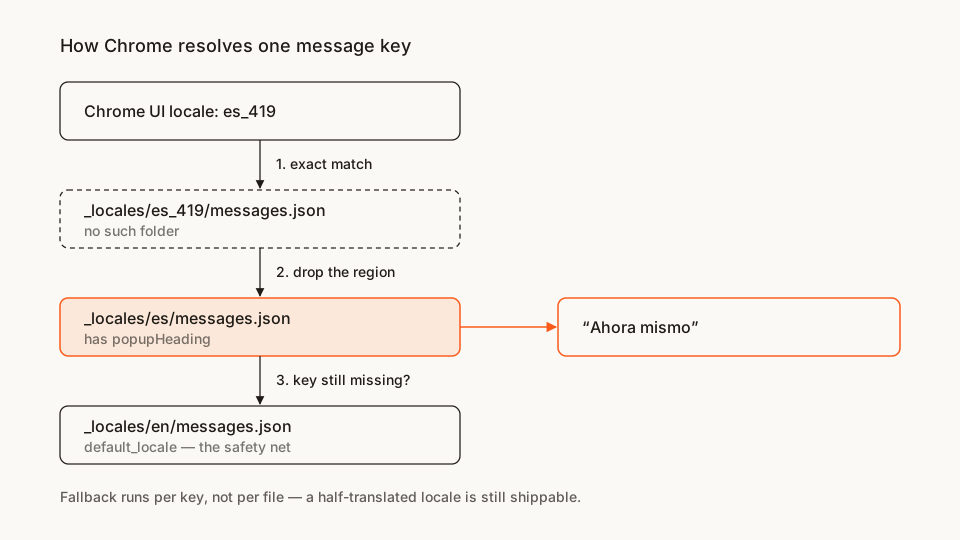
Chrome resolves each key in three passes: the user's exact locale, then the locale with its region stripped, then your default_locale. The official reference spells the order out, and the Chromium design doc has the reasoning behind it.
The consequence is the useful bit: fallback happens per key, not per file. A locale file with four strings in it is a legitimate, shippable thing — every key it doesn't define quietly comes from default_locale. Translators don't have to finish a language before you ship it.
The file tree
No build step, no dependencies:
tab-tally/
├── manifest.json        # name + description go through __MSG_
├── popup.html
├── popup.js
├── options.html
├── options.js
├── i18n.js              # the ~20 lines the docs leave to you
├── shared.css           # one stylesheet, both directions
└── _locales/
    ├── en/messages.json   # default_locale — every key lives here
    ├── es/messages.json   # full translation
    └── ar/messages.json   # deliberately partial
Rather clone than type? The finished extension lives in our public samples repo — load it, then read on with this tutorial as the guided tour.
Make a folder called tab-tally and let's fill it in.
Step 1: a manifest with no English in it
manifest.json
{
  "manifest_version": 3,
  "name": "__MSG_appName__",
  "description": "__MSG_appDesc__",
  "version": "1.0.0",
  "default_locale": "en",
  "action": {
    "default_popup": "popup.html",
    "default_title": "__MSG_actionTitle__"
  },
  "options_ui": {
    "page": "options.html",
    "open_in_tab": false
  }
}
Three strings are now references instead of text. __MSG_key__ is the substitution syntax for the two places that can't call JavaScript: manifest.json and CSS files. action.default_title is the tooltip on your toolbar icon, and it's the one people forget.
default_locale is the other half. Frisbie's manifest walkthrough in Building Browser Extensions (Apress, 2025, ch. 5) puts the rule as an if-and-only-if, which is the right way to hold it: the key must be present when _locales/ exists, and absent when it doesn't. Both directions are errors. Get the first one wrong and Chrome refuses to load the extension at all:
Localization used, but default_locale wasn't specified in the manifest.That error is the single most common first attempt. If you see it, you wrote the _locales folder before you wrote the manifest key.
Step 2: the default locale
_locales/en/messages.json
{
  "appName": {
    "message": "Tab Tally",
    "description": "Extension name. Shown in the store listing and on the toolbar."
  },
  "appDesc": {
    "message": "Counts the tabs and windows you have open, in your own language.",
    "description": "Store listing description. Keep it under 132 characters."
  },
  "actionTitle": {
    "message": "Tab Tally — count your open tabs",
    "description": "Tooltip on the toolbar icon."
  },
  "popupHeading": {
    "message": "Right now",
    "description": "Heading at the top of the popup."
  },
  "tabCount_one": {
    "message": "$count$ tab open",
    "description": "Singular tab count.",
    "placeholders": { "count": { "content": "$1", "example": "1" } }
  },
  "tabCount_other": {
    "message": "$count$ tabs open",
    "description": "Plural tab count.",
    "placeholders": { "count": { "content": "$1", "example": "17" } }
  },
  "windowCount_one": {
    "message": "in $count$ window",
    "description": "Window count, follows the tab count in the same sentence.",
    "placeholders": { "count": { "content": "$1", "example": "1" } }
  },
  "windowCount_other": {
    "message": "in $count$ windows",
    "description": "Window count, follows the tab count in the same sentence.",
    "placeholders": { "count": { "content": "$1", "example": "3" } }
  },
  "uiLocale": {
    "message": "Browser language: $locale$",
    "description": "Diagnostic line at the bottom of the popup.",
    "placeholders": { "locale": { "content": "$1", "example": "en-US" } }
  },
  "optionsButton": {
    "message": "Settings",
    "description": "Button in the popup that opens the options page."
  },
  "optionsHeading": {
    "message": "Tab Tally settings",
    "description": "Heading on the options page."
  },
  "optionsCountPinned": {
    "message": "Count pinned tabs",
    "description": "Label for the only setting."
  },
  "optionsSaved": {
    "message": "Saved",
    "description": "Confirmation shown after the setting changes."
  }
}
Two fields per key. message is what the user reads. description is never rendered — it's context for whoever translates this file, and it's the difference between getting "Right now" translated as a moment in time versus as an adverb. Write it for a person who will never open your extension.
placeholders is how runtime values get in. Inside message you write $count$; the placeholders block maps that name to $1, the first argument you pass at the call site. example is translator context again. You get up to nine.
Step 3: the helper the docs don't give you
Manifest and CSS get __MSG_. JavaScript gets chrome.i18n.getMessage(). HTML gets nothing — there's no declarative binding, so every tutorial ends up writing the same DOM pass. Here's mine.
i18n.js
function t(key, ...substitutions) {
  return chrome.i18n.getMessage(key, substitutions.length ? substitutions : undefined);
}

// chrome.i18n has no plural support. Intl does — so let it pick the key.
function tPlural(base, count) {
  const rule = new Intl.PluralRules(chrome.i18n.getUILanguage()).select(count);
  return t(`${base}_${rule}`, String(count)) || t(`${base}_other`, String(count));
}

function localizePage(root = document) {
  for (const el of root.querySelectorAll('[data-i18n]')) {
    const message = t(el.dataset.i18n);
    if (message) el.textContent = message;
  }
  document.documentElement.lang = chrome.i18n.getUILanguage();
  document.documentElement.dir = t('@@bidi_dir') || 'ltr';
}

document.addEventListener('DOMContentLoaded', () => localizePage());
tPlural is the part worth stealing. chrome.i18n has no plural forms — it hands you a string and that's it — so the usual workaround is "You have {n} tab(s)", which reads badly in English and is simply wrong in languages with three or more plural categories. Intl.PluralRules already knows the rules for every locale Chrome ships, so ask it which category a number falls into and use the answer as part of the message key.
English gets _one and _other. Russian gets _one, _few, _many. Arabic gets six.
You don't have to define all six. getMessage returns an empty string for a key that doesn't exist, so the || falls back to _other — which is exactly the "half-translated is still shippable" behaviour Chrome gives you at the file level, reproduced at the plural level.
@@bidi_dir is one of Chrome's predefined messages: it resolves to ltr or rtl depending on the active locale, without you maintaining a list of RTL languages.
Step 4: the popup
popup.html
<!doctype html>
<html>
  <head>
    <meta charset="utf-8" />
    <title data-i18n="appName"></title>
    <link rel="stylesheet" href="shared.css" />
  </head>
  <body>
    <h1 data-i18n="popupHeading"></h1>
    <p class="row"><span id="tab-count"></span> <span id="window-count"></span></p>
    <p class="muted" id="locale"></p>
    <button id="open-options" data-i18n="optionsButton"></button>
    <script src="i18n.js"></script>
    <script src="popup.js"></script>
  </body>
</html>
Every user-visible string is an empty element with a data-i18n key. Nothing ships hardcoded, so nothing can drift. Load i18n.js first — its DOMContentLoaded listener registers before popup.js's and therefore runs first, which means the static labels are already in place by the time the dynamic ones arrive.
popup.js
document.addEventListener('DOMContentLoaded', async () => {
  const { countPinned = true } = await chrome.storage.sync.get('countPinned');
  const tabs = await chrome.tabs.query({});
  const counted = countPinned ? tabs : tabs.filter((tab) => !tab.pinned);
  const windows = new Set(counted.map((tab) => tab.windowId)).size;

  document.getElementById('tab-count').textContent = tPlural('tabCount', counted.length);
  document.getElementById('window-count').textContent = tPlural('windowCount', windows);
  document.getElementById('locale').textContent = t('uiLocale', chrome.i18n.getUILanguage());

  document.getElementById('open-options').addEventListener('click', () => {
    chrome.runtime.openOptionsPage();
  });
});
chrome.tabs.query({}) with no tabs permission looks like it shouldn't work. It does — without tabs or a host permission Chrome strips url, title, pendingUrl and favIconUrl from the returned objects, but windowId and pinned survive, and counting needs neither of the stripped fields. If your extension only needs to know how many, don't pay for tabs; I went through what that permission actually unlocks separately.
getUILanguage() returns the browser's UI language, like en-US. That's different from getAcceptLanguages(), which returns the reading-preference list a user set for web content — useful if you're picking a language for content rather than for chrome.
Step 5: the options page, and one permission
chrome.storage.sync.get is the first call here that costs something. Add this to manifest.json, alongside the keys from Step 1:
"permissions": ["storage"]chrome.storage needs the storage permission even for storage.local. That API grant adds no install warning in Chrome, as the permissions list confirms. The storage permission explainer covers the difference between a declared permission and a warning.
options.html
<!doctype html>
<html>
  <head>
    <meta charset="utf-8" />
    <title data-i18n="optionsHeading"></title>
    <link rel="stylesheet" href="shared.css" />
  </head>
  <body>
    <h1 data-i18n="optionsHeading"></h1>
    <label class="row">
      <input type="checkbox" id="count-pinned" />
      <span data-i18n="optionsCountPinned"></span>
    </label>
    <p class="muted" id="status" role="status"></p>
    <script src="i18n.js"></script>
    <script src="options.js"></script>
  </body>
</html>
options.js
const STATUS_MS = 1200;

document.addEventListener('DOMContentLoaded', async () => {
  const box = document.getElementById('count-pinned');
  const status = document.getElementById('status');

  const { countPinned = true } = await chrome.storage.sync.get('countPinned');
  box.checked = countPinned;

  box.addEventListener('change', async () => {
    await chrome.storage.sync.set({ countPinned: box.checked });
    status.textContent = t('optionsSaved');
    setTimeout(() => {
      status.textContent = '';
    }, STATUS_MS);
  });
});
The manifest set open_in_tab: false, so this renders as a modal on the extension management page. Frisbie's chapter on extension UIs makes a point that matters more once you're localized than it does in English: that modal sizes itself to its content. German and Finnish routinely run 30–40% longer than English, so a checkbox label that fits on one line for you can wrap for someone else and change the height of the whole dialog. Don't pin dimensions.
Step 6: one stylesheet, both directions
shared.css
:root {
  color-scheme: light dark;
  font-family: system-ui, sans-serif;
}

body {
  direction: __MSG_@@bidi_dir__;
  margin: 0;
  padding: 16px;
  min-width: 260px;
}

h1 {
  font-size: 15px;
  margin: 0 0 12px;
}

.row {
  display: flex;
  gap: 8px;
  align-items: baseline;
  padding-__MSG_@@bidi_start_edge__: 10px;
  border-__MSG_@@bidi_start_edge__: 3px solid #fb5b1a;
}

.muted {
  opacity: 0.6;
  font-size: 12px;
}

.row span {
  unicode-bidi: plaintext;
}
CSS files get the same __MSG_ substitution as the manifest, which is what makes the bidi messages useful. @@bidi_start_edge resolves to left in English and right in Arabic, so padding-__MSG_@@bidi_start_edge__ compiles to padding-left or padding-right depending on who's looking. @@bidi_end_edge is the mirror, and @@bidi_reversed_dir flips the whole direction. One stylesheet, no RTL fork.
CSS logical properties (padding-inline-start) get you most of the way there too, and if you're greenfield I'd reach for those first. The @@bidi_* messages still earn their place for the cases logical properties don't cover — and because they resolve against your extension's active locale rather than the document's, which is occasionally what you want.
The last rule is there because of the partial locale in Step 7, and I only found it by running the code. When the page is rtl and a key falls back to English, that English string is laid out by the Unicode bidi algorithm inside a right-to-left paragraph. Letters are fine; a leading number is not — digits are directionally weak, so "17 tabs open" renders as "tabs open 17". unicode-bidi: plaintext makes each span pick its own direction from its first strong character, the same thing dir="auto" does in HTML. A fully translated locale never shows the problem. A half-translated one does, and half-translated is exactly the state this tutorial argues you should ship.
Step 7: the other two locales
_locales/es/messages.json
{
  "appName": { "message": "Tab Tally" },
  "appDesc": { "message": "Cuenta las pestañas y ventanas que tienes abiertas, en tu idioma." },
  "actionTitle": { "message": "Tab Tally — cuenta tus pestañas abiertas" },
  "popupHeading": { "message": "Ahora mismo" },
  "tabCount_one": {
    "message": "$count$ pestaña abierta",
    "placeholders": { "count": { "content": "$1", "example": "1" } }
  },
  "tabCount_other": {
    "message": "$count$ pestañas abiertas",
    "placeholders": { "count": { "content": "$1", "example": "17" } }
  },
  "windowCount_one": {
    "message": "en $count$ ventana",
    "placeholders": { "count": { "content": "$1", "example": "1" } }
  },
  "windowCount_other": {
    "message": "en $count$ ventanas",
    "placeholders": { "count": { "content": "$1", "example": "3" } }
  },
  "uiLocale": {
    "message": "Idioma del navegador: $locale$",
    "placeholders": { "locale": { "content": "$1", "example": "es-ES" } }
  },
  "optionsButton": { "message": "Ajustes" },
  "optionsHeading": { "message": "Ajustes de Tab Tally" },
  "optionsCountPinned": { "message": "Contar pestañas fijadas" },
  "optionsSaved": { "message": "Guardado" }
}
Note what's missing: description. Translated files don't need it — the translator context belongs in the source locale, and repeating it in every language is maintenance for nobody's benefit.
_locales/ar/messages.json
{
  "popupHeading": { "message": "الآن" },
  "optionsSaved": { "message": "تم الحفظ" }
}
Two keys, on purpose. This is the honest version of a language that a volunteer started and hasn't finished, and it's the state most extensions are actually in. Chrome will flip the layout to RTL because the locale resolves to ar, render those two strings in Arabic, and pull everything else from _locales/en. Nothing breaks.
It's also as far as I'll go writing Arabic I can't proofread. Machine-translating a full locale and shipping it unreviewed is worse than not shipping the language: the reader gets an extension that looks like it was made for them and then reads like it wasn't. Short, verified strings beat a complete bad translation.
Load it and try it
Open chrome://extensions, turn on Developer mode, click Load unpacked, pick the tab-tally folder.
You should get a toolbar icon whose tooltip reads "Tab Tally — count your open tabs", and a popup saying something like "17 tabs open in 3 windows". Open a single tab in a new window and check the singular forms swap in correctly — that's tPlural earning its keep.
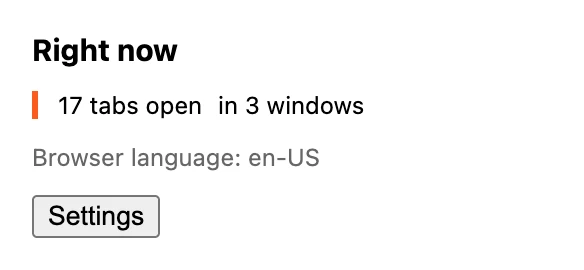
English: the accent border sits on the left edge
Now the actual test. Quit Chrome and relaunch it in Spanish — on Linux that's LANGUAGE=es ./chrome, on Windows a shortcut with --lang=es --user-data-dir=c:\chrome-es, and on macOS you change the system language, because Chrome follows it. The official guide lists all four platforms.
On macOS there's a gentler route than switching the whole system: --lang is ignored there (I checked — the popup stayed English), but macOS lets you set a language per application. System Settings → General → Language & Region → Applications, add Chrome, pick Spanish. The same thing from a terminal, for a scriptable relaunch:
defaults write com.google.Chrome AppleLanguages -array esDelete the key (defaults delete com.google.Chrome AppleLanguages) to go back. Every screenshot below was taken that way.
Reload the extension and look at the extensions page itself, not just the popup: the card's title and description are Spanish now. That's the store listing, rendered locally.
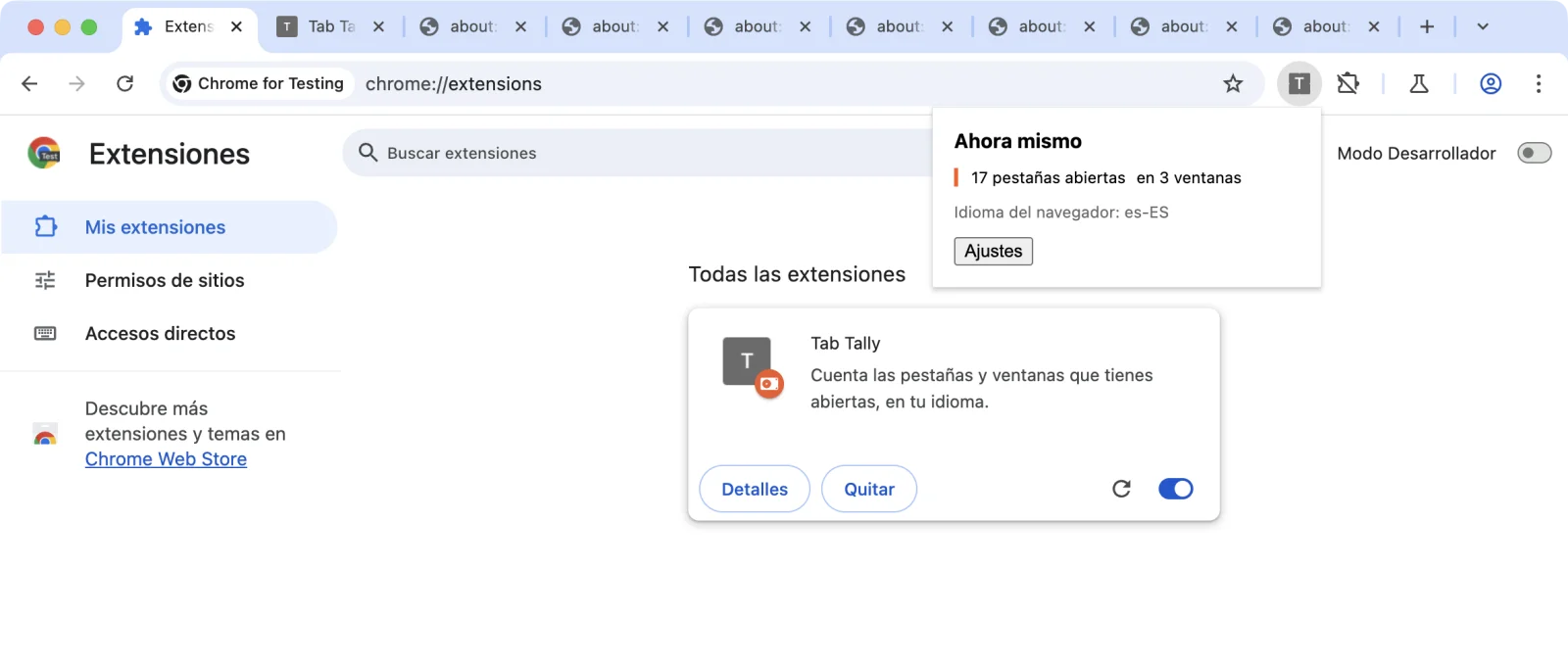
The card title and description come from the same messages.json as the popup
Then do it again with ar. The popup heading turns Arabic, the accent border jumps to the right edge, and everything you didn't translate is still English. The two count phrases swap places too, because the flex row now runs right-to-left — the first phrase sits on the right, which is where an Arabic reader starts. That mixed state is the point.
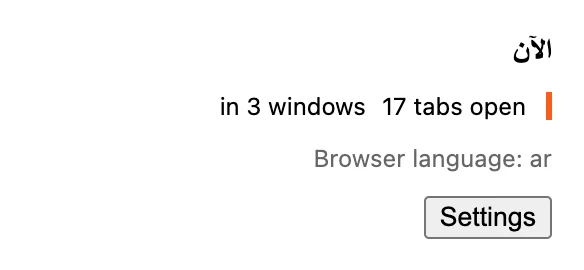
Arabic: the layout mirrors, untranslated keys fall back to English
Chrome i18n troubleshooting: missing messages and default_locale
| Symptom | What to check | Fix |
|---|---|---|
default_locale missing |
_locales exists but the manifest has no default |
Add "default_locale": "en" and _locales/en/messages.json. |
getMessage() returns an empty string |
The message is absent from the locale and its fallbacks | Check the name and add the message to the default locale. |
HTML displays __MSG_...__ literally |
Chrome doesn't substitute messages in HTML | Use the localize() helper to assign text from getMessage(). |
| A translation is ignored | The folder uses an unsupported locale code | Use a supported code, such as pt_BR, then reload. |
$count$ appears literally |
The placeholder definition doesn't match | Check placeholders against the token in message. |
| UI stays in the old language | Extension locale hasn't been reloaded | Reload it on chrome://extensions after switching the browser language. |
The fallback rules above apply to extension strings. The store listing's translated description and screenshots are separate publication work; a translated popup doesn't supply them automatically.
Cross-browser note
This is one of the few extension features that genuinely ports. Firefox implements the same _locales layout, the same messages.json format and the same i18n API under browser.i18n; Edge is Chromium, so it's identical. The files above run in all three unchanged.
The only thing to decide is the namespace. chrome.* works everywhere including Firefox; browser.* has worked in Chrome since 148, which I wrote about when it shipped — though only on 148 and up, so keep the polyfill until your minimum_chrome_version clears it.
Before you ship it
Two things I'd check.
First, the locale codes. Chrome only accepts locales from its supported list and silently ignores directories it doesn't recognise — an _locales/pt/ folder does nothing, because the codes are pt_BR and pt_PT. A folder named for an unsupported locale isn't an error, it's just dead weight, which makes it easy to ship and never notice.
Second, your permission footprint, because localization is exactly the kind of change that quietly grows one. You copy a snippet, it calls something, and now there's a line in the install prompt you didn't budget for:
npx @extenshi/cli scan ./tab-tallyThe CLI reports declared permissions separately from install warnings. For this extension it should list storage, with no install warnings. You get 3 scans and 10 reads free, one-time; past that, prepaid credit packs cover it and never expire. Worth doing before upload rather than after, since publishing is slow enough already. Skimming what other extensions in your category declare is a decent calibration check too. To look up a published extension, paste its store URL into the checker.
Wrapping up
Four things carry the weight:
- The manifest strings are the store listing.
nameanddescriptionthrough__MSG_is the change with commercial upside; the popup is the change with polish upside. - Fallback is per key. Two strings in a locale is a valid locale. Ship the partial one.
Intl.PluralRulespicks the key,chrome.i18nreturns the string. That's the whole plural story, in four lines.@@bidi_*means one stylesheet. RTL is a CSS problem, and Chrome already solved the "which direction" part.
The thing I'd do differently on my next extension is write messages.json from day one, even with only English in it. Retrofitting keys onto a shipped UI is a tedious afternoon of grep; starting with them costs nothing and means adding a language later is a pull request from a stranger rather than a project.
Shipping something on top of this? Once it's live in three languages, which ones actually convert becomes its own question. Explore extension analytics → and claim your extension to get verified install data next to the security scan.
Sources
- chrome.i18n API reference — Chrome for Developers (Google)
- Internationalize the interface — Chrome for Developers (Google)
- Formats: locale-specific messages — Chrome for Developers (Google)
- i18n — WebExtensions API reference — MDN Web Docs (Mozilla)
- Internationalization — WebExtensions — MDN Web Docs (Mozilla)
- Intl.PluralRules — MDN Web Docs (Mozilla)
- i18n design document — The Chromium Projects
- api-samples/il8n — GoogleChrome/chrome-extensions-samples (Apache-2.0). The directory name really is
il8n; that's an upstream typo, not one of mine. - Localizing Your Chrome Extension: An Easy Tutorial — Shahed Nasser (community walkthrough; its supported-locale table links a retired
code.google.compage, so use the Chrome reference above for codes)
Further reading
📚 Building Browser Extensions, 2nd Edition by Matt Frisbie — Amazon | Apress. Chapter 5 walks manifest.json property by property, including the default_locale rule; Chapter 7 covers how options pages render as a modal versus a tab, which is where translated-string length starts to matter.
This article is a hands-on tutorial based on the official Chrome Extensions documentation and Google's Apache-2.0 sample code. Code is provided as-is for educational purposes; verify API behavior against the current developer.chrome.com reference before shipping. If you believe anything here is inaccurate, contact [email protected] and we'll review and update.
Related Articles

The `storage` permission explained: what browser extensions keep, and where it actually lives
The storage permission is the most-requested thing extensions ask for — 62% claim it, with no install warning. Here's what it keeps, where, and how to check.

Chrome's native browser namespace: what cross-browser extension devs should do now
Chrome added a native, promise-based browser.* namespace in 148. Across the 235,887 Chrome extensions we track, here's what it changes — and what to do.

What it really takes to publish a browser extension
How long does it take to publish a Chrome extension? Review timelines, rejection reasons, and the hidden work before your listing goes live in 3 stores.
Omnibox keywords in Chrome extensions: a command palette without permission warnings
Build a Chrome extension omnibox command palette with one keyword, live suggestions and saved shortcuts. Get full MV3 code with no install permission warnings.