What it really takes to publish a browser extension
How long does it take to publish a Chrome extension? Review timelines, rejection reasons, and the hidden work before your listing goes live in 3 stores.

Every tutorial sells you the same fantasy. A weekend, a manifest.json, a popup — and you publish a Chrome extension with a neat little "published" badge. The coding part of that story is roughly true. Everything after the last commit is where the fantasy quietly dies.
In 2026 there's a wrinkle: if you're one of the developers working with LLM agents, even the "after the last commit" part has shrunk. An agent drafts your store copy, localizes it into forty locales, and produces a first-draft privacy policy in an afternoon. What it can't do is wait in the queue for you — or answer to a reviewer for artifacts it generated on your behalf.
That's the part where your extension actually becomes available to users. I've watched enough extensions go through store review to say it plainly: publishing is not one step.
It's a gauntlet. Three gates, a queue, a reviewer, and a clock that restarts every time you get something wrong. Here's what that gauntlet looks like in 2026.
The scale you're lining up behind
First, some perspective on the queue you're joining. According to Chrome-Stats, which tracks the store continuously, the Chrome Web Store held roughly 303,800 extensions as of August 2026. Mozilla's directory counts over 74,000 Firefox add-ons as of January 2026, and community trackers put the Microsoft Edge add-ons catalog at around 31,000.
One tracker on r/chrome_extensions counted 49,518 new Chrome extensions in a single quarter — more than the entire Edge catalog. Your extension isn't entering a curated gallery. It's entering a queue that gets longer every week, and it's being judged by systems built to cope with that flood.
That flood has a new tributary: agent-assisted development has collapsed the cost of producing a working extension to an afternoon, and the queue is filling accordingly. Your extension isn't just competing with 303,800 existing ones — it's competing with everything else agents shipped this week.
The production before the upload
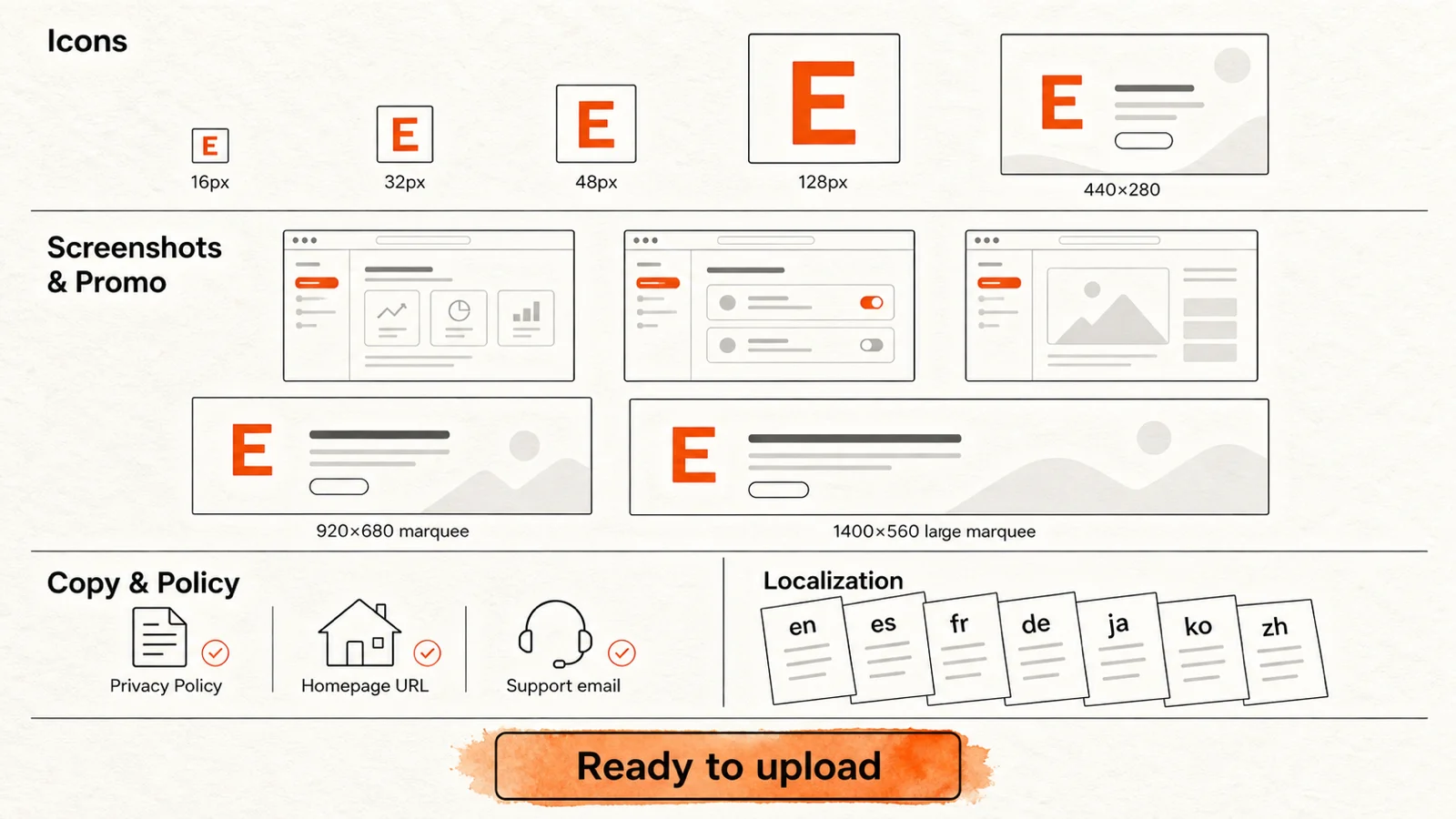
Here's what tutorials skip entirely: the upload button is not the first step. It's step thirty.
Before you can even open the developer dashboard, you need to produce a small media production. Four icon sizes (16, 32, 48, 128 pixels for Chrome, a slightly different set for Firefox and Edge). At least one screenshot per store at a minimum of 1280×800 or 1280×720, though the stores recommend more. Chrome asks for promotional tiles — a 440×280 small promo, a 920×680 marquee, and a 1400×560 large marquee — if you ever want to be featured.
Then the copy. A short description (132 characters for Chrome, 250 for Firefox). A detailed description in markdown, ideally with keywords researched against what your competitors rank for. A privacy policy URL that actually matches what your extension does, not a generic template that says "we collect nothing" while your analytics SDK quietly collects everything. A homepage URL. A support URL. A support email.
If you're serious about distribution, you need that copy in more than one language. Chrome Web Store supports 40+ locales, and localized listings convert dramatically better than English-only ones. That's 40 translations of your short description, your detailed description, your changelog, and your screenshots with localized UI.
Then the smaller decisions that turn out to matter. A category selection that determines which browsing surfaces surface your extension. A data declaration that lists every piece of user data you collect — Chrome's privacy disclosure form is not optional, and it must match your privacy policy. An onboarding flow that actually teaches new users what your extension does, because the store listing is marketing, not documentation.
"A week of work" is the by-hand estimate — conservative, and accurate. If you're running an LLM agent, generation is the cheap part: store copy, forty locales, a landing page, a first-draft privacy policy, an afternoon. What doesn't shrink is verification. Every generated artifact has to be checked against what your extension actually does, because the store will check it against what your extension actually does — and a plausible privacy policy that doesn't match your analytics SDK is a rejection with better grammar. The week doesn't disappear; it converts from production into review. And all of it happens before you touch the upload button, before the review queue, before the part where you wait.
This is also the part where most developers cut corners — and where the tools that exist specifically for this job earn their keep. The icon generator produces a full store-ready icon set from a prompt or an SVG, plus a promo tile and a paste-ready manifest snippet (2 free AI generations, then credit packs for volume). The SEO optimizer scores your listing copy against top competitors in your niche and suggests keyword, readability, and field-length fixes. The AI visibility tool does the same for AI assistants — scores your copy for discoverability by ChatGPT and Claude, then generates llms.txt and Schema.org JSON-LD for your extension's site. The page generator builds a polished single-page HTML landing site you can deploy anywhere.
And if you already have an agent writing your copy, generation isn't your bottleneck — grounding is. A blank-prompt agent will happily produce a generic listing; what it can't do is know that the marquee tile is exactly 920×680, that Edge's priority queue has favored certain categories since February 2025, or which keywords the current top three in your niche actually rank on. Policy-grounded tools are what keep generated output from being confidently wrong.
None of it requires a website of your own, either — which is the part tutorials really skip. The moment your extension needs a privacy policy URL, a support URL, and a homepage, you're suddenly standing up infrastructure for a product that isn't launched. It doesn't have to work that way anymore: every page these tools can produce — privacy policy, pin guide, install instructions, welcome page, uninstall survey — can be hosted for you at a stable permalink. No domain to buy before you have users, no form to build, no server to run. A GitHub Pages account is no longer part of the minimum viable launch.
None of this is glamorous. None of it is optional. And none of it is what the "publish a Chrome extension in 10 minutes" tutorial mentioned.
For the extension itself, localize the popup and manifest with chrome.i18n. That walkthrough includes message fallbacks and RTL layout; translating the store description and screenshots remains a separate publishing step.
Gate one: the manifest is not just config
The first hidden stage happens before you upload anything. The manifest is where most future rejections are already baked in.
Request <all_urls> or the tabs permission when you don't strictly need them and you've done two things at once. You've made every potential user's install dialog scarier, and you've flagged your submission for closer inspection.
Google's own review documentation lists "dangerous permission requests" among the signals that make a reviewer examine an extension more closely. Being a new developer, shipping a new extension, and making significant code changes are on that list too. All four describe you on day one.
Then there's the Manifest V3 deadline pressure. MV2 support is already gone from mainstream Chrome — we covered what the Chrome 150 MV2 removal means for holdouts — and remote code execution (loading JavaScript from a server, eval() on fetched strings) is banned outright in MV3. The rework itself is the tax: blocking webRequest becomes declarativeNetRequest rules, and the persistent background page becomes a service worker that Chrome terminates whenever it idles — in-flight state dies with it, and anything that needs DOM access moves into an offscreen document. Ad-blocker authors fought the first change for years; everyone else meets the second one as a bug report. Plenty of developers discover the rules themselves from a rejection email rather than from the docs.
And one codebase does not mean one package. Firefox wants browser_specific_settings with an add-on ID, requires signing even for self-distribution, and its validator will flag things Chrome's tooling never mentions. And AMO's reviewers must be able to read your code: ship minified or bundled output — webpack, TypeScript, anything with a build step — and you're required to attach the readable source and build instructions, or the submission stalls. Edge mostly accepts the Chrome flavor but runs its own certification against its own developer policies. The "write once" promise quietly becomes "package three times."
For agent-assisted development, this gate cuts both ways. An agent will refactor MV2 to MV3, minimize your permission set, and produce all three store packages in hours instead of days. It will also, if you let it, reach for <all_urls> — host matching is tedious, and broad permissions always work. Agents optimize for making things run; reviewers optimize for why you needed that to run. Read the manifest diff like it's production code, because to a reviewer it is.
This is the point where a five-minute sanity check beats a five-day review queue. The free manifest generator builds and validates a cross-browser MV3 manifest with live store-policy checks, right in the browser, no sign-up — so the permission set that reaches the store has already survived a policy pass before you uploaded anything.
Gate two: what the review actually does
All three stores combine automated scanning with human review, but the mix and the pace differ.
Chrome Web Store. Google combines manual and automated review. Every submission goes through the same pipeline, whatever your tenure as a developer. Officially, "for most extensions, review is completed within a few days, but it can take up to a few weeks." If your item sits in pending review for more than three weeks, Google asks you to contact developer support. That tells you something about what "a few weeks" has become in practice.
The historical baseline has drifted. In early 2021, Google reported that most submissions finished review in under 24 hours, and over 90% within three days.
In 2026, a PSA thread on the chromium-extensions developer forum reports review times growing under submission volume. One developer there described a minor update stuck in review since April 2026. Previous versions of the same extension had been approved within a day.
Firefox AMO. Mozilla runs two distinct passes. First, an automated validator at upload time: errors block the submission outright, and Mozilla's own guidance warns that security and privacy warnings can fail review later. Then human review, for listed distribution.
Officially, signing and publishing can take up to 24 hours "or longer if your submission is selected for manual review." The community reading is blunter. On Mozilla's developer forum, the standard estimate for a manual review in 2026 is between one and two weeks. Backlog threads describe listed versions pending since November 2025. There's also a trap: AMO won't accept a new upload while an earlier version sits in the queue.
Microsoft Edge. Certification officially takes up to seven business days, for new submissions and updates alike. In Edge's own GitHub discussions, the developer support team puts typical review at five to seven business days.
A criteria-driven priority queue introduced in February 2025 accelerates only selected extensions. First-time submissions also sit behind developer account verification. Microsoft says that can take from a few days to a few weeks.
The honest summary table:
| Store | Official guidance | Community-reported reality |
|---|---|---|
| Chrome Web Store | A few days, up to a few weeks; contact support after 3 | Hours for trivial updates, 2–7 days typical for first submissions, weeks when flagged |
| Firefox (listed) | Up to 24 h unless selected for manual review | 1–2 weeks for manual review; backlog cases 6+ weeks |
| Microsoft Edge | Up to 7 business days | ~3 working days typical; 5–7 per support; account verification adds days |
None of this is an SLA. Every number is "up to," and every clock includes weekends, queue depth, and the reviewer's judgment about whether your extension deserves a second look.
Notice what's missing from this section: anything an agent can do for you. This is the one number in this post that agent-assisted development does not compress — which has a strategic consequence. When production shrinks to days, the queue becomes almost all of your calendar time, and avoiding a single rejection cycle becomes the highest-leverage optimization in the entire launch.
Gate three: rejection restarts everything
Here's the part tutorials skip: a rejection isn't a fine, it's a reset. You fix the problem, resubmit, and go to the back of the queue — and Google's documentation notes explicitly that review times may be longer after an extension has been rejected or warned.
Google's troubleshooting documentation maps what actually gets extensions rejected. The common reasons are almost embarrassingly preventable:
- Packaging errors. Files referenced in the manifest that aren't in the package — most commonly missing images — or wrong paths. The extension fails before a human forms an opinion about it.
- Functionality that doesn't match the listing. If your backend is down at the moment of review, or a promised feature actually just links out to an external service, that's a rejection under "functionality not working" and "minimum functionality."
- Single-purpose violations. An extension must have one narrow purpose. Bundling product reviews with ad injection, or a toolbar with five unrelated services, gets split-or-reject treatment.
- Clickbait metadata. Descriptions designed to attract attention rather than describe the extension.
- Missing privacy policy. If your product handles any user data, you must post an accurate, current privacy policy disclosing how data is collected, used, and shared — in the designated dashboard field — and transmit it securely. This one bites developers who genuinely collect nothing but wire up an analytics SDK that does.
On top of the official list, the community lore adds two classics: leftover files from an MV2 past (a stray background.html that MV3 service workers never use), and requesting permissions you don't need, which Google's support channels internally flag as a category of its own.
Two of these have an agent-shaped variant in 2026. "Functionality not working" now includes the agentic overclaim: a listing (agent-written) that promises a feature the code (also agent-written) doesn't quite implement. "Missing privacy policy" increasingly means a generated one — fluent, well-structured, and describing a data-minimal extension that doesn't match the analytics SDK someone wired in. The fix is the same in both cases: derive the listing and the policy from the code, not from a prompt. Have your agent read your manifest and network calls first, then write.
And a rejection is not the worst outcome in the stack. The sharper edge is enforcement: developers on Google's own chromium-extensions forum report extensions taken down and accounts suspended by automated systems, with a canned email citing "malware policy" and an appeal process that historically returned a template denial or weeks of silence. Google introduced a dedicated appeals flow in April 2026 — an Appeal button in the developer dashboard for item takedowns and account suspensions alike, with account issues handled first — which fixed the path but not the asymmetry: a reviewer's judgment takes days; an appeal's can take weeks.
Every one of those is catchable before upload. That's exactly the job of a pre-publish scan: npx @extenshi/cli runs a security and policy scan from your terminal. It's 3 scans and 10 reads free, one-time, with prepaid credit packs past that if you ship often. Five minutes of scanning is cheap insurance against a week in the queue ending in a packaging error — and the findings are machine-readable, so if an agent builds your extension, you don't even spend the five minutes: point the agent at the scanner and let it iterate until the list comes back empty.
The onboarding gap
Approval is not adoption. This is the part where most developers declare victory and walk away — and then wonder why so few of those installs ever become active users.
The store listing got them to click install. Nothing in the store listing taught them what to do next. Nothing told them to pin the extension to the toolbar so they can actually find it. Nothing showed them the first action to take, the first workflow to try, the first moment where the extension proves it's worth the permission dialog they just clicked through.
That's the onboarding gap, and it's where the tools most developers never build are also the ones that matter most:
- A pin guide. A single illustrated page showing users how to find your extension icon and pin it to the toolbar, with your own icon embedded. It's the one onboarding step that almost nobody ships, and the one that correlates most strongly with day-1 retention. The pin guide generator builds this as a self-contained page you can host anywhere.
- Install instructions. Per-browser install steps — the store route for production users, the unpacked route for beta testers, what to try first. The install instructions tool ships this as markdown or a standalone page.
- A welcome page. The post-install page that opens automatically after someone installs your extension. It's your one shot at a first impression, and most developers leave it as the default empty page. The welcome page builder lets you compose one from illustration and text blocks, add click markers for key actions, and confirm that the install actually succeeded.
- Uninstall feedback. When someone removes your extension, Chrome lets you point
setUninstallURL()at one page. Most developers point it at their homepage. The uninstall feedback tool gives you a branded survey with structured churn reasons and version trends — hosted for you at a stable permalink, so the whole integration is one line of code and no backend, and you learn why you're losing users instead of guessing.
None of this is in the store review checklist. None of it affects whether you get approved. All of it affects whether the approval matters.
With an agent, building these pages is an afternoon, which removes the last excuse: the onboarding gap in 2026 isn't a build gap, it's a measurement gap. The pages are cheap; knowing whether they work is not. That's the real argument for structured uninstall feedback over a homepage redirect — churn reasons collected as data are something you and your agent can act on. "Bugs" tells you nothing; "stopped working on YouTube after the last update" is a backlog item.
After approval: the loop nobody budgets for
Getting listed is not the finish line. It's the start of a maintenance loop:
- Every update re-enters review. Google is explicit that new items and updates to existing ones go through the same review process. Your hotfix for a production bug waits in the same queue as everyone's first submission. Agent speed makes this worse before it makes it better: when shipping an update costs a prompt, it's tempting to ship ten. Each one spends a review cycle. Batch your changes and pay the queue once.
- Three stores, three dashboards, three policies. The Chrome listing, the AMO listing, and the Partner Center submission are separate objects that drift apart unless you keep them in sync. The publish tool ships one artifact to all three stores via CLI or MCP, straight from your machine — one command instead of three dashboard sessions. If you publish through an agent, that shape matters more than the convenience: agents can't click a dashboard, but they can call a CLI.
- Deadlines keep moving. The Chrome Web Store API V1 shuts down on October 15, 2026 — if your publish automation or analytics tooling still speaks V1, it stops speaking at all.
- Approval is not survival. The same tracker that counts quarterly launches found that of 124,342 extensions launched in the first half of 2026, only about 1.3% ever reached 1,000 users. The store listing is the beginning of distribution, not the end of it. Agent-assisted development moves the floor, not the ceiling: producing an extension is now trivial, getting it adopted is as hard as ever. When everyone can ship, shipping stops being the moat.
- Running it is another hidden build. Somewhere past approval, most developers discover the extension was the easy half of the product. Is anyone actually using it? Which features? What's crashing? Even "just add analytics" is extension-shaped: MV3 bans remote code, so the standard
gtag.jssnippet is off the table, and the official path is GA4's Measurement Protocol — raw HTTP events sent from a service worker Chrome can kill mid-session. Add accounts, and you need somewhere for sessions to live. Make the extension paid, and you need a billing provider: Google shut Chrome Web Store Payments down — deprecated in 2020, gone by February 2021 — and there has been no store-native way to sell an extension since; every paid extension runs Stripe or Paddle on the side, with license keys, refunds, and taxes as the developer's problem. It's a second stack of decisions (analytics, crash reporting, auth, billing), and here's the part nobody warns you about — every service you wire in changes what your extension collects, which changes your privacy policy and your data declaration, which makes it a review event. An agent compresses the wiring but not the decisions: it can integrate any analytics SDK in an hour, but choosing what to collect, where it lives, and how it's disclosed is still yours — and a wrong choice here is a rejection that arrives after you have users. The cheapest loop to close first is churn: the hosted uninstall survey is one line of code and returns structured reasons; real usage analytics can wait until you have usage to analyze.
That last number is the one I'd pin above every desk. The gauntlet exists, it's worth walking through, and you should go in knowing that shipping is step one of a much longer job.
How long does it take to publish a Chrome extension, really?
Add up the realistic path for a first-time, three-store launch, agent-assisted:
- Icons, screenshots, promo tiles, and store copy: an afternoon to generate with an agent, plus a day to verify — and real screenshots still need a real browser at real resolutions.
- Privacy policy, data declaration, and homepage: minutes to generate, but only trustworthy if derived from your actual permissions and network calls rather than a template.
- Permission and manifest design, including the MV3 rework: hours, with an agent iterating against a policy scanner.
- Cross-browser packaging and testing: hours — validators are exactly the kind of loop agents run well.
- Onboarding materials — pin guide, welcome page, install instructions: hours; with agents and hosted pages there is no longer an excuse to skip them.
- First review round across three queues: 1–2 weeks typical, with real risk of more.
- One rejection cycle, if it happens: add the full queue time again.
The pattern in every failure mode above is the same: the developer found out about the problem from the store, after the queue. Every tool worth using in this process exists to move that discovery earlier — before the upload, before the week of waiting, before the rejection email.
That's the design goal behind the full set of developer tools. The manifest generator catches permission and policy problems at design time. The privacy-policy generator turns your extension's real permissions into a GDPR/CWS/AMO-aligned policy instead of a blank page. The icon generator produces store-ready icon sets and promo tiles from a prompt. The SEO optimizer and AI visibility tool score your listing copy against competitors and AI assistants. The page generator builds a landing page. The pin guide, install instructions, welcome page, and uninstall feedback close the onboarding gap that turns installs into active users. The CLI scanner finds packaging, permission, and security rejection triggers before a reviewer does. The publish tool ships one artifact to all three stores from your terminal. When you claim your extension on the catalog, you also see it from the outside — the same view our scanners get. None of it assumes you have a website, a backend, or a domain: every page can be hosted for you, and the survey wires up with one line. The minimum footprint for a three-store launch is the extension itself.
The queue is real, and no tool — and no agent — removes it. For agent-assisted developers, that inverts the old advice: once production compresses to days, the difference between a two-week launch and a two-month launch almost always is the review — specifically, whether you entered the queue carrying a problem the queue was guaranteed to find. Every rejection costs a full queue you no longer have production work to hide behind. Clear the first submission, and what's left is the part that was always the real job: turning an approval into a user base.
Sources
- "Chrome Web Store review process", Google Chrome Developers (accessed 2026-08-27)
- "Troubleshooting Chrome Web Store violations", Google Chrome Developers (accessed 2026-08-27)
- "Submitting an add-on" and "Signing and distribution overview", Firefox Extension Workshop (accessed 2026-08-27)
- "Publish a Microsoft Edge extension" and "Curation and review process for extensions", Microsoft Learn (accessed 2026-08-27)
- "Empowering Microsoft Edge Add-ons developers with faster reviews", Microsoft Edge Dev Blog, 2025-02-26
- "PSA: Increase in review times for submissions to the Chrome Web Store", chromium-extensions developer forum, 2026
- "Add-on Approval Time?" and "Listed version pending review since 3 July", Mozilla Add-ons Discourse, 2025–2026
- "Why is Microsoft so slow in approving extensions?" discussion #46 and "Long review process for extensions" discussion #114, MicrosoftEdge-Extensions, GitHub
- Chrome-Stats store statistics, August 2026 (Chrome Web Store totals)
- "Add-on (Mozilla)", Wikipedia, January 2026 figure (Firefox add-on count)
- "Chrome Web Store launch stats: how many new extensions reach 1K / 10K / 100K users", r/chrome_extensions, 2026
- "Migrate to Manifest V3" and "Integrate Google Analytics 4 with extensions (Measurement Protocol)", Google Chrome Developers (accessed 2026-08-29)
- "Source code submission" and "Add-on Policies", Firefox Extension Workshop (accessed 2026-08-29)
- "CWS new appeals process", Google Chrome Developers, 2026-04-08
- "Google's Manifest V3 Still Hurts Privacy, Security, and Innovation", Electronic Frontier Foundation, 2021-12
- "Google deprecates Web Store Payments API, effectively nuking Chrome paid extensions", ZDNet, 2020-09
- "Chrome Webstore Account Suspended?" and "Our extension was removed and dev account suspended", chromium-extensions developer forum
- "Google to developers: we take down your extension because we can", palant.info, 2018-07-03
Methodology
No Extenshi catalog data was used in this post. Store-size figures come from Chrome-Stats' continuous tracker (Chrome, Aug 2026), Wikipedia's summary of Mozilla's directory (Firefox, Jan 2026), and a community cross-store tracker cited on r/chrome_extensions (Edge). Review-timeline figures pair each store's official documentation with community-reported experiences on the vendors' own developer forums; where the two diverge, both are shown. The 1.3%-reaching-1,000-users figure comes from the r/chrome_extensions launch-stats analysis of extensions launched January–July 2026 and was not independently verified. The onboarding funnel is an illustrative model of a typical drop-off shape, not a measured statistic. The MV3 rework, appeals, payments, and analytics constraints cite Google's and Mozilla's official documentation and announcements; enforcement experiences additionally draw on developer reports in the chromium-extensions forum.
This article is based on publicly available security research and news reporting. Extenshi does not independently verify all claims made by third-party researchers. References to specific companies or products reflect the findings of cited sources and do not constitute accusations of intentional wrongdoing. If you believe any information is inaccurate, please contact us at [email protected].
Related Articles

We counted what Chrome's Manifest V2 sunset actually removed — and it wasn't the ad blockers
Everyone said Chrome's Manifest V2 deadline would kill ad blockers. Here's what the sunset actually stranded — and why Firefox is now the MV2 refuge.
Host permissions explained: what 'read and change all your data on all websites' really means
Browser extension host permissions let extensions read and change every website you visit. Here's what that warning actually means and when to be concerned.

chrome.management in browser extensions: build a permission audit popup
A hands-on Manifest V3 tutorial: use the chrome.management API and Chrome's own permission warnings to audit every extension installed. Full runnable code.

Extension Pulse, week of August 24: CWS API V1 dies October 15, and Chrome is giving you the Public Suffix List
CWS API V1 dies October 15. Chrome 154 adds chrome.publicSuffix. Edge MV2 and Firefox's two-week train are background.