chrome.management in browser extensions: build a permission audit popup
A hands-on Manifest V3 tutorial: use the chrome.management API and Chrome's own permission warnings to audit every extension installed. Full runnable code.

Here's a thing that surprises most people the first time they see it: one await gets you the full list of every extension installed in the browser — names, IDs, versions, declared permissions, whether each one is on or off. And a second call gets you the exact sentences Chrome showed the user at install time. Not permission keys. The actual English: "Read and change all your data on all websites."
That second call is chrome.management.getPermissionWarningsById(), and it's the piece almost everybody misses. It's the difference between a tool a normal person can read and a dump of "webRequest", "declarativeNetRequestWithHostAccess", "nativeMessaging".
What you'll build: a toolbar popup that lists every extension in the browser, shows Chrome's own permission warnings for each, sorts them broadest-capability-first, and lets you flip one off with a button. Difficulty: intermediate — you should have loaded an unpacked extension before. Time: ~30 minutes. You need Chrome and a text editor, nothing else.
Fair warning up front, because it shapes the whole design: management is a heavy permission. More on that in Step 1.
How the pieces fit together
Three moving parts, no service worker at all. The popup talks to chrome.management, chrome.management talks to the browser's own extension registry, and the browser fires events back at you when anything changes.
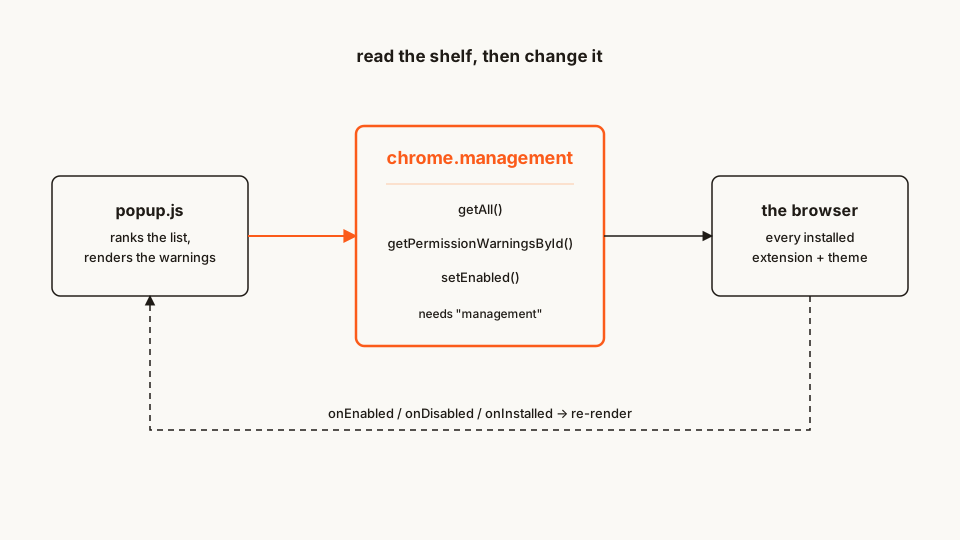
That "no service worker" bit is deliberate. Everything here happens while the popup is open, so there's nothing to keep alive between sessions and nothing to wake up. Fewer moving parts, fewer MV3 lifecycle bugs.
The file tree
Four files, and one of them is CSS:
extension-auditor/
├── manifest.json   # the "management" permission + the popup
├── popup.html      # markup
├── popup.css       # panels are narrow, so this matters more than usual
└── popup.js        # everything else
Rather clone than type? The finished extension lives in our public samples repo — load it, then read on with this tutorial as the guided tour.
Make a folder called extension-auditor and let's fill it in.
Step 1: the manifest, and why this one gets read carefully
Only one permission, and it's the one that does all the work.
manifest.json
{
	"manifest_version": 3,
	"name": "Extension Auditor",
	"version": "1.0",
	"description": "Lists every installed extension with Chrome's own permission warnings, broadest capability first.",
	"permissions": ["management"],
	"action": {
		"default_title": "Extension Auditor",
		"default_popup": "popup.html"
	}
}
Now the honest part. Declaring management means Chrome shows the user "Manage your apps, extensions, and themes" at install time — a string that sounds like housekeeping and is not. It grants your extension the ability to inventory and disable everything else on the shelf. I wrote about what that looks like from the user's side in the management permission explainer.
Two practical consequences if you ever plan to publish something built on this:
- Review gets slower. Broad permissions push a submission into a slower review queue, and adding a warning-generating permission in an update does it too. As Matt Frisbie notes in Building Browser Extensions (Apress, 2025), that shift can turn a sub-24-hour review into several days — worth knowing before you ship a "small" permission bump on a Friday.
- An added permission silently disables your extension for existing users. Chrome updates in the background, so it can't show the install dialog. Instead it disables the extension and drops a badge on the toolbar until the user accepts the new warnings. Some of them never will.
Both of those are arguments for the same thing: if auditing is a secondary feature of your product, put management in optional_permissions and request it at the moment the user opens the audit screen. I walked through that pattern in asking for permissions at runtime. For this tutorial the audit is the whole product, so it stays required.
Step 2: the popup shell
Nothing clever here — a header, an empty list, and enough CSS that a 380px-wide popup doesn't look like a ransom note.
popup.html
<!doctype html>
<html lang="en">
	<head>
		<meta charset="utf-8" />
		<link rel="stylesheet" href="popup.css" />
	</head>
	<body>
		<h1>Installed extensions</h1>
		<p id="summary">Reading the shelf…</p>
		<ul id="list"></ul>
		<script src="popup.js"></script>
	</body>
</html>
popup.css
body {
	width: 380px;
	max-height: 560px;
	margin: 0;
	padding: 12px 14px 16px;
	font: 13px/1.45 system-ui, sans-serif;
	color: #1f1b16;
}
h1 {
	margin: 0;
	font-size: 15px;
}
#summary {
	margin: 4px 0 12px;
	color: #6b6259;
}
#list {
	list-style: none;
	margin: 0;
	padding: 0;
}
.row {
	padding: 10px 0;
	border-top: 1px solid #eae5dd;
}
.row.off {
	opacity: 0.55;
}
.head {
	display: flex;
	align-items: center;
	gap: 8px;
}
.name {
	flex: 1;
	font-weight: 600;
}
.badge {
	padding: 1px 7px;
	border-radius: 10px;
	background: #fb5b1a;
	color: #fff;
	font-size: 11px;
}
.tag {
	padding: 1px 6px;
	border: 1px solid #d8d0c6;
	border-radius: 4px;
	font-size: 11px;
}
button {
	padding: 3px 10px;
	border: 1px solid #d8d0c6;
	border-radius: 4px;
	background: #fff;
	cursor: pointer;
}
button:disabled {
	cursor: not-allowed;
	opacity: 0.5;
}
.warnings {
	margin: 6px 0 0;
	padding-left: 18px;
	color: #4a433b;
}
.quiet {
	color: #8b8279;
	list-style: none;
	margin-left: -18px;
}
Step 3: chrome.management.getAll()
chrome.management.getAll() returns an array of ExtensionInfo. In MV3 the whole API is promise-based, so no callback pyramid.
popup.js
const list = document.getElementById('list');
const summary = document.getElementById('summary');

async function main() {
	const self = await chrome.management.getSelf();
	const all = await chrome.management.getAll();

	// Themes and apps come back too — we only want real extensions,
	// and we don't want to audit ourselves.
	const others = all.filter((e) => e.type === 'extension' && e.id !== self.id);

	summary.textContent = `${others.length} other extensions installed`;

	for (const ext of others) {
		const li = document.createElement('li');
		li.className = 'row';
		li.textContent = `${ext.name} — ${ext.installType}${ext.enabled ? '' : ' (disabled)'}`;
		list.append(li);
	}
}

main();
Load it now if you want (Step 7 has the how) — it already works.
Two fields in ExtensionInfo deserve more attention than they usually get:
installType tells you how the extension got there. normal means the Chrome Web Store. development means someone loaded it unpacked — which is your own extension right now, and also how a lot of local tooling shows up. admin means enterprise policy put it there. And sideload means another program on the machine installed it into the browser. That last one is a genuine signal: it's the install path behind a good chunk of the browser-hijack tooling, and it's exactly how the sideloaded-extension attacks I've covered before plant themselves.
mayDisable tells you whether the user is even allowed to turn it off. Policy-installed extensions come back with mayDisable: false, and calling setEnabled on them fails. Your UI has to handle that rather than throw — Step 6 does.
Step 4: render Chrome's words, not yours
Here's the call that makes this useful:
const warnings = await chrome.management.getPermissionWarningsById(ext.id);
// → ["Read and change all your data on all websites",
//    "Read your browsing history"]
Those strings come straight out of Chrome's own permission-warning machinery — the same text the install dialog uses. Rendering them is better than rendering ext.permissions for three reasons, and the third is the one that matters.
First, they're already written for humans. Second, they're already localized. Third, Chrome collapses and deduplicates them the way the browser actually reasons about risk. A host_permissions of <all_urls> and a host_permissions of *://*/* are different strings in a manifest and the same sentence in the dialog. An extension with both history and <all_urls> doesn't get two overlapping warnings. You would have to re-implement all of that logic to get the same list from raw permission keys, and you would get it subtly wrong.
Also worth knowing: getPermissionWarningsByManifest() is the sibling call that takes a manifest string and needs no permission at all. That's a nice trick for a build-time linter — feed it your own manifest.json in CI and print exactly what your users are about to be asked to accept.
One caveat: wrap the call. A handful of component and enterprise entries can reject it, and one rejection shouldn't blank the whole list.
Step 5: rank the list — and say out loud that it's a heuristic
Sorting alphabetically wastes the data. Sorting by "risk" implies a verdict I can't actually deliver from a manifest. So: a transparent score, with the rules visible in the code, presented as a sort order rather than a judgement.
const HIGH_RISK = new Set([
	'debugger', 'proxy', 'nativeMessaging', 'management',
	'webRequest', 'cookies', 'history', 'downloads',
	'privacy', 'scripting', 'tabCapture', 'desktopCapture',
	'clipboardRead',
]);

const BROAD_HOST = /^(<all_urls>|\*:\/\/\*\/\*|https?:\/\/\*\/\*)$/;
Breadth of host access dominates, because it should: an extension that can read every page you visit can do more damage than one holding three scary-sounding API permissions on a single domain. I unpacked why <all_urls> is the permission that matters most in the host permissions deep dive.
Then high-capability API permissions, then the raw warning count as a tiebreaker, plus a bump for sideload. That's it. Five rules you can read in ten seconds, which is the point — a scoring function nobody can audit is worse than no score.
Step 6: the disable button, and keeping the list live
setEnabled() has two rules the docs state plainly and everyone learns the hard way anyway: it must be called from a user gesture, and Chrome may put its own native confirmation in front of it. A click handler satisfies the first. The second is why your popup sometimes vanishes mid-click — not a bug in your code.
Here's the whole file, replacing Step 3.
popup.js
const list = document.getElementById('list');
const summary = document.getElementById('summary');

// Permissions that unlock capability well beyond an extension's own UI.
// A sort heuristic, not a verdict.
const HIGH_RISK = new Set([
	'debugger', 'proxy', 'nativeMessaging', 'management',
	'webRequest', 'cookies', 'history', 'downloads',
	'privacy', 'scripting', 'tabCapture', 'desktopCapture',
	'clipboardRead',
]);

const BROAD_HOST = /^(<all_urls>|\*:\/\/\*\/\*|https?:\/\/\*\/\*)$/;

function riskScore(ext, warnings) {
	let n = warnings.length;
	if (ext.hostPermissions.some((h) => BROAD_HOST.test(h))) n += 10;
	else if (ext.hostPermissions.length > 0) n += 3;
	n += ext.permissions.filter((p) => HIGH_RISK.has(p)).length * 3;
	if (ext.installType === 'sideload') n += 8;
	if (ext.installType === 'admin') n += 2;
	return n;
}

async function warningsFor(id) {
	try {
		return await chrome.management.getPermissionWarningsById(id);
	} catch {
		// Some component/enterprise entries refuse. Don't let one blank the list.
		return [];
	}
}

async function collect() {
	const self = await chrome.management.getSelf();
	const all = await chrome.management.getAll();
	const others = all.filter((e) => e.type === 'extension' && e.id !== self.id);

	const rows = await Promise.all(
		others.map(async (ext) => {
			const warnings = await warningsFor(ext.id);
			return { ext, warnings, score: riskScore(ext, warnings) };
		}),
	);

	rows.sort((a, b) => b.score - a.score || a.ext.name.localeCompare(b.ext.name));
	return rows;
}

async function toggle(ext, button) {
	button.disabled = true;
	try {
		// Must run inside a user gesture. Chrome may show its own confirmation,
		// which closes this popup — the onDisabled event still fires.
		await chrome.management.setEnabled(ext.id, !ext.enabled);
	} catch (err) {
		button.disabled = false;
		button.textContent = 'Failed';
		button.title = String(err);
	}
}

function renderRow({ ext, warnings, score }) {
	const li = document.createElement('li');
	li.className = ext.enabled ? 'row' : 'row off';

	const head = document.createElement('div');
	head.className = 'head';

	const name = document.createElement('span');
	name.className = 'name';
	name.textContent = ext.name;

	const badge = document.createElement('span');
	badge.className = 'badge';
	badge.textContent = String(score);
	badge.title = 'Heuristic — higher means broader declared capability';

	head.append(name, badge);

	if (ext.installType !== 'normal') {
		const tag = document.createElement('span');
		tag.className = 'tag';
		tag.textContent = ext.installType;
		head.append(tag);
	}

	const button = document.createElement('button');
	button.textContent = ext.enabled ? 'Disable' : 'Enable';
	button.disabled = ext.enabled ? !ext.mayDisable : ext.mayEnable === false;
	if (button.disabled) button.title = 'Locked by policy — this extension cannot change it';
	button.addEventListener('click', () => toggle(ext, button));
	head.append(button);

	const ul = document.createElement('ul');
	ul.className = 'warnings';
	if (warnings.length === 0) {
		const none = document.createElement('li');
		none.className = 'quiet';
		none.textContent = 'No permission warnings';
		ul.append(none);
	} else {
		for (const w of warnings) {
			const item = document.createElement('li');
			item.textContent = w;
			ul.append(item);
		}
	}

	li.append(head, ul);
	return li;
}

async function refresh() {
	const rows = await collect();
	summary.textContent = `${rows.length} extensions, broadest capability first`;
	list.replaceChildren(...rows.map(renderRow));
}

// Keep the list honest without polling.
for (const event of [
	chrome.management.onEnabled,
	chrome.management.onDisabled,
	chrome.management.onInstalled,
	chrome.management.onUninstalled,
]) {
	event.addListener(refresh);
}

refresh();
Note what isn't there: no innerHTML. Every string in this UI — extension names, permission warnings — is attacker-influenced content coming from other people's manifests, and it lands in textContent. An extension auditor that can be XSS'd by an extension name would be a bad look.
The four event listeners are what keep the list live. Disable something, and onDisabled fires and the row re-renders itself. No polling, no refresh button.
Step 7: load it and try it
- Open
chrome://extensions. - Flip on Developer mode (top right).
- Click Load unpacked and pick your
extension-auditorfolder. - Click the puzzle-piece icon in the toolbar, then pin Extension Auditor so it's one click away.
Click the icon. You should get a ranked list, worst-permissions-first, with each extension's own warning sentences underneath it.
Two things to try:
- Disable something from the popup and watch the row grey out on its own. That's
onDisabledfiring, not a re-render you asked for. - Look at what's at the top. On my browser it's the ad blocker, which is correct and boring — a content blocker genuinely needs to see every page. The score is a sort order, not an accusation.
If it doesn't work:
- Popup opens, list is empty, console says
Cannot read properties of undefined.chrome.managementis undefined because"management"isn't in the manifest'spermissionsarray. Fix it, then hit the reload arrow on the extension's card — a manifest change needs a reload, not just closing the popup. - The Disable button does nothing and the popup closes. That's Chrome's native confirmation stealing focus. Reopen the popup; the change either took or the user declined it.
- One extension shows no warnings at all. Plenty of well-built extensions genuinely trigger zero warnings —
storageandalarmsare silent by design. That's a real result, not a bug.
Cross-browser: this one does not port cleanly
Firefox implements browser.management and supports getAll(), get(), getPermissionWarningsById() and getPermissionWarningsByManifest(). The read half of this tutorial works.
The write half does not. MDN is explicit about setEnabled(): in Firefox it enables and disables theme add-ons, and returns an error for any other extension type. So on Firefox your button has to become a deep link to about:addons instead. Firefox also words the install warning differently — "Monitor extension usage and manage themes" rather than Chrome's "Manage your apps, extensions, and themes."
Feature-detect rather than user-agent sniff, and don't assume parity from the Chrome docs. This is one of the API surfaces where the browser.* namespace papers over a real behavioural difference.
What this cannot tell you
The honest limit, and it's a big one: chrome.management reads the manifest. It tells you what an extension has declared, never what it does.
An extension with <all_urls> might be a well-behaved reader-mode button. An extension with nothing but storage can still exfiltrate everything a content script legitimately sees. Declared capability is a first-pass filter — it narrows "which of my 40 extensions deserve a look" down to five. It does not answer the actual question.
Closing that gap means reading the shipped code. For your own extension, that's what @extenshi/cli is for — npx @extenshi/cli scans a build for the behaviours a manifest doesn't declare, and it runs as a build-blocking gate in GitHub Actions if you want it in CI. Three scans and ten catalog reads are free, one-time; past that it's prepaid credit packs that don't expire.
For the extensions your popup just flagged in your own browser, npx @extenshi/guard scan does roughly what this tutorial builds and then keeps going — it reads the installed code, not just the manifest, and can disable or remove with undo. Free account needed for the scan. Or paste an ID into the catalog and read the security report someone already generated.
Settings control is another boundary: an installed extension declaring privacy may still lose to policy or another extension. The levelOfControl privacy panel reads the effective setting before it draws an editable control.
Common pitfalls
- Don't call
setEnabledoutside a click handler. AsetTimeout, a promise chain that awaits a network request first, an event listener firing on load — all of these lose the user gesture and the call fails. - Don't forget
mayDisable/mayEnable. An enterprise fleet is the single most likely place for an audit tool to be used, and it's exactly where policy-locked extensions live. - Don't ship a score you can't explain. If a user asks why an extension scored 19, the answer has to be five lines of readable code, not a model.
- Don't render other extensions' strings as HTML. See the
textContentnote in Step 6. - Consider
optional_permissions. If the audit is one screen in a larger product, requestingmanagementat install time costs you conversions you'll never see.
Further reading
- Official reference:
chrome.managementand MDN'smanagementfor the Firefox side. - The only official Chrome samples that exercise this API are the mole-game pair —
tutorial.mole-game/controller(Apache-2.0, Google). They usegetAll()for cross-extension coordination rather than auditing, so read them as an API-call reference, not as a design. - Two open-source extension managers worth reading end to end: Extensity for the enable/disable and profile-switching UX, and modcore Extension Manager for the privacy-audit framing.
- 📚 Building Browser Extensions, 2nd Edition by Matt Frisbie — Amazon | Apress
Build the thing that reads the code
You now have the first-pass filter. If you're shipping extensions, the more useful half is the other one — knowing what your own build actually does before a reviewer or a user finds out for you.
Sources
chrome.managementAPI reference — Chrome for Developers- Permission warnings — Chrome for Developers
managementAPI — MDN Web Docsmanagement.setEnabled()— MDN Web Docschrome-extensions-samples— tutorial.mole-game/controller (Apache-2.0)- Extensity — open-source Chrome extension manager
- modcore Extension Manager — open-source, privacy-focused extension manager
This article is based on publicly available documentation and open-source code. Extenshi does not independently verify all claims made by third-party sources. References to specific products reflect the findings of cited sources and do not constitute accusations of intentional wrongdoing. If you believe any information is inaccurate, please contact us at [email protected].
Related Articles

The `management` permission explained: what one extension can learn about all your others
The management permission lets a browser extension list every other extension you've installed and toggle them off. Here's what it exposes and how to check.

Optional permissions in Chrome extensions: ask at the click, not at install
Chrome extension optional permissions, end to end: install with no warning, then request topSites and a single host at runtime. Full MV3 code, ~25 minutes.
Host permissions explained: what 'read and change all your data on all websites' really means
Browser extension host permissions let extensions read and change every website you visit. Here's what that warning actually means and when to be concerned.