Optional permissions in Chrome extensions: ask at the click, not at install
Chrome extension optional permissions, end to end: install with no warning, then request topSites and a single host at runtime. Full MV3 code, ~25 minutes.

The scariest screen in your extension is one you never see.
Load an unpacked extension a hundred times during development and Chrome shows you nothing. Ship it, and every new user gets a dialog listing what you asked for — "Read and change all your data on all websites" and friends — with an Install button and a Cancel button. That dialog is the last thing between a person and your extension, and you wrote it by editing an array in a JSON file, mostly without thinking about it.
Chrome extension optional permissions are the way out. Move the risky entries out of permissions and into optional_permissions, then ask for them later, from a button, with your reason on screen next to it. Install gets quiet. The person granting access actually knows what they're granting.
What you'll build: "Permission Desk" — a popup with one always-on feature and two switchable ones, each of which requests its own permission the moment you flip it on and hands it back when you flip it off. Difficulty: intermediate — you should have loaded an unpacked extension at least once. Time: ~25 minutes. You need Chrome and a text editor. No build step, no dependencies.
Why this is worth the extra code
When I counted declared permissions across 308,210 live listings in the Extenshi catalog, 7.4% asked for <all_urls> — read and write access to every site you visit, granted at install, forever, whether or not you ever use the feature that needs it. Meanwhile 35.3% declared activeTab, which grants the current tab only when the user invokes the extension and shows no install warning at all.
The gap between those two numbers is mostly habit. Broad permissions are easier: declare once, never think about state. The official docs are refreshingly blunt about the trade — required permissions buy you fewer prompts and simpler code, optional ones buy better security, a real explanation for the user, and upgrades that don't disable your extension for everyone.
That last one is underrated. Adding a permission to permissions in an update can get your extension disabled until each user re-accepts. Adding one to optional_permissions doesn't.
Where optional permissions actually live
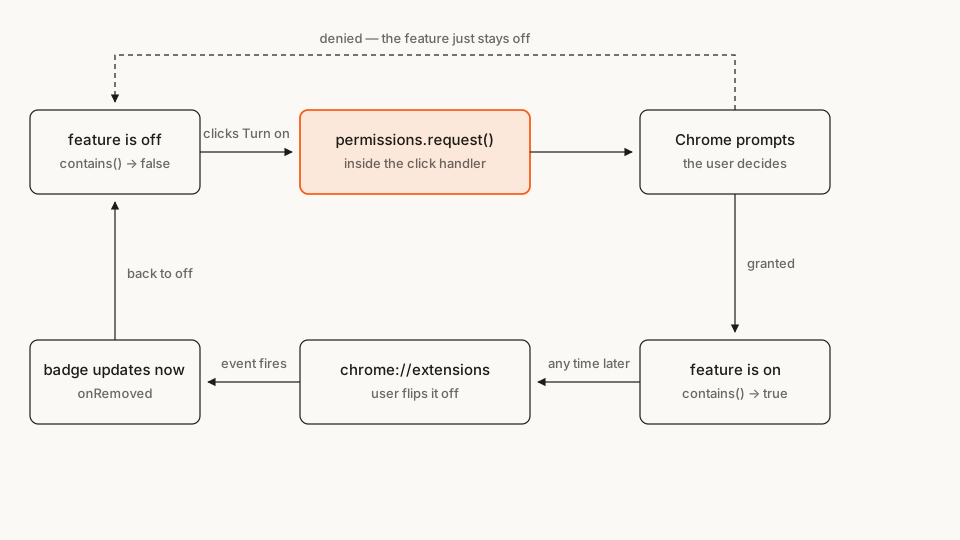
Two things in that picture cause most of the bugs. The request has to happen inside a user gesture — a click handler, not onInstalled, not a timer. And the loop closes: a permission you were granted can be taken away from a page you don't control, so contains() is a question you ask every time, not a boolean you cache at first grant.
The file tree
Five files, no folders:
permission-desk/
├── manifest.json       # two required permissions, two optional ones
├── service-worker.js   # watches permission changes, paints the badge
├── popup.html          # the feature switches
├── popup.css
└── popup.js            # contains() / request() / remove()
Rather clone than type? The finished extension lives in our public samples repo — load it, then read on with this tutorial as the guided tour.
Make a folder called permission-desk and let's fill it.
Step 1: a manifest that asks for almost nothing
Start from the install dialog and work backwards. What genuinely cannot work without a permission at install time? Here, one thing: a note that survives a browser restart, which needs storage.
manifest.json
{
  "manifest_version": 3,
  "name": "Permission Desk",
  "version": "1.0.0",
  "description": "A popup whose features ask for their own permissions the moment you switch them on.",
  "permissions": ["storage", "activeTab"],
  "optional_permissions": ["topSites"],
  "optional_host_permissions": ["https://*/*"],
  "action": {
    "default_title": "Permission Desk",
    "default_popup": "popup.html"
  },
  "background": {
    "service_worker": "service-worker.js"
  }
}
Four permission-shaped keys, and each one is a decision:
permissions: ["storage", "activeTab"]— the required set, deliberately chosen from the tokens that produce no warning text.storageis plumbing.activeTabgives temporary access to the tab the user is looking at when they invoke the extension, which is exactly what opening this popup is, and it's documented as an alternative to<all_urls>that displays no warning during installation.optional_permissions: ["topSites"]— requestable later.topSitescarries a real warning, which is the point: we want the user to read it in context.optional_host_permissions: ["https://*/*"]— the one that looks alarming and isn't. A broad pattern here is not a broad grant; it declares the range of origins you're allowed to ask for at runtime. The same pattern inhost_permissionswould hand you every site at install.background.service_worker— needed for the permission events in Step 2.
One thing readers assume and shouldn't: chrome.permissions itself needs no permission entry. It's always there.
Not everything can be optional. Chrome's list of exceptions is short but sharp — debugger, declarativeNetRequest, devtools, geolocation, mdns, proxy, tts, ttsEngine, and ChromeOS's wallpaper must be declared as required or not at all. If your headline feature is a declarativeNetRequest blocker, that one is going in the install dialog whether you like it or not; plan the rest of your manifest around it.
Step 2: the ledger — noticing when permissions change
Wire this up before the features, because it turns every later step into something you can watch happen. Permissions change from places your code doesn't own: the user can revoke a grant from your extension's details page while your popup is closed. Chrome tells you via permissions.onAdded and permissions.onRemoved.
We'll use them to paint a count on the toolbar badge.
service-worker.js
'use strict';

// Anything permissions.getAll() reports that isn't in the manifest's
// required set was granted at runtime.
const REQUIRED = ['storage', 'activeTab'];

async function paintBadge() {
  const granted = await chrome.permissions.getAll();
  const optional = (granted.permissions ?? []).filter((name) => !REQUIRED.includes(name));
  const origins = granted.origins ?? [];
  const count = optional.length + origins.length;

  await chrome.action.setBadgeBackgroundColor({ color: '#FB5B1A' });
  await chrome.action.setBadgeText({ text: count ? String(count) : '' });
}

chrome.permissions.onAdded.addListener(paintBadge);
chrome.permissions.onRemoved.addListener(paintBadge);
chrome.runtime.onInstalled.addListener(paintBadge);
chrome.runtime.onStartup.addListener(paintBadge);
getAll() returns a merged view — required and optional together, named permissions in permissions and host patterns in origins — which is why we subtract the required set by hand to get "what did the user actually grant me". Note that chrome.action badge calls need no permission of their own; declaring the action key is enough.
The service worker sleeps most of the time and that's fine. Registering the listeners at the top level, synchronously, is what lets Chrome wake it up when a permission changes.
Step 3: the shell, with your reasons in it
The single highest-value line of code in this whole tutorial is not code. It's the sentence next to each button explaining what the feature does with the permission. Chrome's dialog can't carry your reasoning — it only names the capability. Yours has to.
popup.html
<!doctype html>
<html lang="en">
  <head>
    <meta charset="utf-8" />
    <link rel="stylesheet" href="popup.css" />
  </head>
  <body>
    <label class="note-label" for="note">Today's note</label>
    <textarea id="note" rows="2" placeholder="One thing you actually want to finish…"></textarea>

    <section>
      <h2>Top sites</h2>
      <p class="why">Reads your most-visited list to show five shortcuts here. Nothing leaves the browser.</p>
      <button id="enable-top-sites" hidden>Turn on</button>
      <button id="disable-top-sites" class="off" hidden>Turn off</button>
      <p class="status" id="top-sites-status"></p>
      <ul id="top-sites"></ul>
    </section>

    <section>
      <h2>Read <span id="site-label">this site</span></h2>
      <p class="why">Fetches the page you're on and reports its title, size and link count. Asks for this one site, nothing else.</p>
      <button id="enable-site" hidden>Turn on</button>
      <button id="disable-site" class="off" hidden>Turn off</button>
      <p class="status" id="site-output"></p>
    </section>

    <script src="popup.js"></script>
  </body>
</html>
Both buttons in each section start hidden, and the render pass reveals exactly one. That avoids the flash where a user sees "Turn on" for a feature that's already on — a small thing that makes an optional-permission UI feel broken when you get it wrong.
popup.css
body {
  width: 280px;
  margin: 0;
  padding: 14px;
  font: 13px/1.45 system-ui, sans-serif;
  color: #1f1b16;
  background: #faf9f5;
}
h2 { font-size: 13px; margin: 18px 0 4px; }
.note-label { display: block; font-weight: 600; margin-bottom: 4px; }
textarea { width: 100%; box-sizing: border-box; font: inherit; resize: vertical; }
.why { color: #6b6459; margin: 0 0 8px; }
button {
  font: inherit;
  padding: 5px 10px;
  border: 1px solid #fb5b1a;
  border-radius: 6px;
  background: #fb5b1a;
  color: #fff;
  cursor: pointer;
}
button.off { background: none; color: #fb5b1a; }
.status { margin: 8px 0 0; color: #6b6459; }
ul { margin: 8px 0 0; padding-left: 18px; }
a { color: #fb5b1a; }
Step 4: the request, and the trap right next to it
Now the first optional feature. The shape is always the same three moves: contains() to render state, request() from a click, remove() to hand it back.
This file loads and runs as-is — you can stop here, try it, and come back. One thing will look odd: the second section renders as a heading and a sentence with no buttons under it, because nothing has wired that feature up yet. Step 5 fills it in.
popup.js
'use strict';

const TOP_SITES = { permissions: ['topSites'] };

function setStatus(id, message) {
  document.getElementById(id).textContent = message;
}

/* ---------- the free part: a note in chrome.storage.sync ---------- */

async function loadNote() {
  const { note = '' } = await chrome.storage.sync.get('note');
  document.getElementById('note').value = note;
}

document.getElementById('note').addEventListener('change', (event) => {
  chrome.storage.sync.set({ note: event.target.value });
});

/* ---------- feature 1: an optional named permission ---------- */

async function renderTopSites() {
  const list = document.getElementById('top-sites');
  list.textContent = '';

  // Ask every time. A grant is a fact about right now, not one you own.
  const granted = await chrome.permissions.contains(TOP_SITES);
  document.getElementById('enable-top-sites').hidden = granted;
  document.getElementById('disable-top-sites').hidden = !granted;
  if (!granted) return;

  const sites = await chrome.topSites.get();
  for (const site of sites.slice(0, 5)) {
    const item = document.createElement('li');
    const link = document.createElement('a');
    link.href = site.url;
    link.rel = 'noopener noreferrer';
    link.target = '_blank';
    link.textContent = site.title || site.url;
    item.append(link);
    list.append(item);
  }
}

document.getElementById('enable-top-sites').addEventListener('click', async () => {
  // request() is the FIRST thing in this handler — nothing is awaited before it.
  const granted = await chrome.permissions.request(TOP_SITES);
  if (!granted) {
    setStatus('top-sites-status', 'No problem — everything else here still works.');
    return;
  }
  setStatus('top-sites-status', '');
  await renderTopSites();
});

document.getElementById('disable-top-sites').addEventListener('click', async () => {
  await chrome.permissions.remove(TOP_SITES);
  setStatus('top-sites-status', '');
  await renderTopSites();
});

async function init() {
  await loadNote();
  await renderTopSites();
}

init();
The comment above request() is the whole lesson. Chrome and Firefox both require the call to happen inside a user action handler — MDN states it flatly: the extension can only make the request inside the handler for a user action.
What that actually rides on in Chrome is transient user activation, and it expires. A quick await at the top of the handler will usually still be inside the window; a slow one will not, and the difference is a timer rather than anything you can see in the code. I tested this on Chrome 136: a fast chrome.storage.local.get() before request() went through to the prompt, while an eight-second wait before the identical call was rejected outright. This is the shape that fails:
// Broken: the activation has expired by the time request() runs.
button.addEventListener('click', async () => {
  // a round-trip to an origin you already hold permission for
  const response = await fetch('https://api.example.com/config');
  if (!(await response.json()).askForTopSites) return;
  await chrome.permissions.request(TOP_SITES);   // ← rejects, never prompts
});
And it does not fail quietly. The promise rejects with Error: This function must be called during a user gesture, which lands in the popup's console — where nobody is looking, because from the outside the button just did nothing.
The fix is boring and always available: do the awaiting somewhere else. Load whatever you need when the popup opens, keep it in a variable, and let the click handler call request() on its first line. That also sidesteps the question of how long you have, and it's what ports to Firefox, which is stricter about the request coming straight out of the handler. Step 5 leans on exactly that.
One more habit worth forming now: I write renderTopSites() so that it re-checks contains() and repaints from scratch, rather than flipping a hasTopSites flag when the request resolves. It's a few extra milliseconds and it means the UI can never disagree with reality.
Step 5: asking for one site, decided at runtime
Host permissions are where optional permissions earn their keep, because the origin you need is usually only known while the extension is running. The documented pattern is to declare a broad optional pattern — our https://*/* — and request a specific origin from inside it. You may request subsets of your optional origins, so https://*/* in the manifest lets you ask for https://example.com/ and nothing more.
The tab's URL comes from activeTab, which is granted because the user opening the popup counts as invoking the extension — url is one of the four sensitive Tab properties that would otherwise need the tabs permission and its install warning. We read it once when the popup opens, precisely so the click handler stays gesture-clean.
popup.js (complete — replaces the file from Step 4)
'use strict';

const TOP_SITES = { permissions: ['topSites'] };

// The tab the popup was opened on, resolved once at load so that no click
// handler ever has to await before calling permissions.request().
let siteUrl = null;
let siteOrigin = null;

function setStatus(id, message) {
  document.getElementById(id).textContent = message;
}

/* ---------- the free part: a note in chrome.storage.sync ---------- */

async function loadNote() {
  const { note = '' } = await chrome.storage.sync.get('note');
  document.getElementById('note').value = note;
}

document.getElementById('note').addEventListener('change', (event) => {
  chrome.storage.sync.set({ note: event.target.value });
});

/* ---------- feature 1: an optional named permission ---------- */

async function renderTopSites() {
  const list = document.getElementById('top-sites');
  list.textContent = '';

  // Ask every time. A grant is a fact about right now, not one you own.
  const granted = await chrome.permissions.contains(TOP_SITES);
  document.getElementById('enable-top-sites').hidden = granted;
  document.getElementById('disable-top-sites').hidden = !granted;
  if (!granted) return;

  const sites = await chrome.topSites.get();
  for (const site of sites.slice(0, 5)) {
    const item = document.createElement('li');
    const link = document.createElement('a');
    link.href = site.url;
    link.rel = 'noopener noreferrer';
    link.target = '_blank';
    link.textContent = site.title || site.url;
    item.append(link);
    list.append(item);
  }
}

document.getElementById('enable-top-sites').addEventListener('click', async () => {
  // request() is the FIRST thing in this handler — nothing is awaited before it.
  const granted = await chrome.permissions.request(TOP_SITES);
  if (!granted) {
    setStatus('top-sites-status', 'No problem — everything else here still works.');
    return;
  }
  setStatus('top-sites-status', '');
  await renderTopSites();
});

document.getElementById('disable-top-sites').addEventListener('click', async () => {
  await chrome.permissions.remove(TOP_SITES);
  setStatus('top-sites-status', '');
  await renderTopSites();
});

/* ---------- feature 2: one origin, discovered at runtime ---------- */

function toMatchPattern(url) {
  try {
    const { protocol, origin } = new URL(url);
    return protocol === 'https:' ? `${origin}/*` : null;
  } catch {
    return null;
  }
}

async function renderSite() {
  const enable = document.getElementById('enable-site');
  const disable = document.getElementById('disable-site');

  if (!siteOrigin) {
    enable.hidden = true;
    disable.hidden = true;
    setStatus('site-output', 'Open an https:// page, then reopen this popup.');
    return;
  }

  document.getElementById('site-label').textContent = new URL(siteUrl).host;
  const granted = await chrome.permissions.contains({ origins: [siteOrigin] });
  enable.hidden = granted;
  disable.hidden = !granted;
  if (granted) await peek();
}

async function peek() {
  setStatus('site-output', 'Reading…');
  try {
    const response = await fetch(siteUrl, { credentials: 'omit' });
    const html = await response.text();
    const page = new DOMParser().parseFromString(html, 'text/html');
    const title = page.querySelector('title')?.textContent?.trim() || '(no <title>)';
    const kb = (html.length / 1024).toFixed(1);
    setStatus('site-output', `${title} — ${kb} KB, ${page.querySelectorAll('a').length} links`);
  } catch (error) {
    setStatus('site-output', `Could not read it: ${error.message}`);
  }
}

document.getElementById('enable-site').addEventListener('click', async () => {
  if (!siteOrigin) return;
  const granted = await chrome.permissions.request({ origins: [siteOrigin] });
  if (!granted) {
    setStatus('site-output', 'Fine — nothing was read.');
    return;
  }
  await renderSite();
});

document.getElementById('disable-site').addEventListener('click', async () => {
  await chrome.permissions.remove({ origins: [siteOrigin] });
  setStatus('site-output', '');
  await renderSite();
});

/* ---------- boot ---------- */

async function init() {
  const [tab] = await chrome.tabs.query({ active: true, currentWindow: true });
  siteUrl = tab?.url ?? null;
  siteOrigin = siteUrl ? toMatchPattern(siteUrl) : null;

  await loadNote();
  await renderTopSites();
  await renderSite();
}

init();
Three details in there are load-bearing:
credentials: 'omit'. Once you hold a host permission, Chrome treats your requests to that origin as same-site, so evenSameSite=Strictcookies can ride along. Almost no feature needs that, and it turns a "read this page" button into a "read this page as me" button. Sayomitexplicitly rather than reasoning about what the default does.toMatchPatternreturnsnullfor anything that isn'thttps:. Your optional pattern ishttps://*/*, so requesting anhttp://orchrome://origin would be rejected. Handle it in the UI instead of letting a promise reject.tab?.url ?? null. IfactiveTabhasn't kicked in — achrome://page, a PDF viewer, a tab opened before the extension was installed —urlis simply absent. The feature says so and the rest of the popup carries on.
That last one is the real design work in optional permissions: every feature needs a designed "not granted" state. Extensions that skip it ship a broken-looking UI to everyone who says no, which is a fantastic way to turn a polite question into a one-star review.
Load it and try it
- Open
chrome://extensions. - Turn on Developer mode (top right).
- Click Load unpacked and pick your
permission-deskfolder. - Pin the extension so you can see the badge, then open any regular
https://site and click the icon.
Type in the note and reopen the popup: it persists, and nothing was ever requested. Now click Turn on under "Top sites". Chrome's own prompt appears, describing the capability, and your sentence is still on screen behind it describing the feature. Grant it and five shortcuts appear; the toolbar badge ticks to 1.
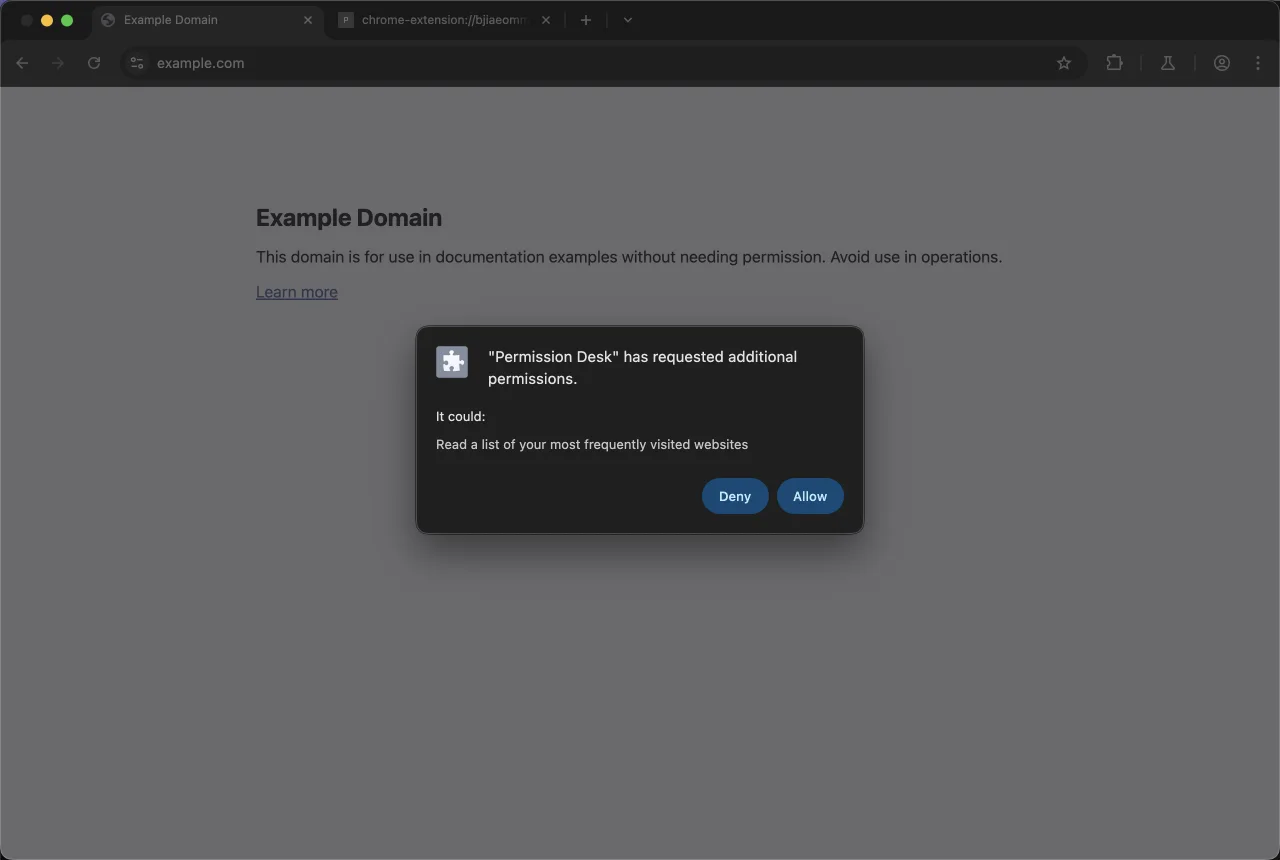
This dialog only appears because you asked for it — and only once the user pressed a button.
Then click Turn on under "Read …": you get a second prompt, this time naming the single site you're on. Grant it and the popup reports the page's title, HTML size and link count.
The last thing to try is the interesting one, and it does not end where you would expect. Open chrome://extensions, click Details, and scroll to Permissions. The topSites grant you just made is listed there — as a line of text, with no switch beside it.
That is worth sitting with. Chrome shows a named optional permission on that page; it does not let the user turn one off there. (Host permissions are the exception — those are governed by the site-access controls further down the same page.) Which is the real argument for the "Turn off" button you built: permissions.remove() is the affordance Chrome doesn't hand the user, and when it runs, onRemoved wakes your service worker, the badge drops, and the popup you reopen has flipped back to "Turn on".
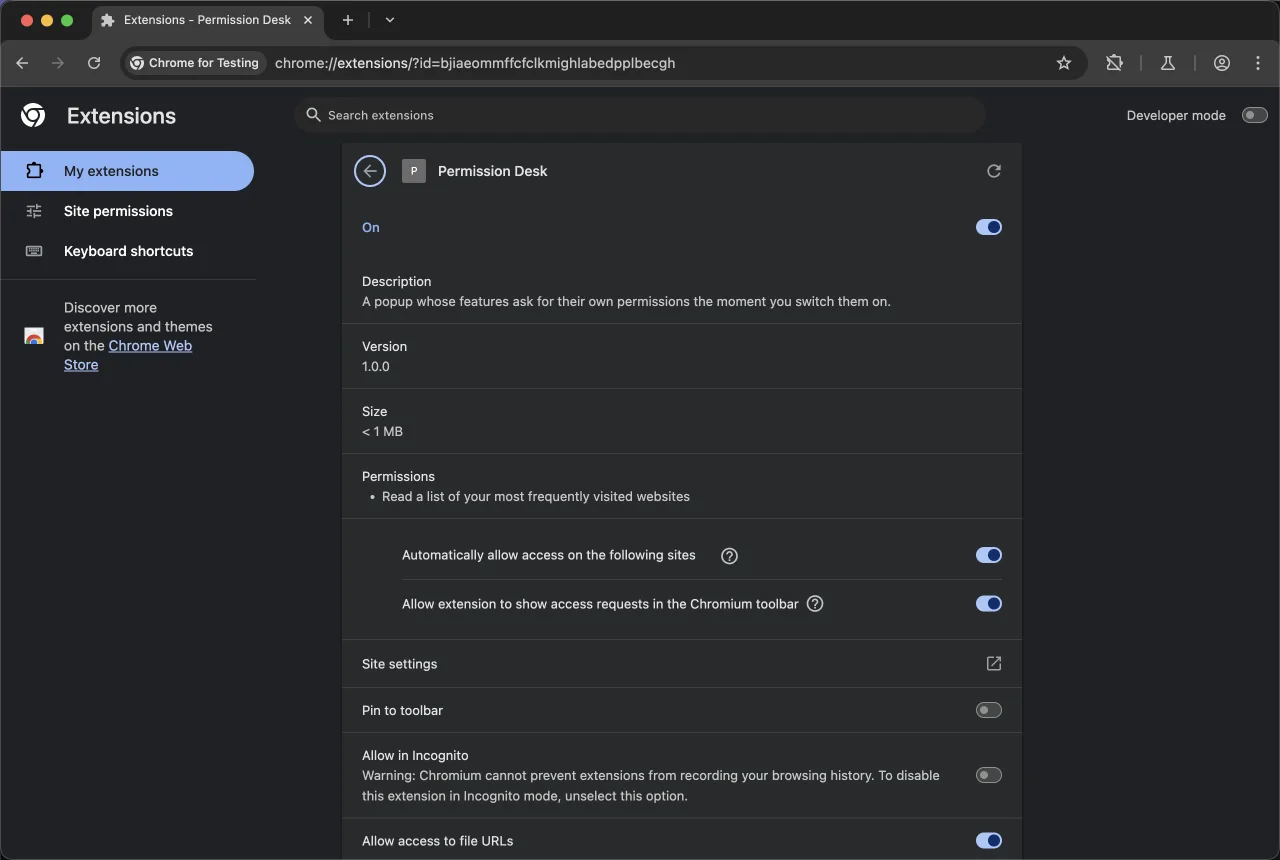
Chrome lists what you were granted — but for a named permission there is no switch here to take it back. The toggles below it govern site access, not this.
If it doesn't work, check these first:
- Nothing happens when you click "Turn on". Open the popup's console (right-click the popup → Inspect). If you see
This function must be called during a user gesture, something slow is awaited beforerequest()in that handler and the activation expired. Move the await out. - The promise rejects with "not in the manifest". The permission isn't listed in
optional_permissions, or the origin you're asking for isn't inside youroptional_host_permissionspattern.https://*/*does not coverhttp://. - Every tab comes back with
urlstripped, so the site section shows its fallback.activeTabis granted when the user invokes the extension. Opening the popup yourself withchrome.action.openPopup()is not an invocation —chrome.tabs.query()then returns tabs with nourlortitleat all. Click the toolbar icon instead. chrome.topSites is undefined. You're calling it before the grant, or on a code path that skipped thecontains()check. Guard the call, not the button.- The site fetch fails with a CORS-flavoured error. The origin grant didn't land — check
chrome.permissions.getAll()in the popup's DevTools console (right-click the popup → Inspect). Note that some sites block extension fetches with their own headers; try a plain content site first. - The badge never changes. The service worker threw. Click service worker on the extension's card in
chrome://extensionsto see its console.
Cross-browser note
The manifest keys port cleanly. Firefox supports optional_permissions and optional_host_permissions — the latter since Firefox 128, so check your floor if you support ESR — and the permissions.request() contract — must be called from a user action handler — is identical. Since Chrome 148 ships the browser.* namespace natively, the same source can address both without a polyfill.
What doesn't port is behaviour around the edges. Firefox lets users withhold host permissions from your required set, which makes runtime contains() checks more load-bearing there than in Chrome — code that assumes a declared host permission is granted will break on Firefox in a way it never does on Chrome. And which specific permissions can be optional differs by browser, so treat Chrome's exception list as Chrome's, not as universal. Promise yourself the same manifest keys, not identical prompts.
Three things I'd tell my past self
You have literally never seen your own install dialog. As Matt Frisbie points out in Building Browser Extensions (Apress, 2025), loading an unpacked extension deliberately skips the install-time permission warning so developers aren't nagged on every reload — while optional permission requests do still prompt. The consequence is uncomfortable: the one dialog every user sees is the one you've been systematically blind to. Pack a .crx once (Pack extension on the extensions page) and drag it in, just to read your own dialog. Or check what Chrome's warning guidelines say your tokens produce.
Don't cache a grant. Once granted, a permission lasts for the extension's lifetime — but users revoke, and a reinstall drops every optional grant you'd accumulated. contains() costs nothing. Call it at the point of use.
Denial isn't final. Unlike web platform permissions, a declined optional permission can be requested again. That's an invitation to be helpful later, not to nag on a timer — and remember that the retry also has to come from a real click.
Before you publish
Two questions get asked about every extension that reaches a review queue: is each declared permission load-bearing, and does the listing explain the scary ones. Answering the first is mechanical once you've split required from optional. If you're scaffolding a fresh manifest, the manifest generator writes the keys — including the optional ones — without you memorising the schema.
For an existing build, scan it before a reviewer does:
cd permission-desk && zip -r ../permission-desk.zip . && cd ..
npx @extenshi/cli scan ./permission-desk.zip
The CLI flags permission bloat and risky API usage in your own source. You get 3 scans and 10 reads free, one-time; past that, prepaid credit packs cover it and never expire. It's also worth skimming what comparable extensions in your category declare — the Extenshi catalog makes over-asking obvious at a glance, and the permission scanner shows the same view a suspicious user gets of you.
I'd add one honest caveat. A narrower permission set means fewer things to justify, but neither Google nor Mozilla publishes review times by permission count, so don't expect a faster approval — expect a shorter conversation.
Wrapping up
You went from an empty folder to an extension that installs without a single permission warning and still does three useful things, because each risky capability is requested at the moment it's needed, explained in your words, and returnable.
The pattern generalises beyond this toy. Anywhere you're tempted to write <all_urls> because you might need a site later, the honest version is optional_host_permissions plus a per-origin request — and you can read what that difference looks like from the user's side in my breakdown of what <all_urls> actually grants. Anywhere you're declaring a permission for a feature 5% of users touch, that's an optional permission with a button in front of it.
Shipping something on top of this? Install numbers, retention and the reviews landing on your listing become their own problem the moment it's live. Explore extension analytics → and claim your extension to get verified data next to the security scan.
Sources
- chrome.permissions API reference — Chrome for Developers (Google)
- Declare permissions — Chrome for Developers (Google)
- The "activeTab" permission — Chrome for Developers (Google)
- Permission warning guidelines — Chrome for Developers (Google)
- chrome.topSites API reference — Chrome for Developers (Google)
- permissions.request() — MDN Web Docs (Mozilla)
- optional_permissions manifest key — MDN Web Docs (Mozilla)
- optional_host_permissions manifest key — MDN Web Docs (Mozilla)
- functional-samples/sample.optional_permissions — GoogleChrome/chrome-extensions-samples (Apache-2.0), the
contains()-then-request()flow this tutorial builds on - fregante/webext-permissions — helper for reading which optional permissions were actually granted
Further reading
📚 Building Browser Extensions, 2nd Edition by Matt Frisbie — Amazon | Apress. Chapter 10 covers permissions end to end, including why you never see your own install dialog while developing.
This article is a hands-on tutorial based on the official Chrome and Mozilla extension documentation and Google's Apache-2.0 sample code. Code is provided as-is for educational purposes; verify API behavior against the current developer.chrome.com reference before shipping. If you believe anything here is inaccurate, contact [email protected] and we'll review and update.
Related Articles

activeTab permission explained: the host access that skips Chrome's warning
The activeTab permission lets browser extensions touch the page you're on — only when you click, with no scary install warning. Here's what it grants.
Host permissions explained: what 'read and change all your data on all websites' really means
Browser extension host permissions let extensions read and change every website you visit. Here's what that warning actually means and when to be concerned.
Chrome extension side panels: build a UI that stays open while you browse
A hands-on Manifest V3 tutorial: build a Chrome extension side panel that persists across tabs, then make it per-site. Full runnable code, ~25 minutes.

Blocking requests in a Chrome extension: a hands-on declarativeNetRequest tutorial
Build a Manifest V3 Chrome extension that blocks trackers and strips tracking parameters with declarativeNetRequest — full runnable code, ~30 minutes.