chrome.notifications in browser extensions: action buttons that survive the MV3 service worker
Build a Chrome extension whose notification buttons still work minutes later, after the MV3 service worker died. Full runnable code and the lifecycle rules.
There is a moment every Manifest V3 developer meets sooner or later. Your notification appears right on time, the user reads it seven minutes later, clicks "Snooze" — and nothing happens. No error, no log line, no crash report. The click fell into a void, because the service worker that was supposed to catch it died four minutes earlier.
Today I'll build the small extension that gets this right: a recurring stand-up reminder that raises a real OS-tray notification with two action buttons, wired so the buttons work no matter how long the worker has been dead. About 25 minutes, beginner-friendly. You need Chrome and a text editor, nothing else.
What you'll build
A toolbar popup where you pick a reminder interval. When the alarm fires, Chrome shows a system notification with Done and Snooze 5 min buttons. Clicking either one works even if it happens long after the service worker was terminated — which is the entire point of the exercise.
Along the way you'll meet the three things this API actually tests you on: the (notificationId, buttonIndex) callback signature, the rule that listeners must exist on the worker's first turn of the event loop, and the habit of keeping notification state somewhere the worker's death can't touch.
The trap: your button click outlives your worker
chrome.notifications is one of the friendliest APIs on the platform. One call, real OS-level UI, no HTML to write. But it is also a lifecycle time bomb, because of the gap between the two halves of the feature:
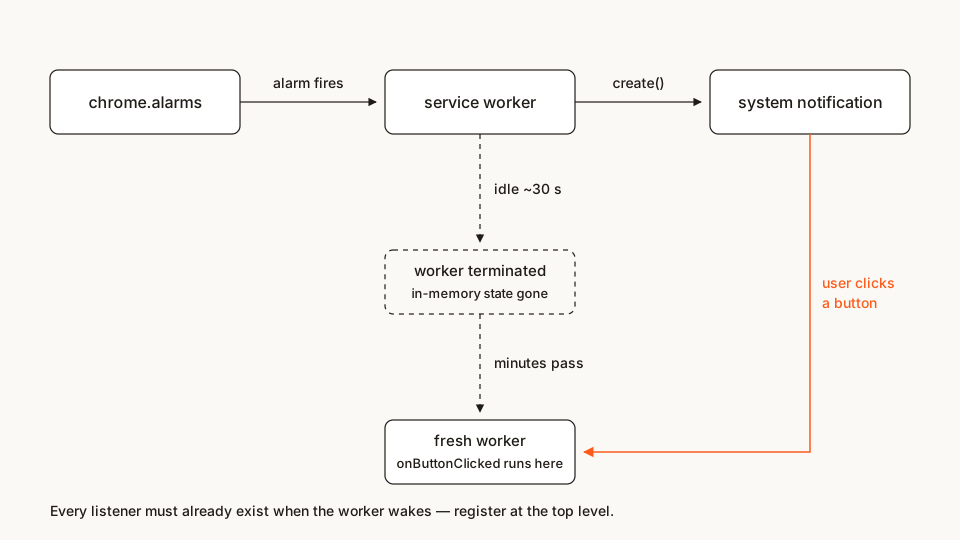
create()runs while your worker is awake.onButtonClickedfires whenever the user decides — often minutes later, by which time Chrome has terminated the idle worker and will cold-start a brand new one to deliver the event.
That new worker is a newborn. Every module-level variable is back to its initial value. Anything you were "holding on to" at create-time is gone. The rest of this article is basically three rules for living with that fact.
The file tree
standup-reminder/
├── manifest.json
├── background.js
├── popup.html
└── popup.js
Rather clone than type? The finished extension lives in our public samples repo — load it, then read on with this tutorial as the guided tour.
No icons folder, on purpose. iconUrl accepts data: URLs, so this tutorial ships zero binary files — the icon is a 32×32 orange square embedded in the code below. When you ship for real, use real PNGs (the store listing wants a 128px icon anyway), but for learning, text-only beats hunting for image assets.
Step 1: manifest with three honest permissions
manifest.json
{
  "name": "Stand-up Reminder",
  "description": "Recurring reminders with notification action buttons that survive service worker restarts.",
  "version": "1.0",
  "manifest_version": 3,
  "permissions": ["alarms", "notifications", "storage"],
  "background": {
    "service_worker": "background.js"
  },
  "action": {
    "default_popup": "popup.html",
    "default_title": "Stand-up reminder"
  }
}
Each permission maps to one job:
notifications— draws in the system tray. Without it,create()rejects.alarms— schedules the next reminder, becausesetTimeoutin a worker is a lie (step 5).storage— holds the user's chosen interval so a cold-started worker can re-arm the right alarm.
No host permissions, no tabs: nothing here reads pages, so the install-time warning stays as small as it gets.
Step 2: the smallest notification that works
Before any lifecycle drama, prove the pipe works. One call, straight from the popup's console or from popup.js:
chrome.notifications.create('reminder:standup', {
  type: 'basic',
  iconUrl: 'data:image/png;base64,iVBORw0KGgoAAAANSUhEUgAAACAAAAAgCAIAAAD8GO2jAAAAKklEQVR42mP4HS1FU8QwasGoBaMWjFowasGoBaMWjFowasGoBaMWDBULAJtPwExLeGOBAAAAAElFTkSuQmCC',
  title: 'Stand-up time',
  message: 'Stretch. Water. Window. Two minutes.',
});
Three things to notice. type is required, and basic means icon + title + message + up to two buttons. iconUrl must resolve to something the extension owns — a path relative to a packaged file, or a data:/blob: URL; a remote https:// image is not allowed.
And the first argument is the notification id: create twice with the same id and the second call replaces the first instead of stacking a duplicate. I'll exploit that in step 4.
Step 3: two buttons and an index you should not trust
Buttons are an array of up to two objects. Clicks arrive on chrome.notifications.onButtonClicked with the notification id and a zero-based button index — not a name, not an id:
chrome.notifications.onButtonClicked.addListener((notificationId, buttonIndex) => {
  console.log(notificationId, buttonIndex); // 'reminder:standup', 0 or 1
});
That index is positional. Reorder or insert a button in a later release and every handler silently shifts meaning, so translate the index into an intent the moment it arrives and never pass it around raw. Also skip button icons: iconUrl on a button has been deprecated since Chrome 59 and never rendered on macOS. The title text is the whole UI. And on macOS the buttons don't sit on the notification's face at all: Notification Center folds both into an Options menu, so the user sees "Done" and "Snooze 5 min" only after opening it. Keep the titles short and self-explanatory — they read as menu items there.
Step 4: the click that arrives at a dead worker
Here is the exact shape of the failure. Timeline of one reminder:
- 14:58 — the alarm fires. The worker wakes, creates the notification, then goes idle.
- ~15:00 — Chrome terminates the idle worker. Its ~30-second TTL is up.
- 15:07 — the user clicks "Snooze 5 min".
- Chrome spawns a fresh worker and dispatches
onButtonClickedto it.
The naive version looks completely reasonable and breaks precisely here:
let pending = null; // dies with the worker, every time

chrome.alarms.onAlarm.addListener(() => {
  pending = { kind: 'standup', interval: 30 };
  chrome.notifications.create('reminder', { /* ... */ });
});

chrome.notifications.onButtonClicked.addListener((id, i) => {
  // seven minutes later, in a fresh worker: pending is null. silently.
  scheduleNext(pending.interval);
});
Two rules fix it, and both come straight from the service worker contract. As Matt Frisbie explains in Building Browser Extensions (Apress, 2025), Chrome wakes an idle worker, runs exactly one turn of its event loop, and only then dispatches the event that woke it — a listener registered after that turn can miss its event entirely.
So: register every listener at the top level, synchronously. No listener inside an async bootstrap, no listener behind a dynamic import(). (Chrome 154 shipped an opt-in async_listener_registration key that relaxes this; I wrote up what actually landed and why you shouldn't flip it yet. Until you can depend on it, top-level registration is the rule.)
Second rule: put state where death can't reach it. Encode the intent in the notification id (reminder:standup) and keep anything bigger in chrome.storage. The id travels back with every event; a variable does not. That's the whole design. Here is the complete worker:
background.js
'use strict';

const ALARM_NAME = 'standup-reminder';
const NOTIFICATION_ID = 'reminder:standup';
const ICON_URL = 'data:image/png;base64,iVBORw0KGgoAAAANSUhEUgAAACAAAAAgCAIAAAD8GO2jAAAAKklEQVR42mP4HS1FU8QwasGoBaMWjFowasGoBaMWjFowasGoBaMWDBULAJtPwExLeGOBAAAAAElFTkSuQmCC';

// Top-level listeners: registered on the worker's first turn, every boot.

chrome.alarms.onAlarm.addListener((alarm) => {
  if (alarm.name !== ALARM_NAME) return;
  chrome.action.setBadgeText({ text: '!' });
  chrome.notifications.create(NOTIFICATION_ID, {
    type: 'basic',
    iconUrl: ICON_URL,
    title: 'Stand-up time',
    message: 'Stretch, grab water, look at something far away.',
    contextMessage: 'Stand-up Reminder',
    buttons: [{ title: 'Done' }, { title: 'Snooze 5 min' }],
    priority: 2,
    requireInteraction: true,
  });
});

chrome.notifications.onButtonClicked.addListener(async (notificationId, buttonIndex) => {
  if (!notificationId.startsWith('reminder:')) return;
  const intent = buttonIndex === 0 ? 'done' : 'snooze';
  chrome.notifications.clear(notificationId);

  if (intent === 'snooze') {
    chrome.alarms.create(ALARM_NAME, { delayInMinutes: 5 });
    return;
  }
  // 'done': re-arm with the interval the user picked, read fresh from storage.
  const { intervalMinutes = 30 } = await chrome.storage.sync.get('intervalMinutes');
  chrome.action.setBadgeText({ text: 'ON' });
  chrome.alarms.create(ALARM_NAME, { delayInMinutes: intervalMinutes });
});

chrome.notifications.onClosed.addListener((notificationId) => {
  if (notificationId === NOTIFICATION_ID) {
    chrome.action.setBadgeText({ text: '' });
  }
});
Walk it once and the pattern is obvious. Constants only at module scope — no per-notification state. The id prefix reminder: is a routing key, parsed in the handler instead of trusted from memory. The interval is read from chrome.storage.sync at click time, not remembered from fire time, so a worker born at 15:07 still knows what "Done" should schedule.
Step 5: schedule with chrome.alarms, because timers die
The scheduling half has its own trap. As Frisbie's chapter on background scripts puts it, setTimeout and setInterval still exist in MV3 workers but silently never run if the worker is terminated before the callback fires — and chrome.alarms is the replacement, with a floor of about half a minute. Alarms live in the browser process, not in your worker, so termination cannot cancel them.
Two caveats from the chrome.alarms reference and What's new in Chrome extensions: Chrome limits alarms to at most one per 30 seconds and may delay them arbitrarily beyond that, so never build a stopwatch on this API. And resist encoding state into alarm names — Chrome 150 capped names at 1024 bytes, and names are labels, not payloads. That's what storage is for.
popup.html
<!doctype html>
<html>
  <head>
    <meta charset="utf-8" />
    <style>
      body { width: 220px; margin: 12px; font: 14px system-ui, sans-serif; }
      button { display: block; width: 100%; margin: 6px 0; padding: 8px; }
    </style>
  </head>
  <body>
    <p>Remind me every:</p>
    <button id="min1" value="1">1 minute (testing)</button>
    <button id="min15" value="15">15 minutes</button>
    <button id="min30" value="30">30 minutes</button>
    <button id="cancel">Stop reminders</button>
    <script src="popup.js"></script>
  </body>
</html>
popup.js
'use strict';

const ALARM_NAME = 'standup-reminder';

function setAlarm(event) {
  const minutes = parseFloat(event.target.value);
  chrome.storage.sync.set({ intervalMinutes: minutes });
  chrome.alarms.create(ALARM_NAME, { delayInMinutes: minutes });
  chrome.action.setBadgeText({ text: 'ON' });
  window.close();
}

function cancelAlarm() {
  chrome.alarms.clear(ALARM_NAME);
  chrome.action.setBadgeText({ text: '' });
  window.close();
}

for (const id of ['min1', 'min15', 'min30']) {
  document.getElementById(id).addEventListener('click', setAlarm);
}
document.getElementById('cancel').addEventListener('click', cancelAlarm);
Note where the interval goes: chrome.storage.sync, not a variable. The popup dies on close exactly like the worker dies on idle, and the sync area means the user's other signed-in Chromes agree on the interval too.
Step 6: the other templates, in one breath
basic is the template this tutorial uses. The other three are one-field variations: image adds an imageUrl thumbnail, list takes an items array of {title, message} pairs (macOS shows only the first item), and progress takes progress from 0 to 100, which you animate with update():
chrome.notifications.create('build:progress', {
  type: 'progress',
  iconUrl: ICON_URL,
  title: 'Packaging release',
  message: 'Uploading to the Web Store…',
  progress: 42,
});

// later, from any context that wakes alive:
chrome.notifications.update('build:progress', { progress: 87 });
Same lifecycle rules apply to all four. The template changes the pixels; the worker contract does not change at all.
Load it and try it
Open chrome://extensions, flip Developer mode, hit Load unpacked, pick the standup-reminder folder. Pin the icon, click it, choose "1 minute (testing)". Close the popup. Within a minute or so the notification lands with both buttons (on macOS, under its Options menu).
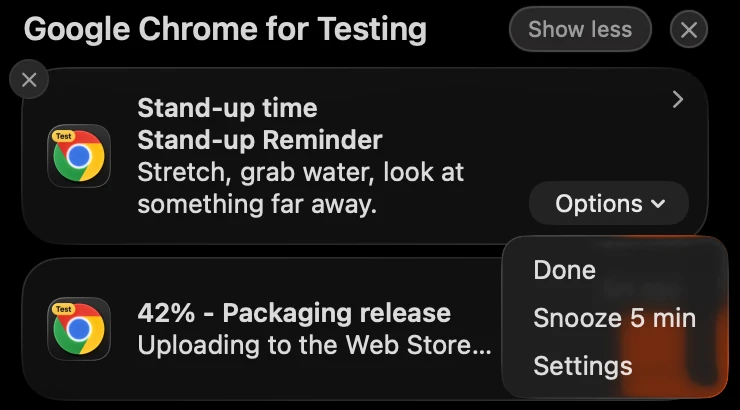
The buttons are real OS UI, not extension HTML. On macOS they live in the Options menu; the second card is the step 6 progress example.
Now the part that makes this tutorial worth writing. Wait two full minutes — long enough for the worker's ~30s idle TTL to expire — then click Snooze 5 min. It works. The worker that handled your click did not exist when you read the notification.
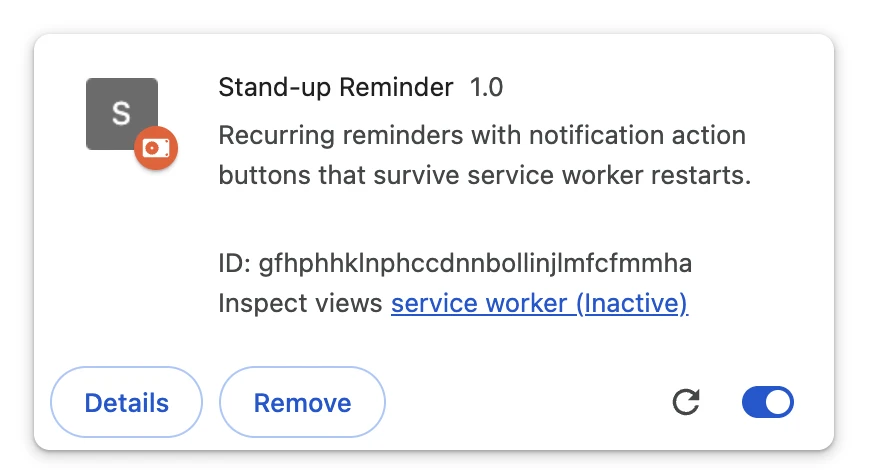
The worker is gone; the notification it raised is not. Captured while the reminder was still waiting in Notification Center.
Two more things to try: click Done and watch the badge return to ON with a fresh alarm, and hit Stop reminders from the popup to confirm alarms.clear really cancels a pending wake.
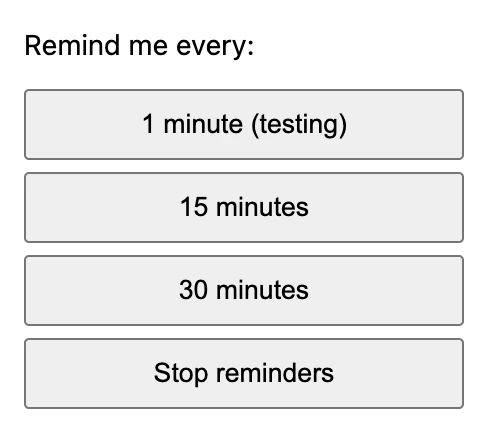
The popup writes the interval to storage.sync, then dies on close.
If it doesn't work, it's almost always one of these three:
- No notification at all. Usually the OS, not your code: Windows focus assist and macOS Do Not Disturb suppress the banner with zero signal to the API. On macOS the notification still lands in Notification Center (click the clock), and its buttons work from there.
chrome.notifications.getPermissionLevel()tells you whether Chrome itself is allowed to notify. - Buttons render but clicks do nothing. Your listener is registered inside an async bootstrap. Move every
addListenercall to the top level ofbackground.js. create()rejects. Either thenotificationspermission is missing from the manifest, oriconUrlpoints at a file that isn't packaged.
One debugging habit worth internalizing: an open DevTools window keeps the worker alive, so the lifecycle bug hides exactly while you're watching. Close the inspector, wait 30 seconds, then reproduce.
Cross-browser: buttons are a Chromium luxury
Firefox implements notifications, but per MDN's NotificationOptions it supports only type, title, message and iconUrl, with 'basic' the only template — so buttons, list and progress simply don't exist there. If you ship cross-browser, treat a click on the whole notification (onClicked) as your "done" path and offer snooze inside the popup instead. Edge is Chromium, so this tutorial runs there unchanged.
Common pitfalls and best practices
- Make ids your routing table. Prefix them (
reminder:,build:,download:) and parse the prefix in handlers. The cap is 500 characters, which is plenty for an intent, not for a payload. requireInteractionkeeps a notification on screen until the user deals with it — right for "your build failed", wrong for "new article posted".silent: trueis the polite counterpart.priorityruns −2 to 2, and on platforms without a notification center the negative values may not display at all. Don't build logic on it.- Clear what you handled, or the tray becomes a landfill.
onClosedhands you abyUserflag so you can tell "user dismissed it" from "the system timed it out". - Test with DevTools closed. I'll say it twice because it costs everyone a day once.
Before you ship it
The flow in this article leans on Google's official samples — api-samples/richNotification and functional-samples/sample.water_alarm_notification, both Apache-2.0. My version is reworked and re-explained, but credit where it's due. For the scheduling half, my chrome.alarms walkthrough goes deeper on periodic work.
When this graduates from tutorial to product, run it through the same checks I run on everything before a store submission: the Extenshi CLI (npx @extenshi/cli) scans your manifest and permissions in CI — three scans free, one-time, then prepaid credit packs that never expire at dojo.extenshi.io/billing. Curious how shipped extensions use these APIs? Browse reminder-style extensions in the catalog, or scan your own build and see exactly which permissions it declares.
Sources
- chrome.notifications API reference — Chrome for Developers
- chrome.alarms API reference — Chrome for Developers
- What's new in Chrome extensions — Chrome for Developers
- notifications.NotificationOptions — MDN
- notifications API (browser.*) — MDN
- api-samples/richNotification — GoogleChrome/chrome-extensions-samples (Apache-2.0)
- functional-samples/sample.water_alarm_notification — GoogleChrome/chrome-extensions-samples (Apache-2.0)
📚 Building Browser Extensions, 2nd Edition by Matt Frisbie — Amazon | Apress
This article is based on publicly available security research and news reporting. Extenshi does not independently verify all claims made by third-party researchers. References to specific companies or products reflect the findings of cited sources and do not constitute accusations of intentional wrongdoing. If you believe any information is inaccurate, please contact us at [email protected].
Related Articles
chrome.alarms in Manifest V3: background jobs that outlive the service worker
MV3 kills setInterval. Build a Chrome extension background job with chrome.alarms that survives service worker termination — full runnable code, ~20 min.
Chrome 154 landed MV3's lost-event fix — for the 336,360 extensions that can't use it yet
Chrome 154 shipped the async_listener_registration manifest key for MV3 service workers. Here's what landed, who it covers, and why you shouldn't switch yet.
Offscreen documents in Chrome extensions: how to use the DOM from an MV3 service worker
MV3 service workers have no DOM. Build a Chrome extension that parses HTML and writes to the clipboard from an offscreen document — runnable code, ~25 min.