Offscreen documents in Chrome extensions: how to use the DOM from an MV3 service worker
MV3 service workers have no DOM. Build a Chrome extension that parses HTML and writes to the clipboard from an offscreen document — runnable code, ~25 min.
You port an extension to Manifest V3, everything compiles, and then one line blows up in the background:
Uncaught (in promise) ReferenceError: DOMParser is not definedDOMParser isn't missing because Chrome removed it. It's missing because your background code is now a service worker, and a service worker has no document, no window, and no DOM constructors hanging off either of them. Same story for navigator.clipboard, localStorage, new Audio(), URL.createObjectURL() on a Blob you wanted to hold onto — all window territory, all gone.
The official escape hatch is chrome.offscreen: a hidden page your extension can open, hand work to, and close again. It has a real DOM. It has no UI. And it has exactly one extension API available inside it, which turns out to be the most interesting design decision in the whole thing.
What you'll build: "Outline It" — click the toolbar icon on any article and a heading outline of that page lands on your clipboard, formatted and ready to paste. Difficulty: intermediate — you should have loaded an unpacked extension before, but nothing beyond Chrome and a text editor is required. Time: ~25 minutes.
What an offscreen document actually is
It's a static HTML file that ships inside your extension, loaded into a hidden page that the user never sees and can never focus. Your extension's permissions carry over to it. The official chrome.offscreen reference is direct about the one big restriction: chrome.runtime is the only extensions API supported inside an offscreen document.
That restriction is the point. Google shipped this in Chrome 109 to give back DOM access, not to give back the MV2 persistent background page — so the offscreen document can talk to your service worker and do DOM work, and that's it. No chrome.tabs, no chrome.storage, no chrome.action. Everything in and out goes through messages.
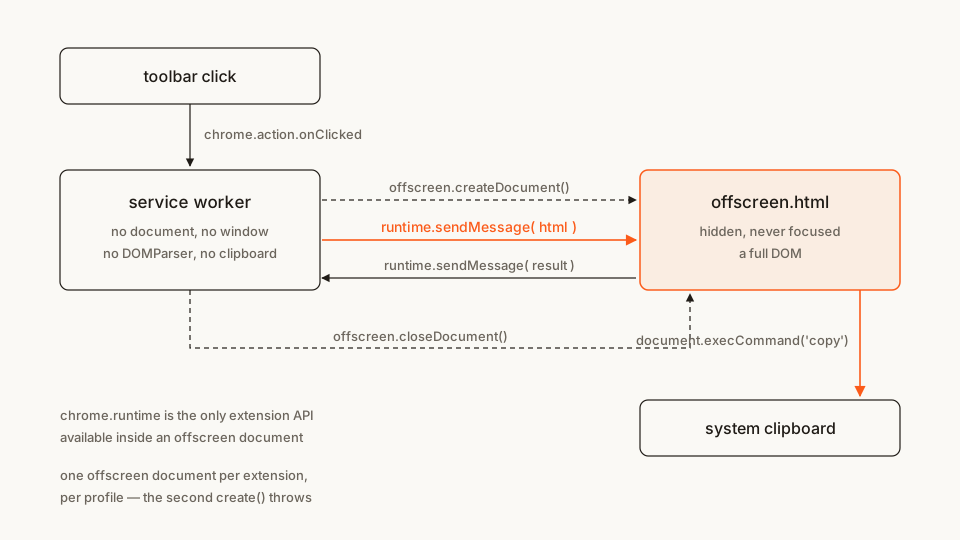
Two more constraints worth loading into memory before you write any code:
- One document per extension, per profile. Call
createDocument()while one is already open and it throws. Half of this tutorial is about not doing that. - The URL must be a static file in your package. No remote pages, no
data:URLs.
The file tree
Four files, no build step, no dependencies:
outline-it/
├── manifest.json        # permissions + the background service worker
├── service-worker.js    # the orchestrator: no DOM, does the plumbing
├── offscreen.html       # the hidden page (a textarea and a script tag)
└── offscreen.js         # DOMParser + clipboard write live here
Rather clone than type? The finished extension lives in our public samples repo — load it, then read on with this tutorial as the guided tour.
Make a folder called outline-it and let's fill it in.
Step 1: the manifest
Start minimal. One permission, one background worker, one toolbar action with no popup — because a popup would defeat the whole exercise. A popup is a page with a DOM; if one is open you don't need an offscreen document at all.
manifest.json
{
  "manifest_version": 3,
  "name": "Outline It",
  "version": "1.0",
  "description": "Copies a heading outline of the current page to your clipboard.",
  "permissions": ["offscreen"],
  "background": {
    "service_worker": "service-worker.js"
  },
  "action": {
    "default_title": "Copy this page's outline"
  }
}
"offscreen" shows the user no install-time warning string, which makes it one of the quiet permissions — worth knowing when you're budgeting what to ask for. (If you write manifests often, our free in-browser Manifest V3 generator scaffolds this block with no sign-up.)
We'll add three more permissions as the code earns them. Adding them up front is how extensions end up shipping permissions nobody can explain in review.
Step 2: the hidden page
The offscreen document is deliberately boring. A <textarea> for the clipboard trick (more on that in Step 6) and a script tag:
offscreen.html
<!doctype html>
<html>
  <head>
    <meta charset="utf-8" />
    <title>Outline It — offscreen worker</title>
  </head>
  <body>
    <textarea id="clipboard-staging"></textarea>
    <script src="offscreen.js"></script>
  </body>
</html>
Nobody sees this page, so don't style it — and don't count on the <title> to identify it either. chrome://extensions lists an open offscreen document under Inspect views by its URL, offscreen.html; Chrome's record of a view carries no title field at all. Name the file for what it does, because the filename is what you'll be reading when you go hunting for a document you forgot to close.
Step 3: the guard that everyone skips
Here's the code most tutorials get wrong, so read this one twice.
You need "create the document if it isn't already there." The naive version — check a boolean, create if false — breaks under two clicks in quick succession, because createDocument() is async: both clicks check before either resolves, both call create, and the second one throws.
Chrome's own API reference solves it with a module-level promise rather than a boolean. chrome.runtime.getContexts() (Chrome 116+) answers "does a document exist right now"; the promise covers the window where one is mid-creation:
let creating = null; // a promise, not a boolean

async function setupOffscreenDocument() {
  const offscreenUrl = chrome.runtime.getURL(OFFSCREEN_PATH);
  const existing = await chrome.runtime.getContexts({
    contextTypes: ["OFFSCREEN_DOCUMENT"],
    documentUrls: [offscreenUrl]
  });
  if (existing.length > 0) return;

  if (creating) {
    await creating; // someone else got here first — wait for them
    return;
  }
  // ...create it
}
Note chrome.runtime.getURL(): getContexts() matches on the full chrome-extension://<id>/offscreen.html URL, not on your relative path. Passing "offscreen.html" straight through is a silent no-match, so the guard reports "no document" every time and you're back to the double-create crash.
Older code you'll find in the wild uses clients.matchAll() instead — that's the pre-Chrome-116 approach, still documented as the fallback. On any Chrome that supports offscreen documents and is worth targeting today, getContexts() is the one to reach for.
Step 4: reasons, and why they aren't decoration
createDocument() takes three things: the url, an array of reasons, and a justification string you write yourself.
The justification has no runtime effect — it's documentation for reviewers and for the browser to potentially surface to users. Write an honest one anyway; "needed for functionality" is the kind of thing that gets a listing bounced.
The reasons are load-bearing. They're an enum — DOM_PARSER, CLIPBOARD, BLOBS, AUDIO_PLAYBACK, USER_MEDIA, WEB_RTC, LOCAL_STORAGE, GEOLOCATION and more — and they determine lifespan. Per the API reference, AUDIO_PLAYBACK closes the document after 30 seconds without audio playing; every other reason sets no lifetime limit at all.
That last part surprises people who've read that offscreen documents are "event-page-like." They aren't self-cleaning. Open one with DOM_PARSER and never close it, and it sits there for the life of the browser session, holding memory, while your service worker keeps getting torn down around it. Closing it is your job — there's a whole section below on why nothing else will do it for you.
Our extension does two DOM things, so it declares two reasons:
reasons: [
  chrome.offscreen.Reason.DOM_PARSER,
  chrome.offscreen.Reason.CLIPBOARD
]
The CLIPBOARD reason explains why the hidden document exists; it does not replace clipboard permissions or method-specific context requirements. See what clipboardRead exposes for the difference between reading, writing and observing a real paste event.
Step 5: the service worker
Now the orchestrator. It does the things a worker can do — respond to the toolbar click, inject a one-liner into the page, manage the offscreen document's lifecycle — and delegates everything DOM-shaped.
Three new permissions get earned here:
"activeTab"— grants access to the current tab for this click only, with no install-time warning and no<all_urls>."scripting"— required forchrome.scripting.executeScript."clipboardWrite"— required for thedocument.execCommand("copy")in Step 6. Google's own clipboard sample (Apache-2.0) declares it alongside"offscreen", and that isn't a stylistic choice — declare it or the copy is liable to fail.
Update the array in manifest.json:
"permissions": ["offscreen", "activeTab", "scripting", "clipboardWrite"]service-worker.js
// Outline It — background service worker.
// There is no DOM in this file: no document, no window, no DOMParser,
// no clipboard. Anything that needs one is delegated to offscreen.html.

const OFFSCREEN_PATH = "offscreen.html";

// A promise, not a boolean. Two clicks in the same worker lifetime would
// otherwise both see "no document yet" and both call createDocument();
// the second call throws.
let creating = null;

async function setupOffscreenDocument() {
  // getContexts() matches on the FULL extension URL — a relative path
  // never matches, and the guard silently stops guarding.
  const offscreenUrl = chrome.runtime.getURL(OFFSCREEN_PATH);
  const existing = await chrome.runtime.getContexts({
    contextTypes: ["OFFSCREEN_DOCUMENT"],
    documentUrls: [offscreenUrl]
  });
  if (existing.length > 0) return;

  if (creating) {
    await creating;
    return;
  }

  creating = chrome.offscreen.createDocument({
    url: OFFSCREEN_PATH,
    reasons: [
      chrome.offscreen.Reason.DOM_PARSER,
      chrome.offscreen.Reason.CLIPBOARD
    ],
    justification:
      "Parse the page's HTML with DOMParser and copy the resulting outline to the system clipboard."
  });

  try {
    await creating;
  } finally {
    // Cleared either way, so a failed create doesn't poison the next click.
    // The failure itself still propagates — out of here, and out of any
    // concurrent caller parked on `await creating` above — which is why the
    // click handler below catches it.
    creating = null;
  }
}

chrome.action.onClicked.addListener(async (tab) => {
  if (!tab.id) return;

  let injection;
  try {
    // activeTab grants us this tab for this click only.
    [injection] = await chrome.scripting.executeScript({
      target: { tabId: tab.id },
      // Deliberately dumb: hand back a string and let the offscreen document
      // do the thinking. Only structured-cloneable data crosses this boundary,
      // so a live DOM node could never come back here anyway.
      func: () => document.documentElement.outerHTML
    });
  } catch {
    // Restricted page — chrome://, the Web Store, the PDF viewer, another
    // extension. executeScript REJECTS on all of them, so without this the
    // click leaves an unhandled rejection in the worker log. Nothing to do
    // but stop before we open a document we'd have no work for.
    return;
  }

  try {
    await setupOffscreenDocument();
  } catch (err) {
    // Extension policy, resource pressure, a create that lost a race — rare,
    // but an async listener that rejects tells you nothing about which.
    console.error("Failed to open the offscreen document:", err);
    return;
  }

  chrome.runtime
    .sendMessage({
      target: "offscreen",
      type: "outline-page",
      data: injection.result
    })
    .catch(() => {
      // The document went away between the check and the send.
    });
});

// Listener at the TOP LEVEL — Chrome wakes the worker, runs one turn of the
// event loop, then dispatches. A listener attached later can be missed.
chrome.runtime.onMessage.addListener((message) => {
  if (message.target !== "service-worker") return;
  if (message.type !== "outline-result") return;
  showResult(message.data.count);
});

async function showResult(count) {
  await chrome.action.setBadgeBackgroundColor({ color: "#FB5B1A" });
  await chrome.action.setBadgeText({ text: String(count) });

  // Close it the moment the work is done. Nothing else will.
  try {
    await chrome.offscreen.closeDocument();
  } catch {
    // Already closed. closeDocument() throws when there's nothing open.
  }
}
That catch is doing more than tidying up. executeScript rejects on every page Chrome won't let an extension touch — chrome:// pages, the Web Store, the built-in PDF viewer, another extension's pages, file:// URLs without file access — and an async listener that rejects leaves an unhandled rejection in the worker log with no clue attached. It's tempting to swap the catch for a list of URL prefixes instead, but don't: reading tab.url drags in a question about which permission populates that field, and the list is Chrome's to maintain, not yours. Catching covers all of them and stays correct when Chrome adds another.
The injected function is one line on purpose. You could obviously run querySelectorAll inside it and skip the offscreen document entirely for this page — and if grabbing headings off a live tab is all you ever need, you should. The pattern earns its keep the moment the HTML doesn't come from a tab you're allowed to inject into: a fetch() response, a cached string, a file the user picked, a payload arriving on an alarm at 3am with no UI open anywhere. In all of those the string lands in a worker with no DOMParser — and the clipboard write at the end has no substitute at all.
Step 6: the offscreen script
chrome.runtime.onMessage is registered at the top level here for a specific reason: createDocument()'s promise resolves once the page has completed its initial load, so registering synchronously guarantees the listener exists before the worker's first message arrives.
offscreen.js
// Outline It — the offscreen document.
// chrome.runtime is the ONLY extension API available in here, so everything
// arrives and leaves as a message.

chrome.runtime.onMessage.addListener(handleMessage);

// Looked up once at load, not per message: this document's DOM is fixed by
// offscreen.html and never changes. If this is ever null, the <textarea> is
// missing from the HTML — not a timing problem.
const staging = document.getElementById("clipboard-staging");

function handleMessage(message) {
  // Not for us. The target field matters more than it looks: every context
  // in the extension receives every runtime message.
  if (message.target !== "offscreen") return;

  switch (message.type) {
    case "outline-page":
      outlineAndCopy(message.data);
      break;
    default:
      console.warn(`Unexpected message type: '${message.type}'.`);
  }
}

function outlineAndCopy(html) {
  // 1. DOM_PARSER — this line is the entire reason this file exists.
  const doc = new DOMParser().parseFromString(html, "text/html");

  const lines = [];
  for (const heading of doc.querySelectorAll("h1, h2, h3")) {
    const text = heading.textContent.trim().replace(/\s+/g, " ");
    if (!text) continue;
    const depth = Number(heading.tagName[1]) - 1;
    lines.push(`${"  ".repeat(depth)}- ${text}`);
  }

  // 2. CLIPBOARD — navigator.clipboard needs a focused window, and an
  // offscreen document can never be focused. So: stage, select, copy.
  if (lines.length > 0) {
    staging.value = lines.join("\n");
    staging.select();
    document.execCommand("copy");
  }

  chrome.runtime
    .sendMessage({
      target: "service-worker",
      type: "outline-result",
      data: { count: lines.length }
    })
    .catch(() => {
      // Worker asleep with no listener — nothing to do about it here.
    });
}
That document.execCommand("copy") looks like something from 2015, and it is deprecated on the web platform. It's still the documented path here, and the reason is structural rather than historical: the modern navigator.clipboard.writeText() requires the document to be focused, and offscreen documents are defined as unfocusable. Google's own sample uses the same <textarea> + select() + execCommand dance for exactly this reason.
Also note what outlineAndCopy does not do: hold state. The service worker can be terminated between the send and the reply, and the offscreen document can be closed out from under it. Every message carries everything it needs.
Load it and try it
- Open
chrome://extensions. - Flip on Developer mode (top right).
- Click Load unpacked and pick your
outline-itfolder. - Navigate to any article-shaped page — a docs page, a long blog post, a Wikipedia entry.
- Click the extension icon. The badge shows how many headings it found. Paste anywhere.
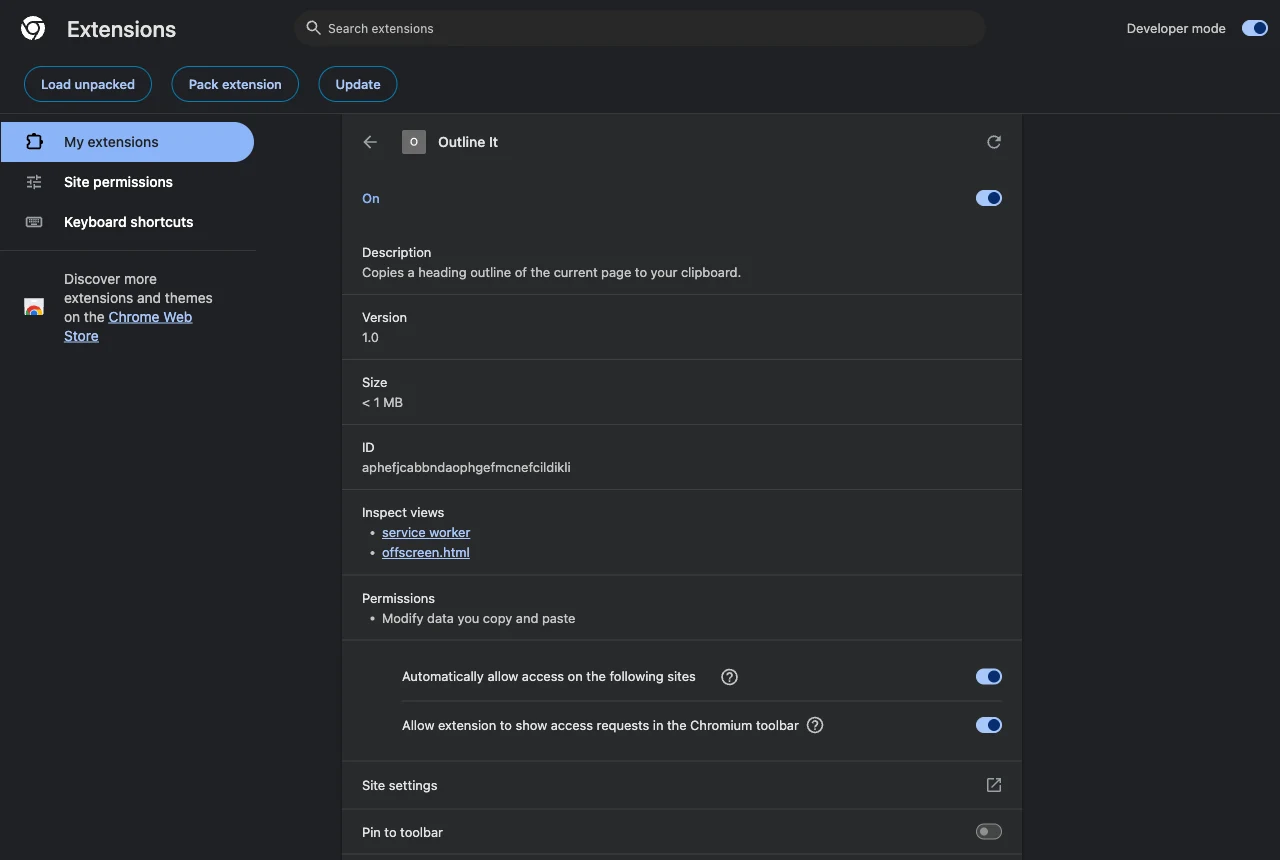
While it's open, the offscreen document appears under Inspect views — listed as offscreen.html, which is how you catch one you forgot to close.
The badge is the signal that the round trip completed: worker → offscreen → worker. If it appears, the document was created, received the HTML, parsed it, wrote to the clipboard, replied, and was closed.
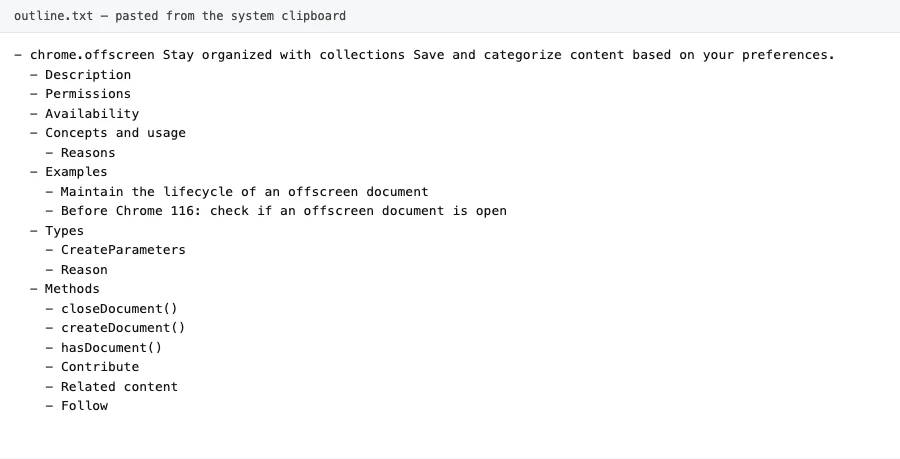
What lands on the clipboard after one click on the chrome.offscreen reference page — parsed in a document that no longer exists by the time you paste it.
If it doesn't work, check these first:
Only a single offscreen document may be created.Your guard isn't guarding. The usual cause is passing a relative path togetContexts({ documentUrls })instead ofchrome.runtime.getURL(...).DOMParser is not defined. The parsing code is still in the service worker. It has to move intooffscreen.js.Could not establish connection. Receiving end does not exist.You sent the message before awaitingsetupOffscreenDocument(), or theonMessagelistener inoffscreen.jssits inside a callback instead of at the top level.- Nothing lands on the clipboard.
"clipboardWrite"is missing frompermissions, or you swapped innavigator.clipboard.writeText()— which rejects rather than copying, because an offscreen document can't take focus. Open DevTools on the offscreen page and the rejection is sitting right there. - Clicking does nothing at all. You're on
chrome://or the Chrome Web Store. Extensions can't inject there, and thetry/catchin the click handler turns that rejection into a silent return — drop aconsole.debug()in thecatchif you want to see it happen. Try any normal site.
Closing it: the part with no safety net
Manifest V3 gave service workers no shutdown event. Matt Frisbie makes the consequence explicit in Building Browser Extensions, 2nd Edition (Apress, 2025): with onSuspend gone, MV3 background code has to do its cleanup eagerly, because there's no callback where you'd otherwise tidy up before the process disappears.
For offscreen documents that's not a style preference. Since only AUDIO_PLAYBACK carries an automatic lifetime, a document you opened for DOM_PARSER outlives the worker that opened it, and the worker gets no chance to notice. Close it at the end of the work — the way showResult() does — rather than on some later event that may never fire.
And resist the obvious temptation. An offscreen document that stays open is a page that survives service-worker termination, and people do reach for it as a persistent background page. That's exactly what the chrome.runtime-only API surface exists to prevent: you can't call chrome.tabs, chrome.storage or chrome.alarms from inside it, so an "always-on" offscreen document is a memory-resident page that can barely do anything. If you need work to happen on a schedule, chrome.alarms is the tool, and it's built for the world where your worker keeps dying.
Future-proofing: leave the replacement in the file
The official Chrome for Developers post introducing offscreen documents suggests a habit worth copying: keep a commented-out service-worker-native implementation next to the offscreen one.
// Solution 2 — when extension service workers can use the Clipboard API
// directly, this replaces the whole offscreen round trip:
//
// async function copyOutline(text) {
//   await navigator.clipboard.writeText(text);
// }
Every one of these workarounds is a bet that the platform's gap is temporary. Writing the two-line future version next to your forty-line present version costs nothing today and turns a future migration into a diff.
Cross-browser note
chrome.offscreen is Chromium-only. Edge gets it for free; Firefox does not implement it at all — and doesn't need to, because Firefox's MV3 background is an event page with DOM access rather than a service worker. DOMParser and clipboard writes work directly in the background there.
So the cross-browser shape is a feature check, not a polyfill:
if (chrome.offscreen) {
  await setupOffscreenDocument();
  // ...message it
} else {
  // Firefox: the background page has a DOM. Just do the work here.
}
Since Chrome 148 ships the browser.* namespace natively, one namespace covers both engines — but namespace parity is not API parity, and offscreen is the clearest example of the difference.
Before you publish
Look at what this extension ends up asking for: offscreen, activeTab, scripting, clipboardWrite. Four permissions, no host permissions, no <all_urls>. Every one of them is traceable to a line of code — which is precisely the review you want to run on yourself before a store reviewer runs it on you. It's easy to calibrate once you've browsed enough listings: skim what comparable extensions actually declare in the Extenshi catalog and the over-askers stand out immediately.
Then scan your own build:
npx @extenshi/cli scan ./outline-itThe CLI flags permission bloat, risky API usage, and known-bad patterns before a reviewer finds them. You get 3 scans and 10 reads free, one-time; past that, prepaid credit packs cover it and never expire. It's the same analysis behind the public security report on a listing — better that you read yours before anyone else does.
Wrapping up
Offscreen documents are a small API with one genuinely tricky part, and it isn't the DOM work — it's the lifecycle. Keep these four and you'll be fine:
- Guard creation with a promise, not a boolean, and match on the full
chrome.runtime.getURL()path. - Pick reasons honestly. Only
AUDIO_PLAYBACKcloses itself; everything else stays until you close it. - Close it when the work is done. There's no shutdown event coming to do it for you.
- Keep every message self-contained. Either side can vanish between two messages.
Swap the DOM parsing for whatever you actually need — audio playback, getUserMedia, a canvas render, a Blob URL, geolocation. The plumbing above doesn't change; only the reasons array and the twenty lines inside offscreen.js do.
Shipping something on top of this? Once it's live, install and uninstall numbers, retention, and the reviews landing on your listing become their own problem. Explore extension analytics → and claim your extension to get verified data alongside the security scan.
If you want the visible counterpart to this hidden one, the side panel tutorial builds a UI that stays open while the user browses.
Sources
- chrome.offscreen API reference — Chrome for Developers (Google)
- Offscreen Documents in Manifest V3 — Ian Stanion, Chrome for Developers (Google)
- chrome.runtime API reference (
getContexts, messaging) — Chrome for Developers (Google) - Migrate to a service worker — Chrome for Developers (Google)
- functional-samples/cookbook.offscreen-clipboard-write — GoogleChrome/chrome-extensions-samples (Apache-2.0)
- functional-samples/cookbook.offscreen-dom — GoogleChrome/chrome-extensions-samples (Apache-2.0)
- DOMParser — MDN Web Docs (Mozilla)
- Clipboard API — MDN Web Docs (Mozilla)
- WebExtensions
backgroundmanifest key — MDN Web Docs (Mozilla) - How to create offscreen documents in Chrome extensions — Himanshu, dev.to (community walkthrough; its persistence framing goes further than the official docs support — treat the lifetime rules above as authoritative)
Further reading
📚 Building Browser Extensions, 2nd Edition by Matt Frisbie — Amazon | Apress. Chapter 4 covers extension architecture and lifecycles, Chapter 6 the MV2→MV3 background-script move and what it cost, Chapter 9 the API tour that offscreen sits in.
This article is a hands-on tutorial based on the official Chrome Extensions documentation and Google's Apache-2.0 sample code. Code is provided as-is for educational purposes; verify API behavior against the current developer.chrome.com reference before shipping. If you believe anything here is inaccurate, contact [email protected] and we'll review and update.
Related Articles
chrome.alarms in Manifest V3: background jobs that outlive the service worker
MV3 kills setInterval. Build a Chrome extension background job with chrome.alarms that survives service worker termination — full runnable code, ~20 min.
Chrome extension side panels: build a UI that stays open while you browse
A hands-on Manifest V3 tutorial: build a Chrome extension side panel that persists across tabs, then make it per-site. Full runnable code, ~25 minutes.
Chrome's native browser namespace: what cross-browser extension devs should do now
Chrome added a native, promise-based browser.* namespace in 148. Across the 235,887 Chrome extensions we track, here's what it changes — and what to do.

The Chromium service worker flaw: how to protect your browser and extensions
Google accidentally exposed an unfixed Chromium service worker flaw that keeps background scripts running after you close the browser. Here's how to stay safe.