Content scripts in single-page apps: how to survive a route change in MV3
Your content script runs once on YouTube and never again. Fix Chrome extension SPA navigation with webNavigation — or without a new permission. Full MV3 code.

Your extension works perfectly on YouTube. Then the user clicks the next video, and it's dead.
Nothing crashed. The URL in the address bar changed, the page contents changed, and your content script — the one Chrome injected at document_idle when the tab first loaded — is still sitting there holding the DOM of a video nobody is watching anymore. No reload happened, so no injection happened, so your code never ran again.
This is the single most common bug in extensions that target real sites, because most real sites are single-page apps now. YouTube, GitHub, Gmail, X, Reddit, Notion — all of them swap content with history.pushState() instead of loading a document. Here's how to make a content script notice, and how to decide whether it's worth a permission warning to do it properly.
What you'll build
A floating panel on YouTube that shows the current route and a render counter. It re-renders on every in-app navigation, tears down its previous copy first, and works whether the user got there by clicking a video, hitting Back, or pasting a URL.
~25 minutes, intermediate. You need Chrome and a text editor. You should have loaded an unpacked extension before; if that's new to you, the "Load it and try it" section covers the clicks.
The file tree
spa-route-panel/
├── manifest.json
├── service-worker.js
└── content/
    ├── panel.css
    └── panel.js
Rather clone than type? The finished extension lives in our public samples repo — load it, then read on with this tutorial as the guided tour.
Four files, no build step, no dependencies.
Step 1: reproduce the bug on purpose
Start with the version that breaks, so you can see the failure with your own console rather than taking my word for it.
manifest.json
{
	"manifest_version": 3,
	"name": "SPA Route Panel",
	"version": "1.0",
	"description": "Shows the current route on YouTube and keeps it correct across in-app navigation.",
	"content_scripts": [
		{
			"matches": ["*://*.youtube.com/*"],
			"js": ["content/panel.js"],
			"css": ["content/panel.css"],
			"run_at": "document_idle"
		}
	]
}
No permissions array at all. A declared content script needs a matches pattern, and that's it — which is worth noticing, because the whole argument later is about what the next line costs you.
content/panel.css
#spa-route-panel {
	position: fixed;
	right: 16px;
	bottom: 16px;
	z-index: 2147483647;
	display: flex;
	gap: 10px;
	align-items: center;
	padding: 8px 12px;
	border-radius: 8px;
	background: #1f1b16;
	color: #faf9f5;
	font: 13px/1.4 system-ui, sans-serif;
	box-shadow: 0 2px 12px rgb(0 0 0 / 25%);
}

#spa-route-panel button {
	border: 0;
	border-radius: 4px;
	padding: 2px 6px;
	background: #fb5b1a;
	color: #faf9f5;
	cursor: pointer;
}
content/panel.js
const panel = document.createElement('div');
panel.id = 'spa-route-panel';
panel.textContent = new URL(location.href).pathname;
document.body.append(panel);

console.log('[spa-panel] content script ran for', location.href);
Load it (Step "Load it and try it" below if you need the clicks), open youtube.com, and watch the console. One log line. Now click any video from the homepage. The address bar goes to /watch?v=…, the whole page visibly changes — and the console stays silent, while the panel keeps showing /.
That's the bug. Your script didn't fail; it was never invited back.
Step 2: the trade-off, before the API
Most tutorials answer this with chrome.webNavigation in the first paragraph. I want to put the cost on the table first, because a lot of extensions reach for that permission and don't need it.
webNavigation gives your service worker events for navigation across the browser. That is genuinely useful, and it is also why Chrome describes it to the user in terms of their browsing history — Chrome's permission warning guidelines are the reference for what a given manifest token renders as on the install dialog. Adding one line to a JSON file changes the sentence a stranger reads before deciding whether to trust you, and I've written up how that permission reads from the user's side if you want the other half of the picture.
The alternative is to notice the change from inside the page, where your content script already is. That costs no new permission, because you already have access to that page — you're running in it.
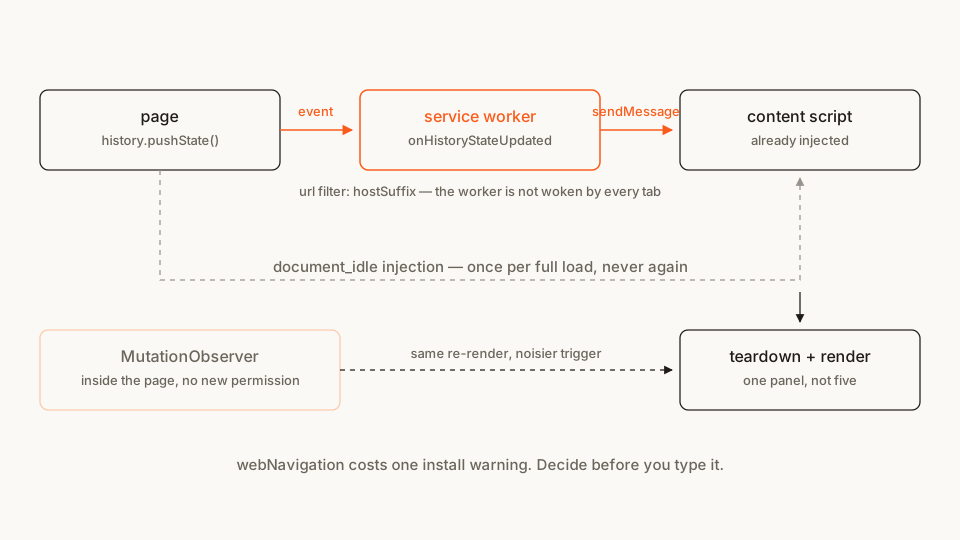
So: two paths, and the honest version of the decision is "do I need to know about navigation on tabs where I'm not already running?" If yes — you want to inject lazily, or react before your script exists — you want webNavigation. If no, stay in the page.
I'll build the webNavigation version, because it's the one with the sharp edges worth documenting, and give you the in-page fallback in full at Step 5.
Step 3: the manifest and the listener
Two new keys, and they do different jobs.
manifest.json (replacing Step 1)
{
	"manifest_version": 3,
	"name": "SPA Route Panel",
	"version": "1.0",
	"description": "Shows the current route on YouTube and keeps it correct across in-app navigation.",
	"permissions": ["webNavigation"],
	"host_permissions": ["*://*.youtube.com/*"],
	"background": {
		"service_worker": "service-worker.js"
	},
	"content_scripts": [
		{
			"matches": ["*://*.youtube.com/*"],
			"js": ["content/panel.js"],
			"css": ["content/panel.css"],
			"run_at": "document_idle"
		}
	]
}
host_permissions is the one people forget. A matches pattern in content_scripts gets your file injected, but it does not grant your extension access to that tab — and chrome.tabs.sendMessage needs that access. Skip the key and every message you send comes back as a rejected promise. The "tabs" permission would also unblock sendMessage, at the cost of a broader grant and its own install warning; host_permissions scoped to the sites you already inject into is the narrower of the two. This trips people up often enough that it's worth reading the content scripts concept doc on what injection does and doesn't buy you.
service-worker.js
const ON_YOUTUBE = { url: [{ hostSuffix: 'youtube.com' }] };

chrome.webNavigation.onHistoryStateUpdated.addListener((details) => {
	if (details.frameId !== 0) return;
	sendRoute(details.tabId, details.url);
}, ON_YOUTUBE);

chrome.webNavigation.onReferenceFragmentUpdated.addListener((details) => {
	if (details.frameId !== 0) return;
	sendRoute(details.tabId, details.url);
}, ON_YOUTUBE);

async function sendRoute(tabId, url) {
	try {
		await chrome.tabs.sendMessage(tabId, { type: 'route-changed', url });
	} catch (err) {
		// "Could not establish connection" is the no-receiver case: the tab
		// is mid-load, or our matches don't cover it. Real errors (a missing
		// host_permissions grant among them) still need to show up in the
		// worker console, or the debug path in "Load it and try it" is a lie.
		if (!String(err).includes('Could not establish connection')) {
			console.warn('[spa-panel] sendMessage failed:', err);
		}
	}
}
Three things in ten lines are load-bearing.
The filter argument. addListener(callback, filters) takes a UrlFilter list, and without it your service worker is woken for navigation in every tab the user has open. With hostSuffix, Chrome does the matching and your worker stays asleep the rest of the time. This is a performance decision and a privacy one at the same time.
frameId !== 0. Frame 0 is the tab's top-level document; anything positive is an iframe. YouTube has plenty of those, and without the guard you'll re-render on ads.
The listeners are registered at the top level. Not inside an onInstalled handler, not after an await. As Matt Frisbie explains in Building Browser Extensions (Apress, 2025), an MV3 service worker gets woken, given one turn of the event loop to install its handlers, and only then handed the queued event — so a handler that isn't attached by the end of that first turn can miss the very event that started the worker. Registering at module scope isn't style. It's the contract.
Step 4: the content script side, done idempotently
The service worker now shouts "the route changed" into a tab. The content script has to handle being told that fifty times in a session without leaving fifty panels behind.
content/panel.js (replacing Step 1)
let teardown = null;
let renders = 0;

function renderPanel(url) {
	if (teardown) teardown();
	renders += 1;

	const { pathname, search } = new URL(url);

	const panel = document.createElement('div');
	panel.id = 'spa-route-panel';

	const route = document.createElement('code');
	route.textContent = pathname + search;

	const count = document.createElement('span');
	count.textContent = `render #${renders}`;

	const close = document.createElement('button');
	close.textContent = '×';
	const onClose = () => panel.remove();
	close.addEventListener('click', onClose);

	panel.append(route, count, close);
	document.body.append(panel);

	teardown = () => {
		close.removeEventListener('click', onClose);
		panel.remove();
	};
}

chrome.runtime.onMessage.addListener((message) => {
	if (message?.type === 'route-changed') renderPanel(message.url);
});

renderPanel(location.href);
The shape to copy is teardown — a closure that undoes exactly what the last render did, called before the next one starts. Your DOM node, your event listeners, your observers, your timers. In a real extension this is where the leaks live: an extension that binds a click handler per route change on a site where people open forty pages has forty handlers by lunchtime.
The last line matters too. The first render still has to happen at injection time, because onHistoryStateUpdated never fires for the initial full page load — the reader arrives on /watch?v=… from a bookmark and no route has "changed" yet.
One caveat about this whole family of extension: as Frisbie puts it in the content scripts chapter, you write them at the mercy of the host page. Your panel survives navigation now, but a selector you depend on is one YouTube redesign away from being gone, and nobody will tell you. Fail soft.
Step 5: the version with no new permission
If you decided in Step 2 that you don't need browser-wide navigation, drop the webNavigation permission, the host_permissions key and the service worker entirely, and merge this into content/panel.js in place of the chrome.runtime.onMessage listener:
let lastUrl = location.href;
let scheduled = false;

const watcher = new MutationObserver(() => {
	if (scheduled) return;
	scheduled = true;
	queueMicrotask(() => {
		scheduled = false;
		if (location.href !== lastUrl) {
			lastUrl = location.href;
			renderPanel(lastUrl);
		}
	});
});

watcher.observe(document.body, { childList: true, subtree: true });
You're using MutationObserver as a heartbeat rather than as a DOM watcher: any mutation is a cue to check whether the URL moved. On YouTube, {childList: true, subtree: true} on document.body fires constantly during playback — player, recommendations, comments. Coalescing the burst into one URL check per microtask flush is the minimum the fallback should do; keep the body to that comparison and nothing else — no querySelector, no layout reads.
It's cruder than the event, and it costs the user nothing on the install dialog. For a lot of extensions that's the right trade. There's also the platform's own Navigation API, which is designed exactly for this — worth testing from your content script's isolated world before you commit to it, since what's reachable there is not always what's reachable from page script.
Which event fires for which navigation
The reason people pick the wrong event is that "the URL changed" covers four different mechanisms. From the webNavigation reference:
| What the user did | Event you want |
|---|---|
| Full page load or reload | onCommitted, then onCompleted |
SPA route change via pushState/replaceState |
onHistoryStateUpdated |
Jump to a #section on the same page |
onReferenceFragmentUpdated |
| Back / Forward within an SPA | onHistoryStateUpdated, with forward_back in transitionQualifiers |
onCompleted is the one everybody tries first, and it's the one that never fires for an SPA route change — the document already completed loading, minutes ago. Google's own api-samples/webNavigation/basic sample (Apache-2.0) is built on onCompleted, which makes it a good template for listener registration and a bad one for this problem. Developers have been comparing notes on exactly this in the Chromium Extensions group for years.
Load it and try it
- Open
chrome://extensions. - Turn on Developer mode, top right.
- Load unpacked, pick the
spa-route-panelfolder. - Open
https://www.youtube.com/and look bottom-right.
You should see the panel with / and render #1. Click a video: it becomes /watch?v=… and render #2, with no page reload. Hit Back: render #3. Open a video in a new tab: that tab starts at render #1 of its own, since it's a fresh injection.
If it doesn't work, it's almost certainly one of three things:
- The panel never updates and the service worker log is empty. The URL filter and your
matchesdisagree —hostSuffix: 'youtube.com'coverswww.youtube.com, but if you narrowed it towww.youtube.comwhile testing onm.youtube.comyou get silence. - The service worker logs the event but nothing renders. You left out
host_permissions. Inspect the worker fromchrome://extensions→ service worker and you'll see[spa-panel] sendMessage failed:— that's thecatchlogging anything that isn't the expected "Could not establish connection" no-receiver case. - Panels pile up. You edited
renderPaneland lost theteardown()call at the top, or you're appending a second listener on each message.
Cross-browser note
Firefox implements browser.webNavigation with the same event set, including onHistoryStateUpdated, and MDN's webNavigation page is the compatibility table to check before you promise parity. The filter argument and the frameId semantics port as written. Since Chrome 148 ships the browser.* namespace natively, the same source can address both without a polyfill.
Safari is where I'd stop making promises. Verify against your minimum target rather than assuming, and note that the in-page MutationObserver fallback has no such problem — it's the same DOM everywhere.
Before you publish
webNavigation is a permission a reviewer will ask about, and a permission a careful user will read as broader than what you're doing with it. Two things worth doing before your listing goes live.
Justify it in your store description in one sentence — "to notice when a site changes page without reloading" is a better answer than silence. And scan your own build the way an outsider would:
cd spa-route-panel && zip -r ../spa-route-panel.zip . && cd ..
npx @extenshi/cli scan ./spa-route-panel.zip
The CLI reports permission bloat and risky API usage against your source. You get 3 scans and 10 reads free, one-time; past that, prepaid credit packs cover it and never expire. It's also worth seeing what comparable extensions declare — the Extenshi catalog makes over-asking obvious side by side, and the permission scanner shows the view a suspicious user gets of you.
If you'd rather not carry webNavigation in the required set at all, there's a third path I've written up separately: declare it as optional and request it at the click, so install stays quiet and only users who turn the feature on ever see the warning.
Wrapping up
The fix is small. Noticing you needed it is the hard part, because the failure is silent — no error, no red text, just a feature that quietly stops working the moment a user does the most normal thing on the site.
Pick your trigger deliberately: onHistoryStateUpdated when you need browser-level awareness and can justify the warning, a MutationObserver heartbeat when you're already in the page. Then make the render idempotent, because whichever trigger you chose is going to fire more often than you expect. If you want to go further on how the injection itself works — declared versus programmatic, and which JavaScript world your code lands in — I walked through that in the scripting API tutorial.
Shipping something on top of this? Install numbers, retention and the reviews landing on your listing become their own problem the day it's live. Explore extension analytics → and claim your extension to get verified data next to the security scan.
Sources
- chrome.webNavigation API reference — Chrome for Developers (Google)
- Content scripts — Chrome for Developers (Google)
- chrome.tabs API reference — Chrome for Developers (Google)
- Permission warning guidelines — Chrome for Developers (Google)
- webNavigation.onHistoryStateUpdated — MDN Web Docs (Mozilla)
- webNavigation — MDN Web Docs (Mozilla)
- MutationObserver — MDN Web Docs (Mozilla)
- Navigation API — MDN Web Docs (Mozilla)
- api-samples/webNavigation/basic — GoogleChrome/chrome-extensions-samples (Apache-2.0), the listener-registration and manifest shape this tutorial builds on
- Handling SPA URL changes — Chromium Extensions group thread
- Making a Chrome extension smart by supporting SPA websites — Varun Malhotra, 2020. Useful for the problem framing; it predates Manifest V3, so treat its code as historical and re-derive against the current docs.
Further reading
📚 Building Browser Extensions, 2nd Edition by Matt Frisbie — Amazon | Apress. Chapter 6 covers why service-worker event handlers have to be registered in the first turn of the event loop; chapter 8 covers content scripts and how much of their behaviour is at the host page's mercy.
This article is a hands-on tutorial based on the official Chrome and Mozilla extension documentation and Google's Apache-2.0 sample code. Code is provided as-is for educational purposes; verify API behavior against the current developer.chrome.com reference before shipping. If you believe anything here is inaccurate, contact [email protected] and we'll review and update.
Related Articles
webNavigation permission explained: what browser extensions see when you move around the web
The webNavigation permission lets an extension watch every URL you open live — no host permissions, no injected code. Here's what it sees and how to check.
Runtime script injection in Chrome extensions: ISOLATED vs MAIN world
chrome.scripting.executeScript end to end: inject on click with activeTab, pass args safely, and choose ISOLATED or MAIN world. Full MV3 code, ~25 min.

Optional permissions in Chrome extensions: ask at the click, not at install
Chrome extension optional permissions, end to end: install with no warning, then request topSites and a single host at runtime. Full MV3 code, ~25 minutes.
Host permissions explained: what 'read and change all your data on all websites' really means
Browser extension host permissions let extensions read and change every website you visit. Here's what that warning actually means and when to be concerned.