Runtime script injection in Chrome extensions: ISOLATED vs MAIN world
chrome.scripting.executeScript end to end: inject on click with activeTab, pass args safely, and choose ISOLATED or MAIN world. Full MV3 code, ~25 min.
Most extensions decide where their code runs by typing a match pattern into a JSON file and never thinking about it again. A content_scripts block with "matches": ["<all_urls>"] is four seconds of work, and it buys you an install dialog that says "Read and change all your data on all websites" forever.
There's another way to do it, and it's barely more code. Declare nothing, wait for the user to click your icon, and inject exactly then — into exactly that tab. Chrome hands you the tab because the click is the permission grant.
Once you're injecting at runtime, a second choice shows up that the manifest never asked you: which JavaScript world the code lands in. The default sandbox, or the page's own environment. That one is a security decision wearing a config-option costume, and this tutorial ends by making it deliberately.
What you'll build: "Page Lens" — click the toolbar icon on any page and a small panel slides in reporting what the page is made of: how many links and scripts it has, and which known libraries it exposes on window. The DOM half runs in the sandbox; the window half has to run in the page. Difficulty: intermediate — you should have loaded an unpacked extension before. Time: ~25 minutes. Chrome and a text editor, no build step, no dependencies.
Why bother, when a manifest block works
In the 308,210 live listings I counted in the Extenshi catalog, 66,801 extensions (21.7%) declare scripting — but 108,948 (35.3%) declare activeTab, while only 7.4% ask for <all_urls>. The permission that produces no install warning is the popular one, and the API that makes it usable is chrome.scripting.
The trade is real, not cosmetic. activeTab grants access to a single tab, starting when the user invokes your extension, and it displays no warning during installation. A static content_scripts block grants your code every matching page, forever, from the moment of install, whether the user ever touches your feature or not.
The cost is that you have to think about when. That's the whole tutorial.
The invocation can start from the keyboard too. First build an omnibox keyword command palette for suggestions and navigation; its follow-up connects that interface to activeTab injection.
The two worlds, before you write anything
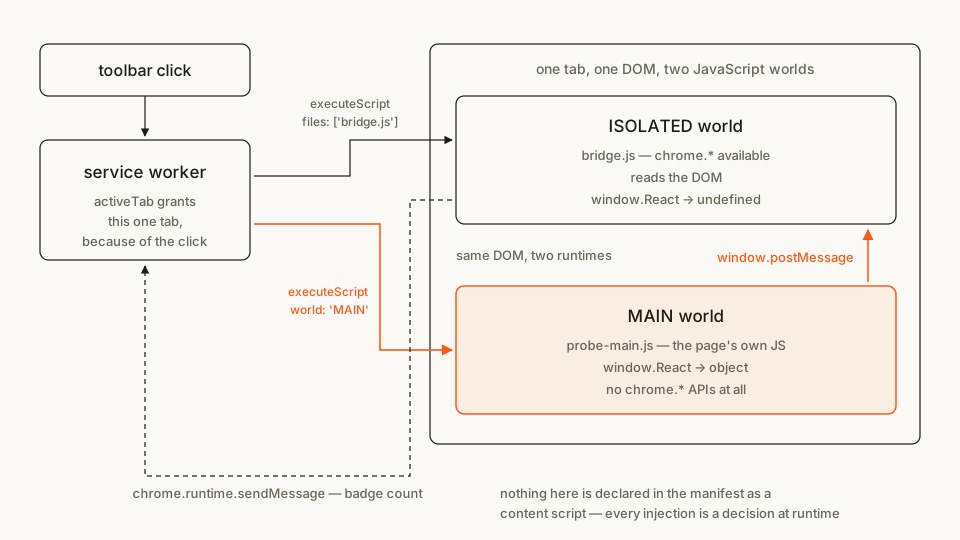
Both worlds are looking at the same page. What differs is what "window" means.
In the ISOLATED world — the default — your script gets a private execution environment: an isolated world isn't accessible to the page or other extensions, so your variables are invisible to the page and the page's variables are invisible to you. You still see the same DOM, and you can call chrome.* APIs.
In the MAIN world, your script is just more page JavaScript. You can read window.React. The page can read you. And the extension APIs are gone, because the page never had them.
Everything below builds the ISOLATED half first, then adds the MAIN half only where nothing else would do.
The file tree
Five files, no folders:
page-lens/
├── manifest.json       # scripting + activeTab, and nothing else
├── service-worker.js   # decides what gets injected, and where
├── bridge.js           # ISOLATED: draws the panel, talks to chrome.*
├── probe-main.js       # MAIN: reads the page's own globals
└── panel.css           # injected and removed with the panel
Rather clone than type? The finished extension lives in our public samples repo — load it, then read on with this tutorial as the guided tour.
Make a folder called page-lens and let's fill it.
Step 1: a manifest that declares no pages at all
manifest.json
{
  "manifest_version": 3,
  "name": "Page Lens",
  "version": "1.0.0",
  "description": "Click the toolbar icon to see what the page in front of you is built with.",
  "permissions": ["scripting", "activeTab"],
  "action": {
    "default_title": "Page Lens"
  },
  "background": {
    "service_worker": "service-worker.js"
  }
}
The interesting thing about this manifest is what isn't in it. No content_scripts. No host_permissions. No matches. A user installing this sees no permission warning at all, and the extension has access to precisely nothing until they click.
Two keys are doing the work:
"scripting"— required for the API itself. It's the permission to havechrome.scripting, not the permission to use it on a given page."activeTab"— the per-tab grant, handed over when the user invokes the extension. That's what makes the injection legal.
You need both. scripting without a host grant gets you an API that throws on every call; activeTab without scripting gets you a grant you can't spend.
Note the action key has no default_popup. That's deliberate — without a popup, clicking the icon fires chrome.action.onClicked, which is where everything starts.
Step 2: inject on click, and get an answer back
Simplest possible version. Count the links on the page and put the number on the badge.
service-worker.js
'use strict';

// This function does NOT run here. It gets copied into the tab and evaluated
// there — which is why it can reference `document` from a service worker that
// has no DOM at all.
function countLinks() {
  return document.querySelectorAll('a[href]').length;
}

chrome.action.onClicked.addListener(async (tab) => {
  if (!tab.id || !/^https?:/.test(tab.url ?? '')) return;

  const [{ result }] = await chrome.scripting.executeScript({
    target: { tabId: tab.id },
    func: countLinks
  });

  await chrome.action.setBadgeBackgroundColor({ color: '#FB5B1A' });
  await chrome.action.setBadgeText({ tabId: tab.id, text: String(result) });
});
Load it now if you like — it works, and it's the whole idea in twenty lines.
Three things in there are worth slowing down for.
tab.url is readable, and that's activeTab doing its job. Reading url off a Tab object normally needs the tabs permission and the install warning that comes with it. Inside onClicked, the user just invoked your extension on that tab, so the grant is live and the URL comes through. Take the grant away — try the same read in an alarm handler — and url is simply absent.
The https?: guard isn't paranoia. activeTab does not extend to chrome:// pages, the Chrome Web Store, or other extensions' pages. Injection there throws, and an unhandled rejection in a service worker is a bad way to find out.
executeScript returns what your function returned. One entry per frame it ran in — here just the main frame — each an InjectionResult with a result property. The return value has to survive a trip between contexts, so it's JSON territory: numbers, strings, plain objects, arrays. Return a DOM node and you get null and a confusing afternoon.
Step 3: the serialization trap
Here's the mistake everybody makes exactly once:
// Broken. This throws a ReferenceError inside the page.
const SELECTOR = 'a[href]';

chrome.scripting.executeScript({
  target: { tabId },
  func: () => document.querySelectorAll(SELECTOR).length   // ← SELECTOR is not defined here
});
The function you pass isn't sent by reference. Chrome's docs put it plainly: the injected function is a copy of the one in your call, so its body must be self-contained, and references to variables outside it throw a ReferenceError. As Matt Frisbie describes in Building Browser Extensions (Apress, 2025), the mechanism is close to func.toString() followed by evaluating that string in the page — which is why closures evaporate on the way over.
The fix is args:
chrome.scripting.executeScript({
  target: { tabId },
  func: (selector) => document.querySelectorAll(selector).length,
  args: [SELECTOR]
});
args entries must be JSON-serializable — so no functions, no undefined, no Map, no DOM references. A regex won't survive either; pass the source string and rebuild it inside.
There's a second gotcha hiding behind the first, and it costs more to debug. Frisbie also points out that an injected inline function runs once and vanishes, which means anything you register inside it — a chrome.runtime.onMessage listener, an interval — has nothing keeping it alive. If your injected code needs to stick around and listen, it belongs in a file. Which is Step 4.
And no, you cannot pass a string of code. MV3's extension CSP bans evaluating arbitrary strings, so executeScript takes a function or a list of files and there is no code: option any more. If you genuinely need to run user-authored script text — a userscript manager — that's what the separate userScripts API exists for, with its own opt-in.
Step 4: files, CSS, and a panel that comes back off
func is for one-shot work. Anything with state, listeners, or more than a screenful of code goes in a file — same call, files instead of func.
Styles get the same treatment through insertCSS, and the reason to prefer it over stuffing CSS into a <style> tag is removeCSS: hand it the same files array and the stylesheet comes back out cleanly. Chrome pairs the two on the file path rather than on the call site, so the removal still works after the service worker has been shut down and restarted in between — which, in MV3, it will have been.
panel.css
#page-lens-panel {
  all: initial;
  display: block;
  position: fixed;
  top: 16px;
  right: 16px;
  z-index: 2147483647;
  width: 260px;
  padding: 12px 14px;
  box-sizing: border-box;
  font: 13px/1.5 system-ui, sans-serif;
  color: #1f1b16;
  background: #faf9f5;
  border: 1px solid #1f1b16;
  border-radius: 8px;
}

#page-lens-panel h2 {
  all: initial;
  display: block;
  font: 600 13px/1.5 system-ui, sans-serif;
  color: #1f1b16;
  margin: 0 0 6px;
}

#page-lens-panel p,
#page-lens-panel li {
  all: initial;
  font: 13px/1.5 system-ui, sans-serif;
  color: #1f1b16;
}

#page-lens-panel p {
  display: block;
  margin: 0;
}

#page-lens-panel ul {
  all: initial;
  display: block;
  margin: 6px 0 0;
  padding: 0 0 0 18px;
  list-style: disc;
}

#page-lens-panel li {
  display: list-item;
}

#page-lens-panel .lens-dim {
  color: #6b6459;
}
The all: initial on every rule is not decoration. Your JavaScript is isolated from the page; your CSS is not. Injected styles land in the same cascade as the site's own, so a news site with p { font-size: 22px } will happily restyle your panel. An id selector plus a reset is the cheap defence — a shadow root is the thorough one, and worth it the moment your UI is bigger than this.
Now the panel itself. This file runs in the ISOLATED world, so it can do both DOM work and chrome.* calls.
bridge.js
'use strict';

// Wrapped in an IIFE on purpose. This file gets injected again on every click,
// into the same isolated world — a bare top-level `const` would throw
// "Identifier has already been declared" the second time.
(() => {
  const PANEL_ID = 'page-lens-panel';

  function render(findings) {
    document.getElementById(PANEL_ID)?.remove();

    const panel = document.createElement('div');
    panel.id = PANEL_ID;

    const heading = document.createElement('h2');
    heading.textContent = 'Page Lens';
    panel.append(heading);

    const stats = document.createElement('p');
    stats.textContent =
      `${document.querySelectorAll('a[href]').length} links · ` +
      `${document.images.length} images · ` +
      `${document.scripts.length} scripts`;
    panel.append(stats);

    if (findings.length === 0) {
      const empty = document.createElement('p');
      empty.className = 'lens-dim';
      empty.textContent = 'No known globals on window.';
      panel.append(empty);
    } else {
      const list = document.createElement('ul');
      for (const name of findings) {
        const item = document.createElement('li');
        item.textContent = name;
        list.append(item);
      }
      panel.append(list);
    }

    document.documentElement.append(panel);
  }

  function onMessage(event) {
    // The page can post here too. Treat every field as hostile input.
    if (event.source !== window) return;
    if (event.data?.source !== 'page-lens-probe') return;
    if (!Array.isArray(event.data.found)) return;

    const findings = event.data.found
      .filter((name) => typeof name === 'string')
      .slice(0, 20);

    render(findings);
    chrome.runtime.sendMessage({ type: 'page-lens-result', count: findings.length });
  }

  // The flag lives on the isolated world's own window — the page cannot see it,
  // and it survives until the tab navigates.
  if (!window.__pageLensReady) {
    window.__pageLensReady = true;
    window.addEventListener('message', onMessage);
  }
})();
Two habits in there that generalise well past this toy.
Guard re-injection. Injecting the same file twice re-runs it in the same isolated world. Without the IIFE you get a SyntaxError on the second click; without the __pageLensReady flag you get two listeners, then three, and a panel that renders once per click ever made.
Treat window messages as untrusted. Anything on the page can post a message shaped like yours. event.source !== window throws out anything from an iframe, and the type checks throw out the rest. This is the seam where a content script most often turns into a vulnerability: the ISOLATED world's whole value is that the page can't reach your chrome.* calls, and a sloppy message handler hands that reach right back.
Step 5: the MAIN world, and why nothing else would do
Everything so far worked in the sandbox. Now try to answer "is this page running React?" from there:
// In the ISOLATED world, on a page that definitely has React:
'React' in window;   // false
window.jQuery;       // undefined
Not a bug. That's the isolation working — the page's globals live in the page's environment, and the sandbox has its own. The only way to see them is to be there.
probe-main.js
'use strict';

(() => {
  // MAIN world: `window` here is the page's own window. No chrome.* APIs exist
  // in this file, and the page can see and overwrite everything it defines.
  const KNOWN = [
    { key: 'React', label: 'React' },
    { key: 'jQuery', label: 'jQuery' },
    { key: 'Vue', label: 'Vue' },
    { key: '__NEXT_DATA__', label: 'Next.js' },
    { key: '__NUXT__', label: 'Nuxt' },
    { key: 'ng', label: 'Angular' },
    { key: 'Shopify', label: 'Shopify' },
    { key: 'wp', label: 'WordPress' },
    { key: 'Drupal', label: 'Drupal' },
    { key: 'dataLayer', label: 'Google Tag Manager' },
    { key: 'Stripe', label: 'Stripe.js' },
    { key: 'ethereum', label: 'an injected wallet provider' },
    { key: 'htmx', label: 'htmx' },
    { key: 'Alpine', label: 'Alpine.js' },
    { key: 'd3', label: 'D3' }
  ];

  const found = KNOWN.filter(({ key }) => key in window).map(({ label }) => label);

  // Same document, so location.origin is a valid target. Never post to '*'
  // out of habit — that is how page data leaks into whatever else is listening.
  window.postMessage({ source: 'page-lens-probe', found }, window.location.origin);
})();
Be honest about what this detects: globals, and only globals. A modern bundled React app usually exposes nothing, so it'll come back empty while the page is obviously React. Real fingerprinting libraries check DOM attributes, script URLs and response headers too. What matters here is the mechanism, and the mechanism is that this file cannot be written any other way.
Also note what's missing from it: chrome. There is no chrome.runtime.sendMessage in the MAIN world, because the page's environment never had extension APIs. The only channel out is the DOM — window.postMessage() to the ISOLATED listener you wrote in Step 4.
Step 6: wiring it together
The service worker now decides between two states rather than blindly injecting. It asks the page which state it's in, using the func trick from Step 2 — and it asks the page rather than remembering, because an MV3 service worker gets shut down between clicks and any variable you left in it is gone.
service-worker.js (complete — replaces the file from Step 2)
'use strict';

const PANEL_ID = 'page-lens-panel';

// Copied into the page, so it takes the id as an argument instead of closing
// over the constant above. Returns true if a panel was there (and removes it).
function takeDownPanel(id) {
  const panel = document.getElementById(id);
  if (!panel) return false;
  panel.remove();
  return true;
}

async function closePanel(tabId) {
  await chrome.scripting.removeCSS({ target: { tabId }, files: ['panel.css'] });
  await chrome.action.setBadgeText({ tabId, text: '' });
}

async function openPanel(tabId) {
  await chrome.scripting.insertCSS({ target: { tabId }, files: ['panel.css'] });

  // Order is load-bearing: the listener has to exist before the probe posts.
  await chrome.scripting.executeScript({ target: { tabId }, files: ['bridge.js'] });
  await chrome.scripting.executeScript({
    target: { tabId },
    files: ['probe-main.js'],
    world: 'MAIN'
  });
}

chrome.action.onClicked.addListener(async (tab) => {
  if (!tab.id || !/^https?:/.test(tab.url ?? '')) return;

  try {
    const [{ result: wasOpen }] = await chrome.scripting.executeScript({
      target: { tabId: tab.id },
      func: takeDownPanel,
      args: [PANEL_ID]
    });

    if (wasOpen) await closePanel(tab.id);
    else await openPanel(tab.id);
  } catch (error) {
    console.warn('Page Lens cannot run on this page:', error.message);
  }
});

chrome.runtime.onMessage.addListener((message, sender) => {
  if (message?.type !== 'page-lens-result' || !sender.tab?.id) return;

  chrome.action.setBadgeBackgroundColor({ color: '#FB5B1A' });
  chrome.action.setBadgeText({ tabId: sender.tab.id, text: String(message.count) });
});
The await between the two executeScript calls is the bug I'd expect you to hit if you wrote this yourself. Fire them in parallel and the MAIN-world probe can post its message before the ISOLATED listener is registered — on a fast page, most of the time, and on a slow one, never. Injection order is yours to enforce.
Also worth noticing: sender.tab.id in the message handler. The service worker doesn't have to track which tab it injected into, because Chrome tells it where the message came from. Reaching for a module-level Map of tab state in MV3 is almost always a sign there's a source of truth you're ignoring.
Load it and try it
- Open
chrome://extensions. - Turn on Developer mode (top right).
- Click Load unpacked and pick your
page-lensfolder. - Pin the extension, open a normal
https://page, and click the icon.
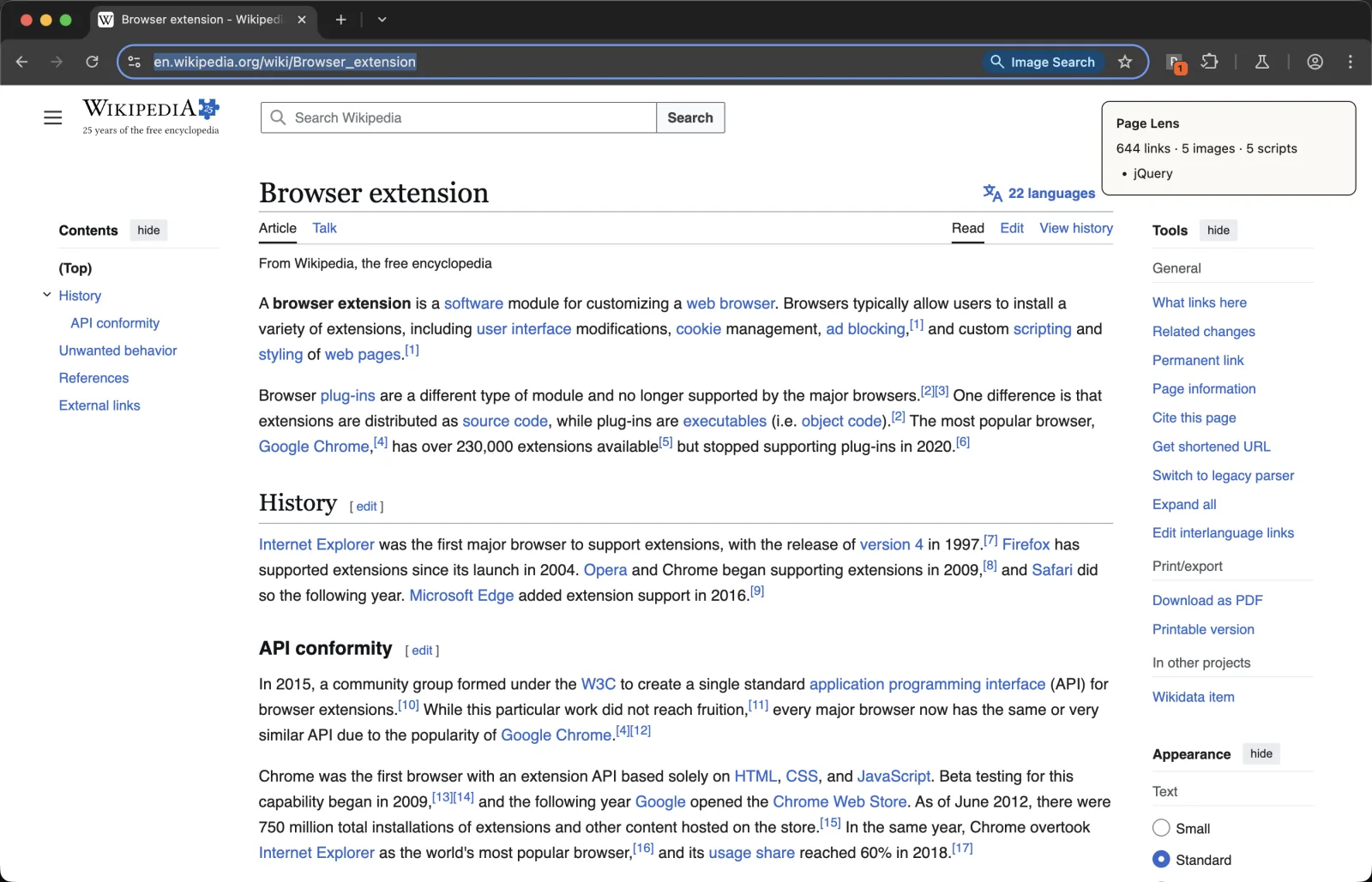
The DOM line came from the sandbox; the list under it could only come from the page's own world.
The panel appears, the badge shows how many globals were recognised, and clicking again takes both away. Try it on a WordPress blog, a Shopify store and a bank's marketing page — the lists differ enormously, and empty is a perfectly normal answer.
The experiment actually worth doing takes ten seconds. Open DevTools on any page, and run the same expression in two places: the page's own console (top context), and your extension's isolated world (the context dropdown in the console toolbar lists it by extension name):
'jQuery' in window;Same tab, same DOM, two answers. That's the whole concept, and seeing it beats reading about it.
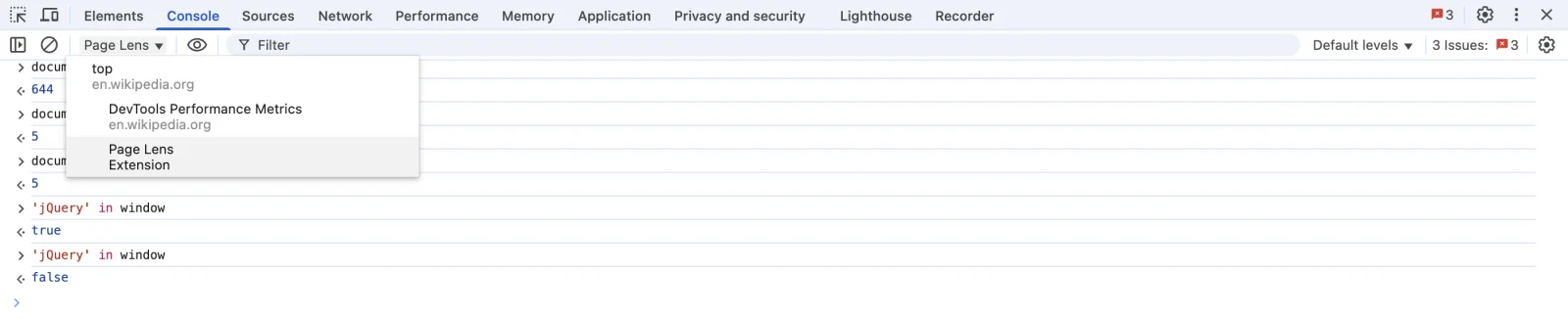
The console's context dropdown is the fastest way to see the two worlds disagree.
If it doesn't work, check these first:
- Nothing happens at all. Click service worker on the extension's card in
chrome://extensionsto open its console.Cannot access contents of the pagemeans the guard let through a URLactiveTabdoesn't cover — achrome://page, the Web Store, a PDF or a local file. - The panel appears but the globals list is always empty. The probe ran before the page defined anything, or it genuinely exposes nothing. Confirm with the DevTools experiment above before blaming the code.
SyntaxError: Identifier 'PANEL_ID' has already been declared. The IIFE aroundbridge.jsis missing. Re-injection re-runs the file in the same world.- The panel renders two or three times per click. The
__pageLensReadyguard is missing, so each injection stacked another listener. - The panel looks like the website. Your CSS lost the cascade fight. Check the
all: initialreset survived, and rememberinsertCSSinjects as an author stylesheet, not a user one. - After a fast double-click the panel closes but its styling lingers.
onClickedis async and Chrome does not serialise concurrent invocations, so two clicks can both read "no panel" before either creates one, and both callinsertCSS. The injections stack;removeCSSonly removes one layer per call, so one is orphaned until the tab reloads (verified: a secondinsertCSSthen a singleremoveCSSleaves the panel's border still applied). The listener guard inbridge.jsdoes not help here — it protects the isolated world, not the stylesheet. Left out of the code above to keep the handler readable; the fix is a re-entry lock, a module-levelSetof tab ids thatonClickedadds to on entry and deletes from in afinally. Note that this is the one kind of service-worker state worth keeping: it coordinates two invocations that overlap in time, rather than trying to remember anything about a tab. - The badge never updates.
chrome.runtime.sendMessagewas called from the MAIN world, wherechromedoesn't exist. That call belongs inbridge.js.
Cross-browser note
The API ports, with one date to check. Firefox implements scripting.executeScript() and matches Chrome on func/args/files. MAIN-world support arrived later: Firefox 128, released July 2024, added MAIN to scripting.ExecutionWorld along with world in contentScripts.register() and the content_scripts manifest key. If you support Firefox ESR, check your floor before relying on it. Edge follows Chromium.
Since Chrome 148 ships the browser.* namespace natively, one source file can address both browsers without a polyfill. And if you're on a framework, the same choice usually surfaces as config rather than a call argument — Plasmo's content-script docs express world as a field in the script's config export, which is worth knowing before you go looking for an executeScript call that isn't there.
When not to reach for MAIN
My rule, and I'd defend it in a review: use MAIN only to interoperate with JavaScript on the page you cannot reach any other way. Reading a page global, calling a library the page already loaded, defining an object the page expects to find — like a wallet extension providing window.ethereum, which is the case David Walsh works through in his write-up of injecting a global under MV3. Those are real, and there's no substitute.
What doesn't qualify is "it didn't work in ISOLATED". Nine times in ten that's a timing problem or a missing permission, and moving to MAIN just trades a fixable bug for a permanent exposure. The exposure is mutual and total: your code sits in the page's environment where the site can read it, rewrite it, and impersonate it. Frisbie is blunt about the direction people forget — access is bidirectional, so the host page can inspect and tamper with anything your injected script defines, including values you'd rather not hand over.
Which is why our own scanners flag world: "MAIN" as something a reviewer should look at, not as a verdict. It's a documented, supported option with a real cost — the question is only whether the code in it needed to be there.
Two practical rules that follow from that:
- Never put a secret in MAIN. No API keys, no tokens, no user data on its way somewhere. Anything the page can read is not yours any more.
- Keep the MAIN half small. Read what you need, post it across, do the work in ISOLATED. The file in this tutorial is fifteen lines and one
postMessageon purpose.
Before you publish
Two questions decide how a reviewer reads an extension like this: does every declared permission earn its place, and does the code do anything the listing doesn't mention. Runtime injection makes the first one easy to answer — scripting and activeTab, and you can say exactly which click spends the grant.
If you're scaffolding a fresh manifest rather than editing this one, the manifest generator writes the keys without you memorising the schema. And before you upload anything, look at your own build the way a scanner does:
cd page-lens && zip -r ../page-lens.zip . && cd ..
npx @extenshi/cli scan ./page-lens.zip
The CLI reports permission bloat and the API calls a reviewer will ask about. You get 3 scans and 10 reads free, one-time; past that, prepaid credit packs cover it and never expire. It's also worth checking what comparable extensions declare — the Extenshi catalog makes over-asking obvious, and the permission scanner shows the same view a suspicious user gets of you.
Wrapping up
You went from an empty folder to an extension that installs with no permission warning, touches nothing until it's clicked, and still reads both the DOM and the page's own JavaScript — because it puts each half in the world that half belongs in.
The pattern generalises. Anywhere you were about to write a content_scripts block "so it's ready", the runtime version is one executeScript call and a permission nobody has to be warned about. Anywhere you were about to reach for MAIN because something was undefined, the honest question is whether the value you want lives in the page or in your own head. And if your problem is the opposite one — code that needs a DOM but no page — that's an offscreen document, not an injection.
Shipping something on top of this? Installs, retention and the reviews landing on your listing become their own problem the day it goes live. Explore extension analytics → and claim your extension to get verified data next to the security scan.
Sources
- chrome.scripting API reference — Chrome for Developers (Google)
- Content scripts — concepts, isolated world, programmatic injection — Chrome for Developers (Google)
- The "activeTab" permission — Chrome for Developers (Google)
- content_scripts manifest key, including the world property — Chrome for Developers (Google)
- chrome.userScripts API reference — Chrome for Developers (Google)
- scripting.executeScript() — MDN Web Docs (Mozilla)
- scripting.ExecutionWorld — MDN Web Docs (Mozilla)
- Firefox 128 release notes for developers — MDN Web Docs (Mozilla), MAIN-world support
- functional-samples/sample.page-redder — GoogleChrome/chrome-extensions-samples (Apache-2.0), the minimal activeTab + inject-on-click shape this tutorial starts from
- functional-samples/reference.mv3-content-scripts — GoogleChrome/chrome-extensions-samples (Apache-2.0),
func+argsvsfiles - functional-samples/tutorial.focus-mode — GoogleChrome/chrome-extensions-samples (Apache-2.0), the
insertCSS/removeCSStoggle - How to Inject a Global with Web Extensions in Manifest V3 — David Walsh (published 2022; check version-specific details against the current API reference)
- Content Scripts — Plasmo framework docs, the same
worldchoice as build config
Further reading
📚 Building Browser Extensions, 2nd Edition by Matt Frisbie — Amazon | Apress. Chapter 8 covers content scripts end to end, including script worlds, CSS isolation, and what programmatic injection does to a function on its way into the page.
This article is a hands-on tutorial based on the official Chrome and Mozilla extension documentation and Google's Apache-2.0 sample code. Code is provided as-is for educational purposes; verify API behavior against the current developer.chrome.com reference before shipping. If you believe anything here is inaccurate, contact [email protected] and we'll review and update.
Related Articles
The `scripting` permission explained: what browser extensions can really inject into your pages
The scripting permission lets extensions run JavaScript on any page you visit — including your Zoom calls. Here's what that actually means for your privacy.
activeTab permission explained: the host access that skips Chrome's warning
The activeTab permission lets browser extensions touch the page you're on — only when you click, with no scary install warning. Here's what it grants.
Offscreen documents in Chrome extensions: how to use the DOM from an MV3 service worker
MV3 service workers have no DOM. Build a Chrome extension that parses HTML and writes to the clipboard from an offscreen document — runnable code, ~25 min.

Optional permissions in Chrome extensions: ask at the click, not at install
Chrome extension optional permissions, end to end: install with no warning, then request topSites and a single host at runtime. Full MV3 code, ~25 minutes.