Blocking requests in a Chrome extension: a hands-on declarativeNetRequest tutorial
Build a Manifest V3 Chrome extension that blocks trackers and strips tracking parameters with declarativeNetRequest — full runnable code, ~30 minutes.

The first thing that trips people up about declarativeNetRequest isn't the syntax. It's that your JavaScript never sees the request.
In Manifest V2 you wrote a webRequest listener, Chrome handed you every request, and you decided. In MV3 you write a JSON file, hand it to Chrome, and Chrome decides — natively, in C++, before a line of your code runs. That's the whole trade: you lose inspection, you gain speed and a much smaller privacy footprint. Once that clicks, the API stops feeling like a downgrade and starts feeling like a config format.
So let's write the config format. In this tutorial you'll build a working extension from an empty folder: it blocks a domain outright, strips tracking parameters out of URLs as you navigate, lets you add new blocks at runtime from a popup, and shows you which of your rules actually fired.
What you'll build: "Clean Link" — a static block rule, a query-parameter scrubber, and a runtime rule manager. Difficulty: intermediate — you should have loaded an unpacked extension before. Time: ~30 minutes. You need Chrome and a text editor, no build step, no dependencies.
Where your declarativeNetRequest rules actually run
A DNR rule is two halves: a condition describing which requests it matches, and an action describing what Chrome does to them. You never get a callback. You never see a request body. You hand over the rules and step out of the way.
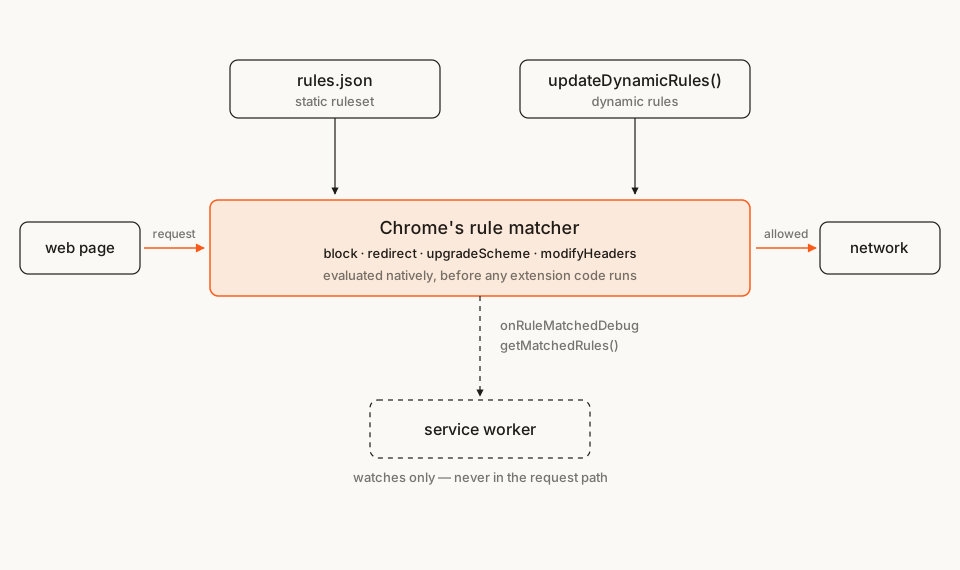
That picture is worth holding onto, because it explains the API's odd corners. Rules can't depend on anything only your code knows. Debugging is a separate, deliberately limited feature rather than a console.log in your handler. And your service worker can be dead — asleep, terminated, never started — while your rules keep blocking perfectly.
Matt Frisbie makes the honest version of the trade-off in Building Browser Extensions (Apress, 2025): DNR is billed as the successor to webRequest, and for nearly every extension it's an effective replacement — but it is deliberately less powerful, because the whole point was to delete the blocking JavaScript handler. My own take after building on both: the constraint is mostly a gift. Rules you can't compute at runtime are rules you can't accidentally make user-specific.
The file tree
Five files:
clean-link/
├── manifest.json        # permissions + points at the static ruleset
├── rules.json           # the static rules themselves
├── service-worker.js    # debug logging only — not in the request path
├── popup.html           # runtime rule manager UI
└── popup.js             # adds/removes dynamic rules, lists matches
Rather clone than type? The finished extension lives in our public samples repo — load it, then read on with this tutorial as the guided tour.
Make a folder called clean-link and let's fill it in.
Step 1: the manifest
Two things matter here. permissions unlocks the API, and the declarative_net_request key tells Chrome where your static rules live.
manifest.json
{
  "manifest_version": 3,
  "name": "Clean Link",
  "version": "1.0",
  "description": "Blocks domains and strips tracking parameters, using declarativeNetRequest.",
  "permissions": ["declarativeNetRequest", "declarativeNetRequestFeedback"],
  "declarative_net_request": {
    "rule_resources": [
      {
        "id": "ruleset_1",
        "enabled": true,
        "path": "rules.json"
      }
    ]
  },
  "background": {
    "service_worker": "service-worker.js"
  },
  "action": {
    "default_title": "Clean Link",
    "default_popup": "popup.html"
  }
}
"declarativeNetRequest" gives you implicit access to block, allow and allowAllRequests rules on any origin, with no host permissions at all. That's a genuinely nice property: a pure blocker can ship without asking to read a single website.
"declarativeNetRequestFeedback" is the debug half. It unlocks getMatchedRules() and the onRuleMatchedDebug event, and the two are gated differently — a distinction the official reference blurs in its permission blurb and then draws properly in the per-member docs. onRuleMatchedDebug is unpacked-only: Chromium's API feature list marks it "location": "unpacked", alongside testMatchOutcome. getMatchedRules() carries no such marker — it is gated on the permission alone (or on activeTab for a specific tabId), so it keeps working in a packed Web Store build.
There's a third permission worth knowing about, "declarativeNetRequestWithHostAccess". It grants the same capabilities but shows no install-time warning — the catch being that you then need host permissions before you can touch anything. Use it when your extension already holds host permissions for other reasons and you don't want a second warning stacked on top. We're not there yet. (If you write manifests often, our free in-browser Manifest V3 generator scaffolds this block without a sign-up.)
Step 2: your first static rule
Static rules are packaged with the extension and loaded at install or update. Here's the smallest useful one — the same shape Google's own url-blocker sample uses (Apache-2.0):
rules.json
[
  {
    "id": 1,
    "priority": 2,
    "action": { "type": "block" },
    "condition": {
      "urlFilter": "||example.com/",
      "resourceTypes": ["main_frame"]
    }
  }
]
Four fields, and three of them hide a trap.
urlFilter is not a glob and not a regex. It's a small pattern language where || anchors to a domain and ^ matches a separator. Chrome's docs are blunt about how easy it is to get wrong: google.com matches https://example.com/?param=google.com, and ||google.com happily matches https://google.company. The trailing slash in ||example.com/ is what makes it mean that domain and its subdomains, and nothing that merely contains the string.
resourceTypes has a default you almost never want. Omit it and the rule matches every resource type except main_frame — which is exactly the type you mean when you say "block that page." MDN spells this out on the RuleCondition page. Spell it out yourself, every time.
priority is your tiebreaker, and it's not optional in practice. When two of your rules match the same URL, the higher priority wins. Only on an exact tie does Chrome fall back to action ordering — allow and allowAllRequests beat block, which beats upgradeScheme, which beats redirect. The reference carries an explicit warning that browser vendors agreed not to standardise ordering beyond that, so anything you leave to chance can change between Chrome versions.
Step 3: rewriting URLs instead of killing them
Blocking is the blunt instrument. The more interesting action is redirect, and its transform form lets you edit a URL in place — which is how you build a tracking-parameter scrubber.
Redirecting is also where the permission bill arrives. Blocking needs nothing; redirecting or modifying headers needs host permissions for the origins involved. A link cleaner that works everywhere therefore has to ask for everywhere.
manifest.json (replacing Step 1)
{
  "manifest_version": 3,
  "name": "Clean Link",
  "version": "1.0",
  "description": "Blocks domains and strips tracking parameters, using declarativeNetRequest.",
  "permissions": ["declarativeNetRequest", "declarativeNetRequestFeedback"],
  "host_permissions": ["*://*/*"],
  "declarative_net_request": {
    "rule_resources": [
      {
        "id": "ruleset_1",
        "enabled": true,
        "path": "rules.json"
      }
    ]
  },
  "background": {
    "service_worker": "service-worker.js"
  },
  "action": {
    "default_title": "Clean Link",
    "default_popup": "popup.html"
  }
}
Be honest with yourself about that line. *://*/* is "read and change all your data on all websites" in the install dialog — the single scariest string a user can be shown. If your real product only needs to clean links on a handful of sites, scope host_permissions to those hosts and add a requestDomains condition to the rule; you'll lose the warning and gain reviewers' goodwill.
Now the rule:
rules.json (replacing Step 2)
[
  {
    "id": 1,
    "priority": 2,
    "action": { "type": "block" },
    "condition": {
      "urlFilter": "||example.com/",
      "resourceTypes": ["main_frame"]
    }
  },
  {
    "id": 2,
    "priority": 1,
    "action": {
      "type": "redirect",
      "redirect": {
        "transform": {
          "queryTransform": {
            "removeParams": [
              "utm_source",
              "utm_medium",
              "utm_campaign",
              "utm_term",
              "utm_content",
              "utm_id",
              "gclid",
              "fbclid",
              "mc_eid",
              "igshid"
            ]
          }
        }
      }
    },
    "condition": {
      "regexFilter": "[?&](utm_source|utm_medium|utm_campaign|utm_term|utm_content|utm_id|gclid|fbclid|mc_eid|igshid)=",
      "resourceTypes": ["main_frame"]
    }
  }
]
queryTransform.removeParams deletes the named query keys and leaves the rest of the URL untouched — scheme, host, path, fragment, everything else in the query string. No string surgery, no regex substitution, no chance of mangling a URL that happened to contain something that looked like a parameter.
Two things about this rule are load-bearing.
The condition list and the removeParams list must describe exactly the same set. This is the bug that will bite you. A redirect rule whose condition still matches its own output is an infinite loop: Chrome rewrites, re-evaluates, matches again, rewrites again. It's tempting to write [?&](utm_[a-z]+|gclid|fbclid)= for brevity — do that, and a URL carrying utm_referrer matches the condition but survives removeParams, and the tab spins forever. Enumerate both lists identically, even though it's ugly. When they match, the rewritten URL can't satisfy the condition, and the loop terminates after exactly one hop.
regexFilter is RE2, not JavaScript. No backreferences, no lookahead. It's also capped — a thousand regex rules per rule type, and each rule has to compile to under 2 KB. Prefer urlFilter when it can express what you need; reach for regexFilter only when it can't, as here.
Notice the priorities: the block rule sits at 2, the scrubber at 1. If a URL is both blocked and cleanable, blocking should win, and being explicit about that is cheaper than reasoning about action-ordering fallbacks later.
Step 4: rules you can change at runtime
Static rules ship with the extension. To change them you ship an update — which, to be fair, may qualify for expedited review if the ruleset is all that changed. But anything user-configurable needs dynamic rules: added and removed from JavaScript, persisting across browser restarts and extension updates.
(There's a third flavour, session rules, which are wiped when the browser shuts down. Same API shape, different lifetime.)
The nice surprise is that the popup can call the API directly — it's an extension page, so it has the full chrome.declarativeNetRequest namespace. No message passing, no waking a service worker.
popup.html
<!doctype html>
<html>
  <head>
    <meta charset="utf-8" />
    <style>
      body { font: 13px system-ui, sans-serif; margin: 0; padding: 14px; width: 260px; }
      h1 { font-size: 14px; margin: 0 0 10px; }
      h2 { font-size: 11px; margin: 14px 0 4px; text-transform: uppercase; letter-spacing: .05em; color: #6b655c; }
      label { display: block; margin-bottom: 6px; color: #6b655c; }
      input { width: 100%; box-sizing: border-box; padding: 6px; font: inherit; }
      button { margin: 8px 4px 0 0; font: inherit; padding: 5px 9px; }
      ul { margin: 0; padding-left: 18px; color: #6b655c; }
      li { margin-bottom: 3px; word-break: break-all; }
    </style>
  </head>
  <body>
    <h1>Clean Link</h1>
    <label for="domain">Block a domain</label>
    <input id="domain" type="text" placeholder="ads.example.org" />
    <button id="add">Block it</button>
    <button id="clear">Clear all</button>

    <h2>Blocked at runtime</h2>
    <ul id="rules"></ul>

    <h2>Rules that fired</h2>
    <ul id="matches"></ul>

    <script src="popup.js"></script>
  </body>
</html>
popup.js
const domainInput = document.getElementById("domain");
const rulesList = document.getElementById("rules");
const matchesList = document.getElementById("matches");

// Dynamic rules live in their own ID space, separate from the static
// ruleset's. Starting well above the static IDs keeps a matched-rule
// log readable at a glance — rule 1001 is obviously "one I added".
const DYNAMIC_ID_BASE = 1000;

function fill(list, items, emptyText) {
  const rows = items.length ? items : [emptyText];
  list.replaceChildren(
    ...rows.map((text) => {
      const li = document.createElement("li");
      li.textContent = text;
      return li;
    })
  );
}

// Read-then-write, so two calls in flight at once can pick the same ID and
// the second updateDynamicRules() throws. Fine for a popup driven by one
// click at a time; not fine anywhere concurrent.
async function nextRuleId() {
  const existing = await chrome.declarativeNetRequest.getDynamicRules();
  return existing.reduce((max, rule) => Math.max(max, rule.id), DYNAMIC_ID_BASE) + 1;
}

async function renderRules() {
  const rules = await chrome.declarativeNetRequest.getDynamicRules();
  fill(
    rulesList,
    rules.map((rule) => `${rule.id}: ${(rule.condition.requestDomains ?? []).join(", ")}`),
    "nothing yet"
  );
}

async function renderMatches() {
  // Needs "declarativeNetRequestFeedback". Chrome drops matches older than
  // five minutes that aren't tied to a live document.
  const { rulesMatchedInfo } = await chrome.declarativeNetRequest.getMatchedRules();
  const recent = rulesMatchedInfo.slice(-8).reverse();
  fill(
    matchesList,
    recent.map((match) => `rule ${match.rule.ruleId} · ${match.rule.rulesetId}`),
    "nothing yet"
  );
}

document.getElementById("add").addEventListener("click", async () => {
  const domain = domainInput.value.trim().toLowerCase();
  if (!domain) return;

  try {
    await chrome.declarativeNetRequest.updateDynamicRules({
      addRules: [
        {
          id: await nextRuleId(),
          priority: 2,
          action: { type: "block" },
          condition: {
            requestDomains: [domain],
            resourceTypes: ["main_frame", "sub_frame", "script", "xmlhttprequest", "image"]
          }
        }
      ]
    });
    domainInput.value = "";
  } catch (error) {
    // A malformed domain, or a duplicate ID from two fast clicks.
    fill(rulesList, [`could not add: ${error.message}`], "");
    return;
  }

  await renderRules();
});

document.getElementById("clear").addEventListener("click", async () => {
  try {
    const existing = await chrome.declarativeNetRequest.getDynamicRules();
    await chrome.declarativeNetRequest.updateDynamicRules({
      removeRuleIds: existing.map((rule) => rule.id)
    });
  } catch (error) {
    fill(rulesList, [`could not clear: ${error.message}`], "");
    return;
  }

  await renderRules();
});

renderRules();
renderMatches();
updateDynamicRules() takes removeRuleIds and addRules in one call, and removals are applied before additions — so the canonical "replace my whole rule set" move is to pass every existing ID alongside the new rules, exactly as the official docs' example does. Adding a rule with an ID that already exists throws, which is why nextRuleId() reads the current set rather than keeping a counter in memory.
That read-then-write is also the one race in this file, and it's why both handlers are wrapped in try/catch. Two clicks fast enough to overlap resolve nextRuleId() to the same number and the loser throws; so does a malformed domain string. Without the catch the popup would just sit there looking like it worked. Note the await on renderRules() too — an unawaited async call in a handler swallows its rejection silently.
The resourceTypes list here is deliberately a shortlist of the types worth blocking by hostname, not the full set. Omitting the key entirely would match everything except main_frame, which is the wrong default for a user-typed domain; naming the five keeps main_frame in and leaves stylesheet, font, media and friends alone, since a stylesheet from a domain you've blocked is usually already dead with its page.
That's also why this list is longer than the static rule's back in Step 2. The static rule blocks a page you'd navigate to, so main_frame alone is the whole job. A domain a user types into the popup is usually a domain whose sub-resources they want gone — trackers and ad servers you never navigate to directly.
requestDomains beats hand-rolling a urlFilter here: it matches the domain and its subdomains, it takes a plain string with no anchoring syntax to get wrong, and it's the condition you actually mean when a user types a hostname into a box. Gourav Goyal's walkthrough of dynamic rules covers the same ground from the request-blocking side if you want a second angle on it.
Step 5: seeing what fired
Rules that silently don't match are the worst part of this API — nothing errors, requests just… go through. Two tools, both gated behind declarativeNetRequestFeedback.
service-worker.js
// Clean Link — the only JavaScript here that runs on its own.
//
// Note what is NOT in this file: a request handler. Chrome evaluates
// rules.json natively, before any of this runs. Delete every line below
// and the extension still blocks and rewrites exactly as before — the
// worker is a debug console, not part of the request path.

// Exists only for UNPACKED extensions holding "declarativeNetRequestFeedback".
// In a packed Web Store build the whole event object is undefined, so the
// guard is not optional — without it this line throws at worker startup.
if (chrome.declarativeNetRequest.onRuleMatchedDebug) {
  chrome.declarativeNetRequest.onRuleMatchedDebug.addListener((info) => {
    const { rule, request } = info;
    console.log(
      `[clean-link] rule ${rule.ruleId} in "${rule.rulesetId}" matched ${request.url}`
    );
  });
}
onRuleMatchedDebug is the live feed — open the service worker's DevTools from the extension's card and watch matches stream past as you browse. getMatchedRules(), which the popup calls, is the pull-based version: it returns recent matches with their rule and ruleset IDs.
The production caveat is the one that catches people out, and it only applies to one of them. onRuleMatchedDebug stops existing the moment your extension is packed — not "stops firing": the event object itself is undefined, so an unguarded addListener() throws a TypeError at service-worker startup. That's why the listener above sits behind an if. Your rules keep blocking either way, since they never needed the worker, but a worker that dies on line one is a confusing thing to ship.
getMatchedRules() survives packing, which means a "what did I block for you today" panel is a shippable feature, not just a debug crutch.
If you do ship one, mind the quota: getMatchedRules() is capped at 20 calls per 10 minutes, with calls made in response to a user gesture exempt. Opening the popup counts as a gesture, so rendering on open is free — but a setInterval refresh in that popup would burn the whole quota in a few minutes and start failing with a runtime.lastError.
Load it and try it
- Open
chrome://extensions. - Turn on Developer mode (top right).
- Click Load unpacked and pick your
clean-linkfolder. - Navigate to
https://example.com— the page is blocked. - Now try a URL with tracking junk on it, like
https://developer.chrome.com/docs/extensions?utm_source=test&utm_campaign=demo. Watch the address bar: the parameters are gone by the time the page loads. - Open the popup, type a domain, hit Block it, and reload a page that uses it.
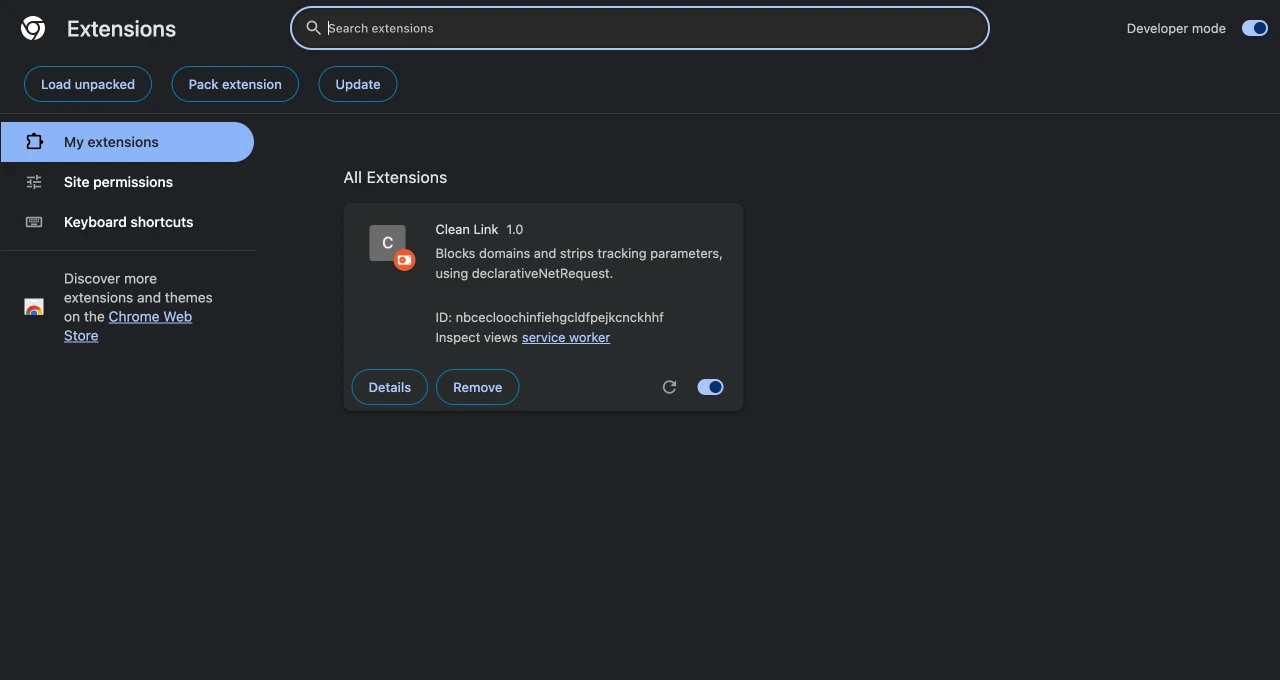
Static rule errors only surface for unpacked extensions — this card is where they'd appear.
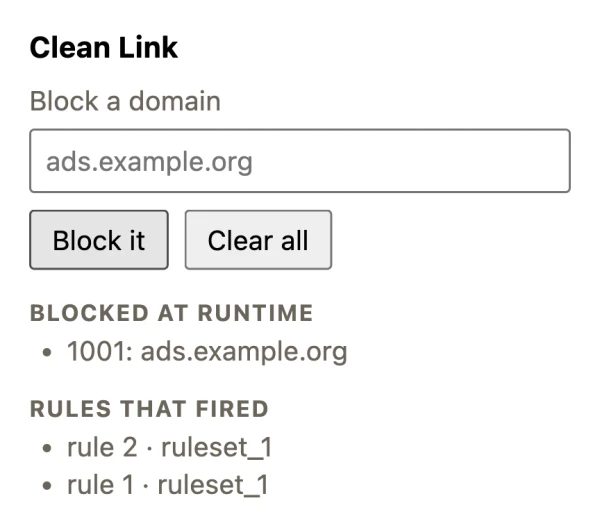
getMatchedRules() reports the rule and ruleset IDs, which is why keeping dynamic IDs above 1000 pays off. Rule 2 is the scrubber, rule 1 the block.
If it doesn't work, check these first:
- The block does nothing. You edited
rules.jsonand didn't reload the extension. Static rules are read at load time — hit the reload arrow on the extension's card after every edit. Dynamic rules need no reload, which is part of why they're pleasant to develop against. - An "Errors" button appeared on the card. A static rule is invalid. Click it: Chrome names the rule ID and the offending key. Worth doing early, because invalid static rules in a packed extension are silently ignored — the error only ever shows for unpacked builds.
- The tab redirects forever. Your
regexFiltermatches a parameter thatremoveParamsdoesn't remove. Line the two lists up. - The scrubber does nothing but the blocker works. You're missing
host_permissions. Blocking needs none; redirecting needs host access to the origin. getMatchedRules is not a function."declarativeNetRequestFeedback"isn't inpermissions. (Packing is not the cause here — unlikeonRuleMatchedDebug, this one works in a packed build.)- A request sails through that should have matched. DNR only sees requests that reach the network stack. A response served by a page's own service worker, or straight out of
CacheStorage, never gets there.
Cross-browser note
DNR is a WebExtensions API, not a Chrome one. Firefox shipped it to all extensions in Firefox 113, and Edge inherits Chrome's implementation wholesale, so everything above runs there unchanged.
The permission model matches too: Mozilla documents the same split, where blocking and scheme upgrades need no host permissions but redirects and header edits do. Two things I'd verify rather than assume:
- Limits are not portable. The rule and ruleset ceilings differ by browser and by version. Call
getAvailableStaticRuleCount()at runtime instead of hardcoding a number you read in a Chrome doc. - Debug hooks are Chrome-flavoured.
onRuleMatchedDebugandgetMatchedRules()are the parts most likely to differ, since they're explicitly developer-only. Check MDN before relying on them off-Chromium.
Since Chrome 148 ships the browser.* namespace natively, the same source can now address both without a polyfill.
Before you publish
Network-modifying extensions get read closely — by Web Store reviewers, by users squinting at the permission dialog, and by anyone who's watched the webRequest permission get abused over the years. The two questions worth answering before you submit are whether every host permission you declared is actually load-bearing, and whether a rule of yours can be made to redirect somewhere you didn't intend.
It's easy to calibrate the first one: skim what comparable extensions in your category actually declare in the Extenshi catalog, and the ones over-asking stand out immediately. For your own build:
npx @extenshi/cli scan ./clean-linkThe CLI flags permission bloat and risky API usage before a reviewer does. You get 3 scans and 10 reads free, one-time; past that, prepaid credit packs cover it and never expire. If you'd rather start from the user's side of the question, the permission scanner shows what an installed extension is actually asking for.
Wrapping up
You went from an empty folder to an extension that blocks a domain, rewrites URLs mid-flight, takes new rules at runtime, and reports what it matched — with roughly a hundred lines of JavaScript, none of which is in the request path.
The mental shift is the whole lesson. Stop asking "how do I intercept this request" and start asking "what rule describes this request." Everything you'd have written as an if in a webRequest listener has a condition key waiting for it: requestDomains, initiatorDomains, requestMethods, resourceTypes, regexFilter. When you genuinely can't express something as a condition — that's the real edge of the API, and it's worth finding out early rather than three weeks into a port.
Shipping something on top of this? Install numbers, retention, and the reviews landing on your listing become their own problem the moment it's live. Explore extension analytics → and claim your extension to get verified data alongside the security scan.
Want the wider argument about whether MV3 actually crippled content blocking? I went through the peer-reviewed evidence separately — the short version is that it didn't. And if you need this extension to also do something on a schedule, chrome.alarms is the piece that survives the service worker dying.
Sources
- chrome.declarativeNetRequest API reference — Chrome for Developers (Google)
- Replace blocking web request listeners — Chrome for Developers (Google)
- api-samples/declarativeNetRequest/url-blocker — GoogleChrome/chrome-extensions-samples (Apache-2.0)
- api-samples/declarativeNetRequest/no-cookies — GoogleChrome/chrome-extensions-samples (Apache-2.0)
- functional-samples/sample.dnr-rule-manager — GoogleChrome/chrome-extensions-samples (Apache-2.0)
- extensions/common/api/_api_features.json — Chromium source (BSD-3-Clause), for which DNR members are
"location": "unpacked" - declarativeNetRequest.RuleCondition — MDN Web Docs (Mozilla)
- declarativeNetRequest — MDN Web Docs (Mozilla)
- declarativeNetRequest available in Firefox — Mozilla Add-ons Community Blog
- Block API requests via chrome extension — Gourav Goyal
Further reading
📚 Building Browser Extensions, 2nd Edition by Matt Frisbie — Amazon | Apress. Chapter 11 covers networking and authentication, including declarativeNetRequest alongside the webRequest API it replaced.
This article is a hands-on tutorial based on the official Chrome Extensions documentation and Google's Apache-2.0 sample code. Code is provided as-is for educational purposes; verify API behavior against the current developer.chrome.com reference before shipping. If you believe anything here is inaccurate, contact [email protected] and we'll review and update.
Related Articles
declarativeNetRequest in browser extensions: what a peer-reviewed study says about MV3 ad blocking
A peer-reviewed study found Manifest V3 ad blocking matches MV2 effectiveness. Here's what declarativeNetRequest really changes if you build content filters.

chrome.alarms in Manifest V3: background jobs that outlive the service worker
MV3 kills setInterval. Build a Chrome extension background job with chrome.alarms that survives service worker termination — full runnable code, ~20 min.

Chrome extension side panels: build a UI that stays open while you browse
A hands-on Manifest V3 tutorial: build a Chrome extension side panel that persists across tabs, then make it per-site. Full runnable code, ~25 minutes.

The `webRequest` permission explained: what browser extensions can really see in your traffic
The webRequest permission lets browser extensions watch — and sometimes rewrite — every network request you make. Here's what it really sees and how to check.