chrome.bookmarks in browser extensions: search and de-duplicate the user's bookmark tree
Build an MV3 popup with the Chrome bookmarks API: flatten the whole bookmark tree, search it live as you type, and de-duplicate URLs behind a safe preview step.
Most bookmark collections look alike: one recipe blog saved four times, three links to the same docs page, and a folder called "Later" that nobody opens. Unlike history or cookies, bookmarks are data the user chose to keep, so people actually want tools that tidy them.
chrome.bookmarks is the API for that tooling, and a pleasant one: a single permission with a clear install warning, no host permissions, and a promise-based CRUD surface over a tree.
Today I'll build Bookmark Janitor, a popup that indexes the whole tree, searches it as you type with folder paths on every result, and finds duplicate URLs — then deletes them behind a preview step, because the moment your extension removes user data, "it mostly works" stops being acceptable.
Difficulty: beginner — promises and basic DOM scripting. Time: ~25 minutes with Chrome (or Edge) and a text editor. This extension deletes bookmarks, so export a backup first (chrome://bookmarks → ⋮ menu → Export bookmarks) or use a fresh Chrome profile.
The tree model in two minutes
Everything in chrome.bookmarks is a BookmarkTreeNode, and a node is exactly one of two things:
- A bookmark — it has a
url(plustitle,dateAdded,id). - A folder — it has
childreninstead. Folders have no URL; Chrome's own docs note that when you search by exacturl, folders never match.
The whole tree hangs off a root node with the id "0" (Chrome 145+ also exposes it as the constant ROOT_NODE_ID). The root's children are the permanent folders ("Bookmarks Bar", "Other Bookmarks", sometimes "Mobile Bookmarks"), and per the official chrome.bookmarks reference you cannot rename, move, or remove the bar and Other Bookmarks, or add and remove entries directly under the root.
Don't assume there's exactly one of each, though. In June 2025 Chrome announced a gradual rollout that splits desktop bookmarks into synced and local-only storage, so a user who signs in without uploading their existing bookmarks can have two "Bookmarks Bar" folders. Two Chrome 134+ properties tell them apart: folderType ("bookmarks-bar", "other", "mobile", "managed") names the permanent folder, and syncing says whether a node lives in account storage. For a de-dupe tool the same URL in both trees looks like a duplicate — and deleting the account copy is not the same as deleting the local one.
One more property: unmodifiable. Bookmarks configured by an administrator (or a supervised user's custodian) carry it, and writes to them fail, so the UI treats them as read-only.
Here's the shape of the whole app:
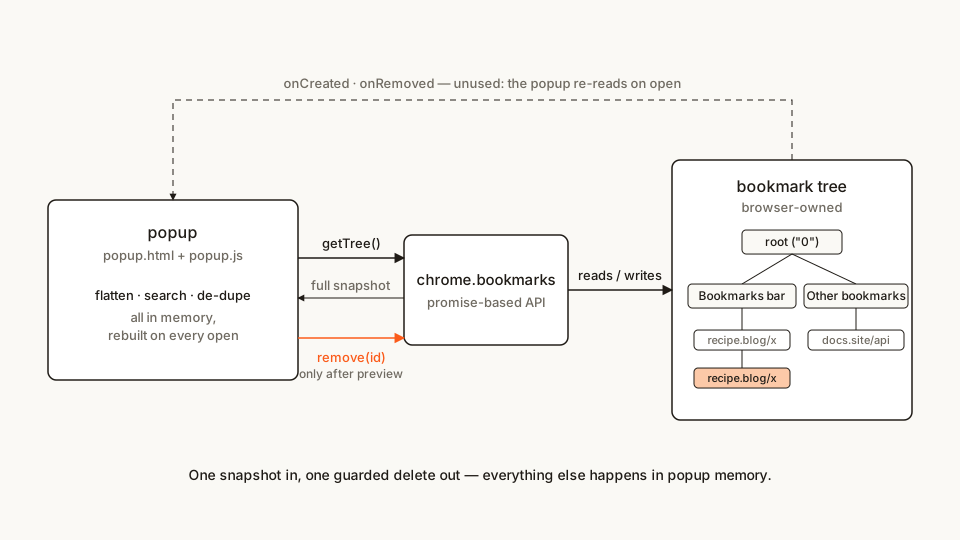
One snapshot in, one guarded delete out. The dashed line is the event API we deliberately don't use — Step 6 explains why.
And the file tree — every file appears in full below:
bookmark-janitor/
├── manifest.json
├── popup.html
├── popup.css
└── popup.js
Step 1: the manifest — one honest permission
Starting from scratch? The Extenshi manifest generator scaffolds a valid MV3 manifest in the browser; for this tutorial the block below is everything.
manifest.json
{
	"name": "Bookmark Janitor",
	"description": "Search every bookmark as you type and de-duplicate the tree with a preview step before anything is deleted.",
	"version": "1.0",
	"manifest_version": 3,
	"permissions": ["bookmarks"],
	"action": {
		"default_popup": "popup.html",
		"default_title": "Bookmark Janitor"
	}
}
First, what's not there: no host_permissions, no "tabs", no storage. The bookmarks permission is the whole footprint, and its install warning reads "Read and change your bookmarks" — after my cookies tutorial, where <all_urls> makes the warning practically need a lawyer, this one almost sells itself.
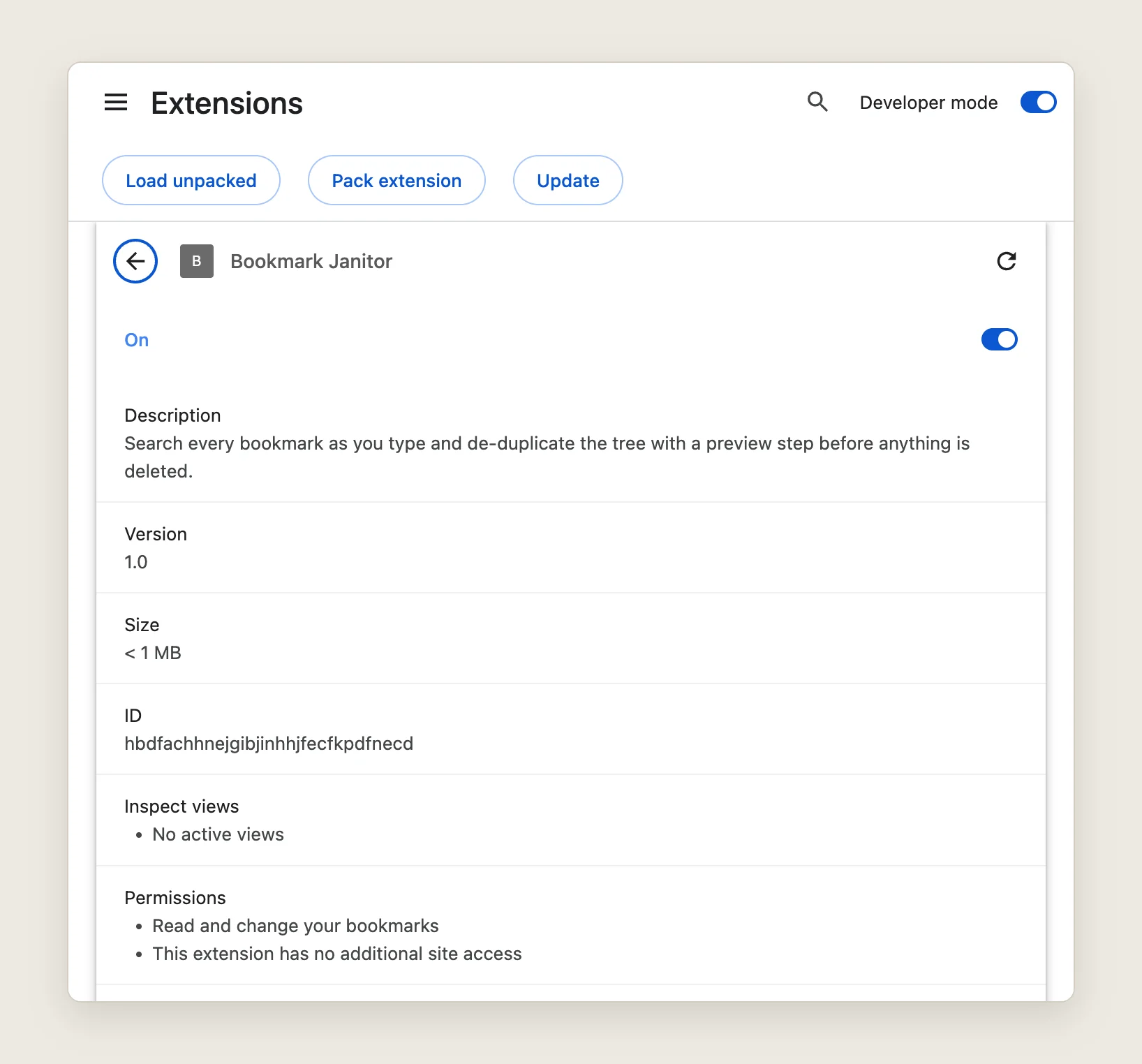
One warning and no site access: the same sentence a store install would show
Second: chrome.tabs.create(), which opens search results, needs no permission at all per the tabs reference. It's reading tab.url and tab.title that costs you "tabs".
Step 2: read the tree and flatten it
getTree() returns the entire tree in one call as [root], where root.children are the permanent folders. Search-as-you-type wants a flat array, so we walk the tree once and keep {id, title, url, dateAdded, unmodifiable, synced, folder} records — folder being the breadcrumb getTree() doesn't hand you directly.
The walk itself (this ends up inside popup.js from Step 6):
// One walk turns a subtree into flat records. `path` holds the folder
// titles above the current level.
function flatten(nodes, path, out) {
	for (const node of nodes) {
		// Firefox reports separators with the URL "data:" — skip them.
		if (node.url && node.type !== 'separator') {
			out.push({
				id: node.id,
				title: node.title,
				url: node.url,
				dateAdded: node.dateAdded ?? 0,
				unmodifiable: node.unmodifiable,
				synced: node.syncing === true,
				folder: path.join(' / ')
			});
		}
		if (node.children) {
			flatten(node.children, [...path, node.title], out);
		}
	}
	return out;
}
reindex() in Step 6 calls it once per permanent folder, seeding the path with the folder's name. Only when two folders share a folderType does it append "(account)" or "(this device)", the suffix Chrome's sync post suggests for this case. Tens of thousands of bookmarks are one array pass per popup open.
As Matt Frisbie explores in Building Browser Extensions (Apress, 2025), these APIs take a callback or return a promise — pick one per call, never both, and on the promise path errors arrive through try/catch instead of chrome.runtime.lastError. Every bookmarks method has returned promises since Chrome 90, so this tutorial is async/await throughout.
Step 3: search — and when the browser should do it instead
Chrome ships its own matcher: chrome.bookmarks.search("recipe") returns nodes whose title or URL match those words, and search({url: "https://example.com/"}) matches a URL verbatim. Use it for one-off questions like "is this URL already bookmarked?" — the browser does the work and you never touch the tree.
For a live filter box it's the wrong tool: you'd re-query on every keystroke, and the returned nodes carry no folder path, so you'd walk parents anyway for the breadcrumb. With the flattened array from Step 2 in hand, filter locally:
searchInput.addEventListener('input', () => {
	const q = searchInput.value.trim().toLowerCase();
	if (!q) {
		renderResults(allBookmarks.slice(0, 20));
		return;
	}
	const matches = allBookmarks.filter(
		(b) => b.title.toLowerCase().includes(q) || b.url.toLowerCase().includes(q)
	);
	renderResults(matches.slice(0, 50));
});
It's also synchronous, which removes a bug class: a search()-per-keystroke box needs a debounce and a generation counter, or a slow early query resolves late and overwrites newer results. Nothing here is awaited, so the last keystroke always wins.
One rendering rule that is not optional: bookmark titles are attacker-influenced — any page can set <title> to anything, and the user bookmarked it. Build every row with textContent/createElement, never innerHTML, or a bookmark titled <img src=x onerror=…> runs inside your extension's privileged popup.
Step 4: de-duplicate without eating anyone's bookmarks
The plan: normalize each URL, group, pick a keeper, and offer the rest for removal. Normalization is where judgment lives — lowercase the host, drop the #fragment, strip one trailing slash, nothing else:
// Two URLs are "the same page" if they match after lowercasing the host,
// dropping the fragment and one trailing slash. Anything unparseable
// compares verbatim.
function normalizeUrl(raw) {
	try {
		const u = new URL(raw);
		u.hostname = u.hostname.toLowerCase();
		u.hash = '';
		let key = u.toString();
		if (key.endsWith('/')) key = key.slice(0, -1);
		return key;
	} catch {
		return raw;
	}
}
Query strings stay: ?article=1 and ?article=2 are different pages, and stripping tracking params is a policy decision your user didn't ask for. Aggressive normalization turns a cleanup tool into a data-loss tool.
The keeper is the oldest copy, with one exception from the tree model: a synced copy beats a local-only one, because deleting the account copy takes it out of the user's Google Account, while the local one only lives on this machine. Find duplicates renders the plan — each keeper plus its extras as pre-checked checkboxes — and nothing is deleted until a second click:
const plans = [...groups.values()]
	.filter((g) => g.length > 1)
	// Keeper first: a synced copy beats a local-only one, then the oldest wins.
	.map((g) => g.sort((a, b) => b.synced - a.synced || a.dateAdded - b.dateAdded));
The delete loop re-reads each copy and its keeper with get() right before deleting, because the tree can change under an open popup (sync, another window). The invariant worth the extra call: never delete a copy unless its keeper still exists with the same URL. And it only calls remove(), never the recursive removeTree():
for (const box of boxes) {
	try {
		const [[copy], [keeper]] = await Promise.all([
			chrome.bookmarks.get(box.dataset.id),
			chrome.bookmarks.get(box.dataset.keeper)
		]);
		if (!copy.url || copy.unmodifiable || normalizeUrl(copy.url) !== normalizeUrl(keeper.url ?? '')) {
			skipped++;
			continue;
		}
		await chrome.bookmarks.remove(copy.id);
		removed++;
	} catch {
		skipped++; // get() rejects: the copy or its keeper is gone
	}
}
That preview step is the whole product decision here. A one-click "clean my bookmarks" button is a support-ticket generator; showing exactly what goes, with the keeper beside it, is the difference between a tool and a hazard.
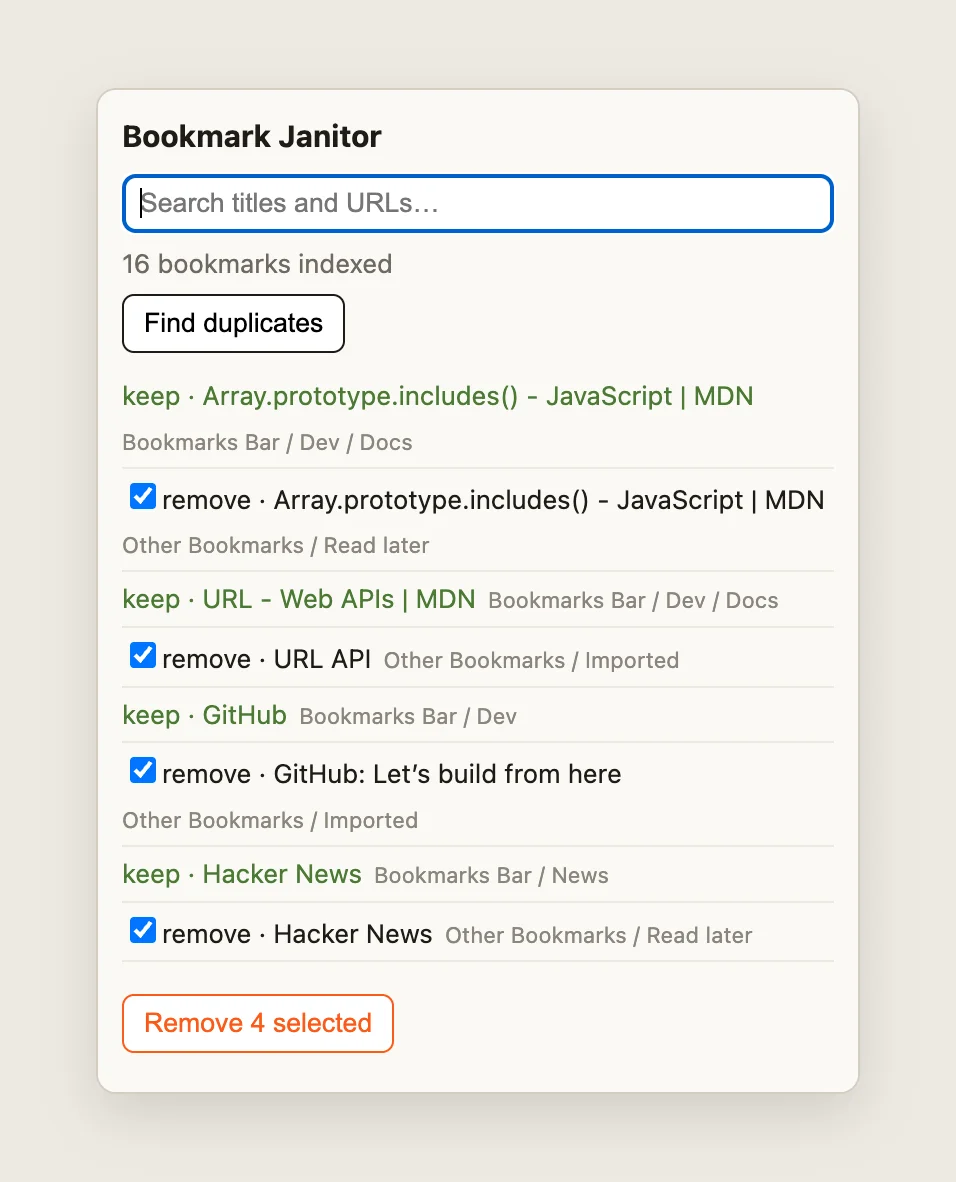
Nothing is deleted until the second click — the keeper stays visible next to every copy
Step 5: the popup shell
Now the two static files. The HTML is deliberately plain — a search box, a status line, a results list, and the de-dupe panel that stays hidden until there's a plan:
popup.html
<!DOCTYPE html>
<html lang="en">
<head>
	<meta charset="utf-8">
	<link rel="stylesheet" href="popup.css">
</head>
<body>
	<header>
		<h1>Bookmark Janitor</h1>
		<input id="search" type="search" placeholder="Search titles and URLs…" autofocus>
	</header>
	<p id="status" class="status"></p>
	<section id="dedupe-panel">
		<button id="dedupe">Find duplicates</button>
	</section>
	<div id="plan" hidden>
		<ul id="plan-list"></ul>
		<button id="remove-selected" disabled>Remove selected</button>
	</div>
	<ul id="results"></ul>
	<script src="popup.js"></script>
</body>
</html>
popup.css
body {
	width: 380px;
	max-height: 560px;
	overflow-y: auto;
	margin: 0;
	font: 13px/1.45 system-ui, sans-serif;
	color: #1f1b16;
	background: #faf9f5;
}
header { padding: 12px 12px 0; }
h1 { font-size: 15px; margin: 0 0 8px; }
#search {
	width: 100%;
	box-sizing: border-box;
	padding: 6px 8px;
	border: 1px solid #d8d4cc;
	border-radius: 6px;
}
.status { padding: 6px 12px; margin: 0; color: #6f6a61; }
#dedupe-panel { padding: 0 12px 8px; }
button {
	padding: 6px 10px;
	border: 1px solid #1f1b16;
	border-radius: 6px;
	background: #fff;
	cursor: pointer;
}
button:disabled { opacity: 0.45; cursor: default; }
#remove-selected { margin: 4px 12px 8px; border-color: #fb5b1a; color: #fb5b1a; }
ul { list-style: none; margin: 0; padding: 0 12px 12px; }
li {
	padding: 4px 0;
	border-bottom: 1px solid #ece9e1;
	display: flex;
	flex-wrap: wrap;
	align-items: baseline;
	gap: 6px;
}
li a { color: #1f1b16; text-decoration: none; font-weight: 500; }
li a:hover { color: #fb5b1a; text-decoration: underline; }
.folder { color: #8a857b; font-size: 11px; }
.empty { color: #8a857b; }
.keeper { color: #4c7a34; }
The fixed width on body is load-bearing. A popup sizes itself to its content, and Frisbie's UI chapter warns that browsers apply different sizing rules — his advice is a fixed size, a responsive page, or less content. Chrome's chrome.action reference bounds every popup between 25×25 and 800×600 pixels, so a fixed width plus a max-height under 600 keeps the layout predictable.
Step 6: the whole popup.js — and why we skip the events
chrome.bookmarks fires onCreated, onChanged, onMoved, and onRemoved for every tree mutation, from any source. A long-lived surface — an override page, a service worker maintaining an index — should subscribe; Chrome's sync post says the same, since permanent folders can appear and disappear as the user's sign-in state changes.
A popup shouldn't. As Frisbie points out, a popup closes the moment it loses focus, and since each browser window can have its own, you must assume several run at once — so listeners a popup registers die with it seconds later. Re-read on open, derive everything fresh, subscribe to nothing: that's reindex() below, and why the diagram's event arrow is dashed.
For the long-lived version, the skeleton is four listeners and a re-derive. Deleting a folder recursively fires one onRemoved for the folder and none for its contents:
const events = [
	chrome.bookmarks.onCreated,
	chrome.bookmarks.onChanged,
	chrome.bookmarks.onMoved,
	chrome.bookmarks.onRemoved
];
for (const ev of events) {
	ev.addListener(() => rebuildIndex());
}
Here is the complete popup, everything from Steps 2–4 wired to the shell:
popup.js
// Bookmark Janitor — popup logic.
// Every bookmark lives in `allBookmarks` as a flat record:
// { id, title, url, dateAdded, unmodifiable, synced, folder }

const searchInput = document.getElementById('search');
const resultsList = document.getElementById('results');
const statusLine = document.getElementById('status');
const dedupeButton = document.getElementById('dedupe');
const planPanel = document.getElementById('plan');
const planList = document.getElementById('plan-list');
const removeButton = document.getElementById('remove-selected');

let allBookmarks = [];

init();

async function init() {
	await reindex();
	renderResults(allBookmarks.slice(0, 20));
}

async function reindex() {
	const [root] = await chrome.bookmarks.getTree();
	const top = root.children ?? [];
	// Signed-in Chrome can hold a synced AND a local-only copy of each
	// permanent folder. Only when it does, label which copy is which.
	const types = top.map((f) => f.folderType).filter(Boolean);
	const dual = new Set(types).size < types.length;
	allBookmarks = [];
	for (const folder of top) {
		const name = dual ? `${folder.title} (${folder.syncing ? 'account' : 'this device'})` : folder.title;
		flatten(folder.children ?? [], [name], allBookmarks);
	}
	statusLine.textContent = `${allBookmarks.length} bookmarks indexed`;
}

// One walk turns a subtree into flat records. `path` holds the folder
// titles above the current level.
function flatten(nodes, path, out) {
	for (const node of nodes) {
		// Firefox reports separators with the URL "data:" — skip them.
		if (node.url && node.type !== 'separator') {
			out.push({
				id: node.id,
				title: node.title,
				url: node.url,
				dateAdded: node.dateAdded ?? 0,
				unmodifiable: node.unmodifiable,
				synced: node.syncing === true,
				folder: path.join(' / ')
			});
		}
		if (node.children) {
			flatten(node.children, [...path, node.title], out);
		}
	}
	return out;
}

// --- search --------------------------------------------------------------

searchInput.addEventListener('input', () => {
	const q = searchInput.value.trim().toLowerCase();
	if (!q) {
		renderResults(allBookmarks.slice(0, 20));
		return;
	}
	const matches = allBookmarks.filter(
		(b) => b.title.toLowerCase().includes(q) || b.url.toLowerCase().includes(q)
	);
	renderResults(matches.slice(0, 50));
});

// Bookmark titles are untrusted strings — everything is built with
// textContent/createElement, never innerHTML, so a bookmark titled
// `<img src=x onerror=...>` stays inert text.
function renderResults(bookmarks) {
	planPanel.hidden = true;
	resultsList.textContent = '';
	if (bookmarks.length === 0) {
		const empty = document.createElement('li');
		empty.className = 'empty';
		empty.textContent = 'No matches.';
		resultsList.appendChild(empty);
		return;
	}
	for (const b of bookmarks) {
		resultsList.appendChild(renderRow(b));
	}
}

function renderRow(b) {
	const li = document.createElement('li');

	const open = document.createElement('a');
	open.href = b.url;
	open.textContent = b.title || b.url;
	open.addEventListener('click', (e) => {
		e.preventDefault();
		// No "tabs" permission needed. Chrome refuses some URLs (javascript:
		// bookmarklets, for one), so report that instead of failing silently.
		chrome.tabs.create({ url: b.url }).catch((err) => {
			statusLine.textContent = `Can't open this one: ${err.message}`;
		});
	});

	const folder = document.createElement('span');
	folder.className = 'folder';
	folder.textContent = b.folder || '(root)';

	li.append(open, folder);
	return li;
}

// --- de-duplication ------------------------------------------------------

// Two URLs are "the same page" if they match after lowercasing the host,
// dropping the fragment and one trailing slash. Anything unparseable
// compares verbatim.
function normalizeUrl(raw) {
	try {
		const u = new URL(raw);
		u.hostname = u.hostname.toLowerCase();
		u.hash = '';
		let key = u.toString();
		if (key.endsWith('/')) key = key.slice(0, -1);
		return key;
	} catch {
		return raw;
	}
}

dedupeButton.addEventListener('click', () => {
	const groups = new Map();
	for (const b of allBookmarks) {
		const key = normalizeUrl(b.url);
		if (!groups.has(key)) groups.set(key, []);
		groups.get(key).push(b);
	}
	const plans = [...groups.values()]
		.filter((g) => g.length > 1)
		// Keeper first: a synced copy beats a local-only one, then the oldest wins.
		.map((g) => g.sort((a, b) => b.synced - a.synced || a.dateAdded - b.dateAdded));
	renderPlan(plans);
});

function renderPlan(plans) {
	planList.textContent = '';
	resultsList.textContent = '';
	if (plans.length === 0) {
		const clean = document.createElement('li');
		clean.className = 'empty';
		clean.textContent = 'No duplicates found. Nothing to do.';
		planList.appendChild(clean);
		updateRemoveCount();
		planPanel.hidden = false;
		return;
	}
	for (const group of plans) {
		const [keeper, ...extras] = group;

		const keepRow = document.createElement('li');
		keepRow.className = 'keeper';
		keepRow.append(document.createTextNode(`keep · ${keeper.title || keeper.url}`));
		const keepWhere = document.createElement('span');
		keepWhere.className = 'folder';
		keepWhere.textContent = keeper.folder || '(root)';
		keepRow.appendChild(keepWhere);
		planList.appendChild(keepRow);

		for (const dup of extras) {
			const row = document.createElement('li');
			const label = document.createElement('label');
			const box = document.createElement('input');
			box.type = 'checkbox';
			box.className = 'dup-remove';
			box.dataset.id = dup.id;
			box.dataset.keeper = keeper.id;
			box.checked = !dup.unmodifiable;
			box.disabled = Boolean(dup.unmodifiable); // managed nodes can't be removed
			label.append(box, document.createTextNode(`remove · ${dup.title || dup.url}`));
			const where = document.createElement('span');
			where.className = 'folder';
			where.textContent = dup.folder || '(root)';
			row.append(label, where);
			planList.appendChild(row);
		}
	}
	updateRemoveCount();
	planPanel.hidden = false;
}

// The button always states what it will do, and is disabled when that is nothing.
function updateRemoveCount() {
	const n = planList.querySelectorAll('.dup-remove:checked').length;
	removeButton.textContent = `Remove ${n} selected`;
	removeButton.disabled = n === 0;
}

planList.addEventListener('change', updateRemoveCount);

removeButton.addEventListener('click', async () => {
	const boxes = [...planList.querySelectorAll('.dup-remove:checked')];
	removeButton.disabled = true;
	let removed = 0;
	let skipped = 0;
	for (const box of boxes) {
		try {
			// Re-read the copy and its keeper right before deleting: sync or
			// another window may have changed the tree since the preview.
			const [[copy], [keeper]] = await Promise.all([
				chrome.bookmarks.get(box.dataset.id),
				chrome.bookmarks.get(box.dataset.keeper)
			]);
			if (!copy.url || copy.unmodifiable || normalizeUrl(copy.url) !== normalizeUrl(keeper.url ?? '')) {
				skipped++;
				continue;
			}
			await chrome.bookmarks.remove(copy.id);
			removed++;
		} catch {
			skipped++; // get() rejects: the copy or its keeper is gone
		}
	}
	await reindex();
	renderResults(allBookmarks.slice(0, 20));
	statusLine.textContent =
		`${allBookmarks.length} bookmarks indexed · removed ${removed}` +
		(skipped ? `, skipped ${skipped}` : '');
});
Load it and try it
- Open
chrome://extensions, flip Developer mode on (top right), click Load unpacked, and pick thebookmark-janitor/folder. - Unpacked extensions install without a prompt, so check the bill yourself: click Details on the card. Permissions lists "Read and change your bookmarks" and "This extension has no additional site access".
- Pin the extension from the puzzle-piece menu and click its icon. The status line reports how many bookmarks were indexed, and the first 20 are listed with their folder breadcrumbs.
Type a fragment of a URL you've saved and watch the list filter; click a result and it opens in a new tab (the popup closes — expected). Then save one page into two folders, reopen the popup, and hit Find duplicates: the older copy is marked keep, the newer one sits behind a checked box, and Remove 1 selected deletes only that.
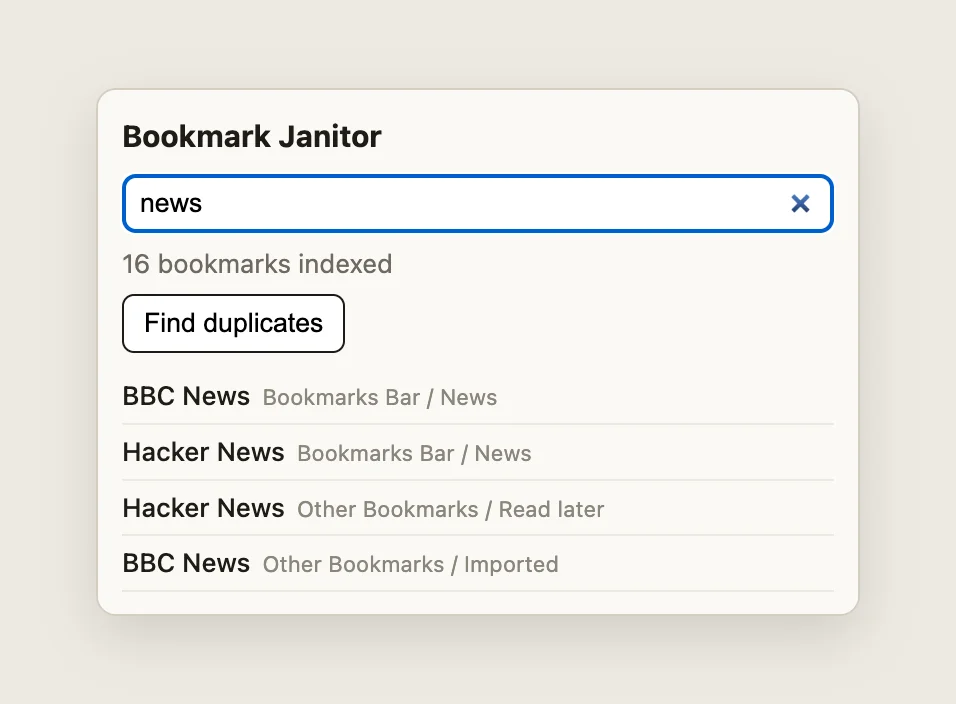
Live filtering over the flattened tree — folder paths included, which chrome.bookmarks.search() alone doesn't give you
If it doesn't work:
Cannot read properties of undefined (reading 'getTree')→"bookmarks"is missing or misspelled inpermissions, sochrome.bookmarksdoesn't exist. Fix the manifest and hit the reload icon on the extension card; Chrome doesn't watch your editor.- Popup opens blank → right-click inside it → Inspect and read the console. Usually a filename mismatch:
default_popup, the stylesheethrefand the scriptsrcmust match the files exactly. - "No duplicates found" on a messy profile → the normalization is conservative:
https://example.comvshttps://www.example.com, or a link with and without?utm_source=…, are different keys by design.
Cross-browser: Firefox and Edge
Edge is Chromium, so Bookmark Janitor runs there unchanged. Firefox is close but not identical. browser.bookmarks is explicitly based on Chromium's API, with the same tree model, search() and events. Three rules matter:
- Never hardcode node ids.
"1"and"2"are Chrome's numbering, and Chrome's sync post says ids aren't fixed even there; Firefox uses GUID-style strings (toolbar_____,menu________). The code above only uses ids the tree handed back. - Firefox has separators. Its
BookmarkTreeNodecan be a separator, and Firefox's implementation gives each one the URL"data:". Without thetypecheck inflatten(), every separator would land in one "duplicate" group. folderTypeandsyncingare Chrome additions. MDN doesn't list them; when they're missing,dualstays false and the keeper rule falls back to oldest-first.
Building a full bookmark-manager replacement? That's an override page (chrome_url_overrides.bookmarks). If it must open javascript: bookmarklets, read the Chromium Extensions thread on MV3 bookmark managers first: MV2 managers ran them through code-string tabs.executeScript, which MV3 removed. Chrome itself refuses them in tabs.create(), which is why renderRow() reports the error.
If you'd rather write browser.* everywhere, Chrome has shipped it as a native alias since 148 — details in my post on the namespace going GA.
Common pitfalls and best practices
- Preview every bulk delete. The API has no undo: once
remove()resolves, the bookmark is gone — from the user's account too, if it was a synced copy. - Don't assume one of each permanent folder. Identify them by
folderType, never by id or by name (names are localized), and expect a synced and a local-only copy to coexist. - The write rate limits are history. Old tutorials warn about
MAX_WRITE_OPERATIONS_PER_HOUR; the current reference marks those constants deprecated — "Bookmark write operations are no longer limited by Chrome." Don't build throttling for it (do still await eachremove()so failures stay attributable). - Respect
unmodifiable. Disable a managed node's checkbox up front instead of failing mid-loop. - Render titles with
textContent. Step 3's rule, repeated because it's the one that turns a bookmark tool into an XSS hole.
Before you ship it
Bookmark Janitor skips icons to stay code-only; the Chrome Web Store requires a 128×128 icon in the package, so add an icons block before submitting. For fuller references, Google's Apache-2.0 samples api-samples/bookmarks (minimal search/add/remove) and functional-samples/sample.bookmarks (a fuller manager with edit dialogs) cover the same API; this tutorial's code is my own rewrite with the de-dupe plan added. MDN's Work with the Bookmarks API is a good second explanation of the tree model.
Then zip the folder and scan your own build before the store sees it:
npx @extenshi/cli@latest login   # once: signs in or creates a free account
(cd bookmark-janitor && zip -r ../bookmark-janitor.zip .)
npx @extenshi/cli@latest scan ./bookmark-janitor.zip
The Extenshi CLI checks the package against store rules; add --report report.md and it also writes a used / not used / cannot verify verdict for every declared permission — for Bookmark Janitor, one row: bookmarks. You get 3 scans and 10 reads free with a free account, one-time; past that, prepaid credit packs cover it and never expire. Curious how shipped bookmark managers handle the same data? Browse them in the catalog, and check any one of them for its security report.
Sources
- chrome.bookmarks API reference — Chrome for Developers
- Update your extensions ahead of upcoming bookmark sync changes — Chrome for Developers blog, June 17, 2025
- chrome.action API reference — Chrome for Developers
- chrome.tabs API reference — Chrome for Developers
- Override Chrome pages — Chrome for Developers
- bookmarks — MDN WebExtensions API reference — MDN Web Docs (Mozilla)
- bookmarks.BookmarkTreeNode — MDN Web Docs (Mozilla)
- Work with the Bookmarks API — MDN Web Docs (Mozilla)
- ext-bookmarks.js — Firefox source (mozilla-firefox/firefox)
- api-samples/bookmarks — GoogleChrome/chrome-extensions-samples (Apache-2.0)
- functional-samples/sample.bookmarks — GoogleChrome/chrome-extensions-samples (Apache-2.0)
- Manifest V3 bookmark managers and bookmarklets — Chromium Extensions group
Further reading
📚 Building Browser Extensions, 2nd Edition by Matt Frisbie — Amazon | Apress. Chapter 7 covers popup lifecycle and sizing across browsers; chapter 9 walks the promise/callback duality of the WebExtensions APIs.
This article is a hands-on tutorial based on the official Chrome and Mozilla extension documentation and Google's Apache-2.0 sample code. Code is provided as-is for educational purposes; verify API behavior against the current developer.chrome.com reference before shipping. Extenshi does not independently verify all claims made by third-party authors, and references to specific products reflect cited documentation, not accusations of wrongdoing. If you believe any information is inaccurate, contact [email protected] and we will review and update.
Related Articles
chrome.contextMenus in browser extensions: build a right-click clip saver
Build a Chrome extension context menu with selected text, saved links and a popup. Get full MV3 code, real screenshots and fixes for missing or duplicate menus.
chrome.storage.sync in browser extensions: settings that follow the user to every device
Build an MV3 extension whose settings follow the user to every device — chrome.storage.sync quotas, onChanged, and the sync vs local split, with full code.
The `history` permission explained: what an extension can dig out of your past
The history permission lets a browser extension read every site you visited — even before you installed it. Here's what it exposes and how to check yours.