Read, write and watch cookies from an MV3 extension
Use the Chrome cookies API in Manifest V3 to read, edit and watch cookies. Fix empty getAll results, host permissions and duplicate cookies with runnable code.
The first time you call chrome.cookies.getAll() from an extension, you almost certainly get this back:
[]No error. No rejected promise. No warning in the console. An empty array, on a site you know full well has a dozen cookies. And because nothing failed, there's nothing to search for — you end up re-reading your own code looking for a typo that isn't there.
The cause is that "cookies" is only half a permission. It opens the API; it grants you access to exactly zero cookies. What decides what you can see is the host permissions sitting next to it, and if you forgot those, every call returns cleanly and empty.
What you'll build: "Cookie Peek" — a popup that lists every cookie for the site in the current tab, lets you edit or delete one in place, updates live as cookies change, and badges the toolbar icon when a cookie you're watching disappears. Difficulty: intermediate — you should have loaded an unpacked extension at least once. Time: ~25 minutes. You need Chrome and a text editor, nothing else.
One thing before we start: this API reads session cookies, including httpOnly ones that page JavaScript can't touch. Build accordingly, and ask for the narrowest access that does the job — I come back to that at the end, with code.
Already seeing an empty list? Jump to the host-permission fix. The tutorial deliberately starts with that failure so you can see what the missing grant changes.
How the pieces fit
Four moving parts, and only one of them is interesting.
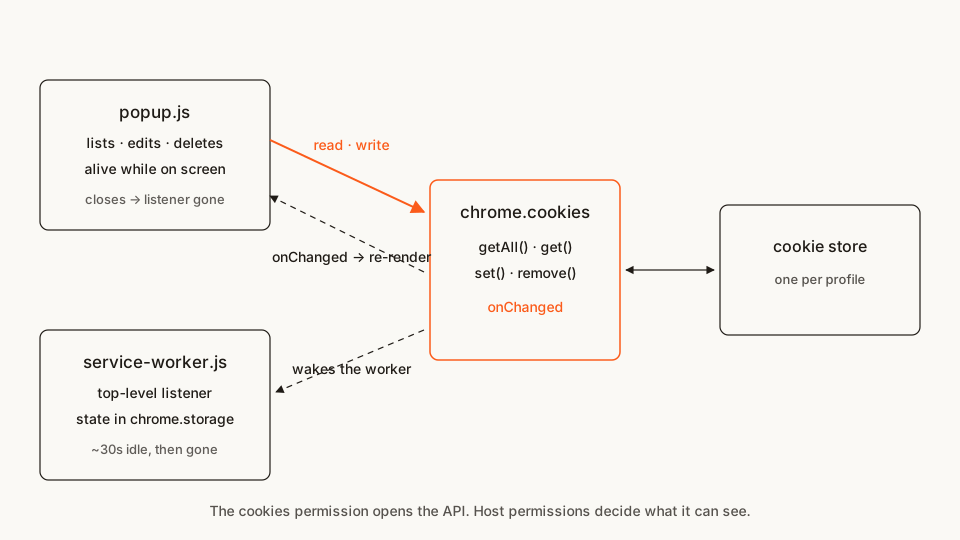
The popup does the reading and writing while it's on screen. The service worker exists for the one thing a popup can't do — notice something when nobody's looking. And chrome.cookies.onChanged fires into both, which is where most of the sharp edges live.
The file tree
No build step, no dependencies:
cookie-peek/
├── manifest.json        # permissions — the part that decides if any of this works
├── popup.html           # the UI shell
├── popup.js             # read, edit, delete, live updates
└── service-worker.js    # watches one cookie while the popup is closed
Rather clone than type? The finished extension lives in our public samples repo — load it, then read on with this tutorial as the guided tour.
Make a folder called cookie-peek and let's fill it in.
Step 1: the manifest, deliberately incomplete
manifest.json
{
  "manifest_version": 3,
  "name": "Cookie Peek",
  "version": "1.0",
  "description": "Lists, edits and watches the cookies of the site in the current tab.",
  "permissions": ["cookies", "tabs"],
  "action": {
    "default_popup": "popup.html",
    "default_title": "Cookies for this site"
  }
}
"cookies" gets us the API. "tabs" gets us the active tab's URL, which is how we know whose cookies to ask for.
Notice what's missing. We'll add it in Step 4, after you've seen what its absence looks like — it's a failure mode worth meeting once on purpose, because it looks identical to "this site has no cookies."
(If you write manifests often, our free in-browser Manifest V3 generator scaffolds this block, no sign-up.)
Step 2: the popup shell
popup.html
<!doctype html>
<html>
  <head>
    <meta charset="utf-8" />
    <title>Cookie Peek</title>
    <style>
      body { font: 13px/1.4 system-ui, sans-serif; margin: 0; padding: 12px; width: 380px; }
      #status { margin: 0 0 10px; color: #555; word-break: break-all; }
      .row { display: grid; grid-template-columns: 1fr 1fr auto auto; gap: 6px;
             align-items: center; margin-bottom: 6px; }
      .name { font-weight: 600; overflow: hidden; text-overflow: ellipsis; }
      input { width: 100%; box-sizing: border-box; font: inherit; padding: 3px 4px; }
      button { font: inherit; cursor: pointer; }
    </style>
  </head>
  <body>
    <p id="status">Reading this tab…</p>
    <div id="list"></div>
    <script src="popup.js"></script>
  </body>
</html>
Nothing clever here. The script tag goes at the end of <body> so the elements exist by the time popup.js looks for them, and the styles are inline because MV3's content security policy blocks inline scripts, not inline CSS.
Step 3: read
The API scopes reads by URL, so the first job is finding out which URL we're on.
popup.js
// Cookie Peek — popup. Step 3: read the current tab's cookies.
const statusEl = document.getElementById("status");
const listEl = document.getElementById("list");

let origin = null;

init();

async function init() {
  const [tab] = await chrome.tabs.query({ active: true, currentWindow: true });
  const url = tab?.url ?? "";

  // chrome:// pages, the Web Store and extension pages have no cookies we can
  // read — bail before new URL() gives you something the API will reject.
  if (!/^https?:\/\//.test(url)) {
    statusEl.textContent = "Open an http(s) page — this one has no cookies to show.";
    return;
  }

  origin = new URL(url).origin;
  await render();
}

async function render() {
  let cookies;
  try {
    cookies = await chrome.cookies.getAll({ url: `${origin}/` });
  } catch (error) {
    statusEl.textContent = `Couldn't read cookies: ${error.message}`;
    return;
  }

  statusEl.textContent = `${cookies.length} cookie(s) for ${origin}`;
  listEl.textContent = "";

  for (const cookie of cookies) {
    const row = document.createElement("div");
    row.className = "row";

    const name = document.createElement("span");
    name.className = "name";
    name.textContent = cookie.name;

    const value = document.createElement("input");
    value.value = cookie.value;
    value.readOnly = true;

    row.append(name, value);
    listEl.append(row);
  }
}
Two choices worth calling out.
Filtering by url rather than domain matters more than it looks. getAll({ domain }) sweeps in subdomains; getAll({ url }) returns the cookies that would actually be sent to that address, path rules included. For a "what does this page see" panel, the second one is the honest answer.
And the rows are built with createElement and textContent, not template strings into innerHTML. Cookie values are attacker-controlled data by definition — the whole point of the panel is showing you strings that some server put there. Interpolating them into markup inside a privileged extension page is how a cookie value becomes extension-context script.
Load it now (chrome://extensions → Developer mode → Load unpacked → pick the folder), open it on any site, and you'll get: 0 cookie(s).

No error, no warning — just an empty list. This is what a missing host permission looks like.
Step 4: why does chrome.cookies.getAll() return an empty array?
The chrome.cookies reference is blunt about it: getAll() "only retrieves cookies for domains that the extension has host permissions to." Not "throws if you lack them" — retrieves nothing, successfully.
manifest.json (replacing Step 1)
{
  "manifest_version": 3,
  "name": "Cookie Peek",
  "version": "1.0",
  "description": "Lists, edits and watches the cookies of the site in the current tab.",
  "permissions": ["cookies", "tabs"],
  "host_permissions": ["<all_urls>"],
  "action": {
    "default_popup": "popup.html",
    "default_title": "Cookies for this site"
  }
}
Reload the extension and the same popup fills up.
<all_urls> is what Google's own cookie-clearer sample declares (Apache-2.0), and for a general-purpose cookie inspector it's genuinely what the feature needs. It is also the single most expensive line in this manifest. Matt Frisbie makes a point in Building Browser Extensions, 2nd Edition (Apress, 2025) that took me a while to internalise: "cookies" on its own produces no permission warning at all. Every scary word your users read at install time — "read and change all your data on the websites you visit" — comes from the host permissions beside it. Which means the API you're using isn't what makes your listing look invasive. The scope you asked it for is.
"Before you publish", further down, swaps this line for something narrower. Leave it as-is for now, so the rest of the tutorial has something to read.
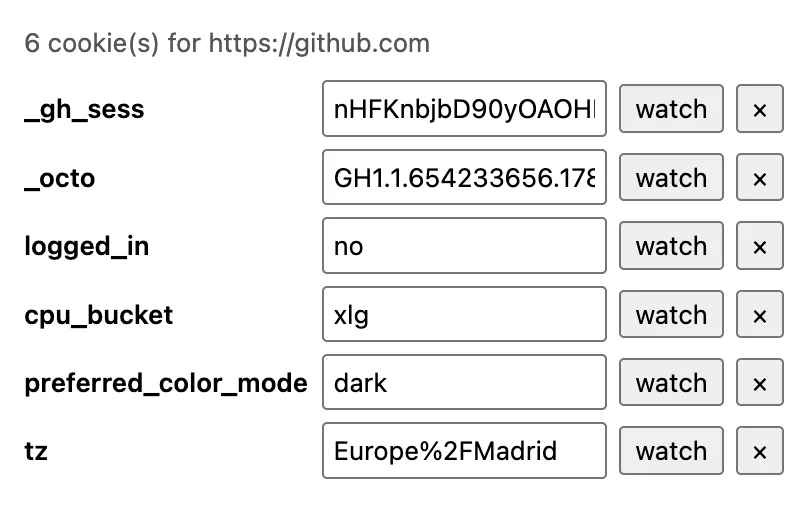
Same code, one manifest line later.
Step 5: write, delete, and stay live
Now the interesting half. Three things get added: editing a value, deleting a cookie, and re-rendering when something changes underneath us.
Add "storage" to the permissions array — the watch button in a moment persists one small object, and chrome.storage is undefined without it:
"permissions": ["cookies", "tabs", "storage"],popup.js (replacing Step 3)
// Cookie Peek — popup. Reads, edits, deletes and live-watches the cookies of
// whatever site is in the active tab.
const statusEl = document.getElementById("status");
const listEl = document.getElementById("list");

let origin = null;
let host = null;

init();

async function init() {
  const [tab] = await chrome.tabs.query({ active: true, currentWindow: true });
  const url = tab?.url ?? "";

  if (!/^https?:\/\//.test(url)) {
    statusEl.textContent = "Open an http(s) page — this one has no cookies to show.";
    return;
  }

  origin = new URL(url).origin;
  host = new URL(url).hostname;
  await render();
}

// set() and remove() want a URL; the API hands you a Cookie. Rebuild one.
// The scheme has to match the cookie's `secure` flag or the call silently
// addresses a cookie that doesn't exist, and the leading dot on a domain
// cookie has to go — Google's sample keeps it and notes in a comment that the
// resulting URL may be invalid, which is a footgun I'd rather just remove.
function cookieUrl(cookie) {
  const scheme = cookie.secure ? "https:" : "http:";
  return `${scheme}//${cookie.domain.replace(/^\./, "")}${cookie.path}`;
}

function coversHost(cookieDomain) {
  const domain = cookieDomain.replace(/^\./, "");
  return host === domain || host.endsWith(`.${domain}`);
}

async function render() {
  let cookies;
  try {
    cookies = await chrome.cookies.getAll({ url: `${origin}/` });
  } catch (error) {
    statusEl.textContent = `Couldn't read cookies: ${error.message}`;
    return;
  }

  statusEl.textContent = `${cookies.length} cookie(s) for ${origin}`;
  listEl.textContent = "";

  for (const cookie of cookies) listEl.append(buildRow(cookie));
}

function buildRow(cookie) {
  const row = document.createElement("div");
  row.className = "row";

  const name = document.createElement("span");
  name.className = "name";
  name.textContent = cookie.name;
  name.title = `${cookie.domain}${cookie.path}${cookie.httpOnly ? " · httpOnly" : ""}`;

  const value = document.createElement("input");
  value.value = cookie.value;
  value.addEventListener("change", () => saveCookie(cookie, value.value));

  const watch = document.createElement("button");
  watch.textContent = "watch";
  watch.addEventListener("click", async () => {
    await chrome.storage.local.set({ watch: { name: cookie.name, host } });
    statusEl.textContent = `Watching ${cookie.name} on ${host}`;
  });

  const remove = document.createElement("button");
  remove.textContent = "×";
  remove.addEventListener("click", () => deleteCookie(cookie));

  row.append(name, value, watch, remove);
  return row;
}

async function saveCookie(cookie, value) {
  const details = {
    url: cookieUrl(cookie),
    name: cookie.name,
    value,
    path: cookie.path,
    secure: cookie.secure,
    httpOnly: cookie.httpOnly,
    sameSite: cookie.sameSite,
    storeId: cookie.storeId
  };

  // A host-only cookie has no domain attribute. Send one anyway and you don't
  // update the cookie — you create a second, broader one beside it.
  if (!cookie.hostOnly) details.domain = cookie.domain;
  if (!cookie.session) details.expirationDate = cookie.expirationDate;

  try {
    await chrome.cookies.set(details);
  } catch (error) {
    statusEl.textContent = `set() refused it: ${error.message}`;
  }
}

async function deleteCookie(cookie) {
  try {
    await chrome.cookies.remove({
      url: cookieUrl(cookie),
      name: cookie.name,
      storeId: cookie.storeId
    });
  } catch (error) {
    statusEl.textContent = `remove() refused it: ${error.message}`;
  }
}

// Live updates. This listener lives in the popup because the popup is what's
// on screen — when it closes, the listener goes with it, which is correct.
chrome.cookies.onChanged.addListener(({ cookie }) => {
  if (!origin || !coversHost(cookie.domain)) return;
  // Don't yank the field out from under someone mid-edit.
  if (document.activeElement?.tagName === "INPUT") return;
  render();
});
chrome.cookies.set() mirrors the HTTP Set-Cookie header nearly field for field, which is the mental model to keep: you're not patching an object, you're re-issuing the cookie. Anything you leave out gets a default, not the previous value. That's why saveCookie copies path, secure, httpOnly, sameSite and the expiry across — drop expirationDate and you've quietly demoted a persistent login to a session cookie.
The hostOnly branch is the one that produces genuinely confusing bugs. A cookie set without a Domain attribute is host-only; the API reports that as a boolean but expects you to express it by omitting domain on the way back in. Pass cookie.domain for a host-only cookie and set() succeeds, the UI refreshes, and now there are two cookies with the same name — one of which shadows the other on the next request.
Step 6: watching while nobody's looking
The popup's listener dies with the popup. If you want to know that a session cookie vanished at 3am, that has to live in the service worker.
service-worker.js
// Cookie Peek — background. One job: notice when the watched cookie goes away.
// Registered at the top level and unconditionally, so Chrome knows this
// extension cares about cookie changes and can start the worker to deliver one.
// A listener added inside a function is a listener Chrome never hears about.
chrome.cookies.onChanged.addListener(async ({ cookie, cause, removed }) => {
  const { watch } = await chrome.storage.local.get("watch");
  if (!watch || cookie.name !== watch.name) return;

  const domain = cookie.domain.replace(/^\./, "");
  if (!(watch.host === domain || watch.host.endsWith(`.${domain}`))) return;

  // Updating a cookie is implemented as a remove followed by a set, and that
  // remove arrives with cause "overwrite". Count it as a loss and your session
  // watcher fires on every page load that refreshes the token.
  if (removed && cause !== "overwrite") {
    await chrome.storage.local.set({ lostAt: new Date().toISOString(), cause });
    await chrome.action.setBadgeBackgroundColor({ color: "#B3541E" });
    await chrome.action.setBadgeText({ text: "!" });
  } else if (!removed) {
    await chrome.action.setBadgeText({ text: "" });
  }
});
That cause !== "overwrite" line is the whole reason this step exists. The API docs spell out the two-step behaviour — a cookie update generates a removal with cause "overwrite", immediately followed by a set with cause "explicit" — and every naive logout detector I've written ignored it and then cried wolf on every single request that rotated a token.
Wire the worker in, and this is the manifest you finish with:
manifest.json (final)
{
  "manifest_version": 3,
  "name": "Cookie Peek",
  "version": "1.0",
  "description": "Lists, edits and watches the cookies of the site in the current tab.",
  "permissions": ["cookies", "tabs", "storage"],
  "host_permissions": ["<all_urls>"],
  "background": {
    "service_worker": "service-worker.js"
  },
  "action": {
    "default_popup": "popup.html",
    "default_title": "Cookies for this site"
  }
}
Be honest with yourself about what this buys you. Chrome starts the worker to deliver the event, the callback runs, and then the worker goes away again — the documented idle timeout is 30 seconds, and module-scope variables do not survive it. Which is why the watch target and the result both go through chrome.storage rather than a variable at the top of the file. "Always-on cookie monitoring" is not a thing you can promise a user in MV3; "we noticed and left you a badge" is.
While we're here: the old advice that you keep the worker alive by having your UI open a chrome.runtime port is out of date. Per the current lifecycle docs, opening a port no longer resets the idle timer on its own — messages crossing it do. If you find yourself needing that trick, the design is usually the problem.
Load it and try it
- Open
chrome://extensions. - Turn on Developer mode (top right).
- Load unpacked → pick your
cookie-peekfolder. - Go to a site you're logged into and click the extension icon.
- Edit a value and press Tab. Delete a throwaway cookie with ×. Both should take effect immediately — reload the page and check.
- Click watch on a session cookie, close the popup, then log out of the site. The toolbar icon picks up a
!.
Troubleshooting empty results and duplicate cookies
Check the cookies API reference against the exact cookie you see in DevTools:
| Symptom | Check | Fix |
|---|---|---|
| Empty list everywhere | cookies and granted host access |
Add the matching host permission and reload the extension. |
| Empty list on one URL | Cookie domain and path | Query a URL covered by the cookie's scope. |
| Cookie in another store is missing | storeId |
Find the tab's store with getAllCookieStores() and pass its ID. |
| Partitioned cookie is missing | partitionKey |
Query its top-level-site partition; see the note below. |
| Editing creates a duplicate | hostOnly and domain |
Preserve the original scope; omit domain for a host-only cookie. |
| Deletion misses a secure cookie | URL scheme and path | Rebuild an https:// URL matching the cookie. |
storage.local is undefined |
Manifest permissions | Add storage. |
| Badge fires constantly | Change listener | Restore the sample's cause !== "overwrite" guard. |
Cross-browser note
This one ports well. Firefox implements the same surface as browser.cookies, with the same getAll/set/remove/onChanged shape, and MDN's task-shaped guide is worth reading even if you only ship on Chrome. Since Chrome 148 the browser.* namespace works in Chrome too — I wrote about what that does and doesn't fix separately.
The real difference is stores. Both browsers expose getAllCookieStores(), but Firefox has container tabs, so a single window can have several stores in play at once and a cookie's storeId is load-bearing rather than incidental. That's why storeId is threaded through set() and remove() above instead of being left to default — on Chrome it costs nothing, on Firefox it's the difference between editing the cookie you clicked and one in a different container.
Why are partitioned cookies missing?
One Chrome-side subtlety: by default every method operates on unpartitioned cookies. Cookies set with the Partitioned attribute — CHIPS — need an explicit partitionKey with the top-level site, or they simply won't appear in your list. If your panel is missing a cookie you can see in DevTools, that's the first thing to check.
Before you publish
Look at what this extension asks for: cookies, tabs, storage, <all_urls>. The first three are cheap. The last one is why cookie extensions get read closely — and it's worth reading what actually happened to that category before you inherit its reputation.
The fix is to ask at the moment the user points at a site, not at install:
"optional_host_permissions": ["<all_urls>"],...and then, from a click handler in the popup:
const granted = await chrome.permissions.request({ origins: [`${origin}/*`] });
if (granted) await render();
Your install prompt loses its scariest line, and the user grants exactly the origin they were looking at. It needs the permissions API and a real user gesture — I walked through the full pattern, including the revoke path, in the optional-permissions tutorial.
Then scan the build before a reviewer does:
npx @extenshi/cli scan ./cookie-peekThe CLI flags permission bloat and risky API usage — useful here specifically, because cookies plus broad host access is a combination that gets manual review. You get 3 scans and 10 reads free, one-time; past that, prepaid credit packs cover it and never expire. Comparing your permission set against what similar extensions actually declare is a decent sanity check too. To look up a published extension, paste its store URL into the checker.
Wrapping up
Four things carry most of the weight here:
"cookies"is half a permission. Host permissions decide what you can see, and their absence looks exactly like an empty site.set()re-issues the cookie. Copy every attribute forward, and leavedomainoff host-only cookies.- Rebuild the URL from the cookie. Scheme from
secure, no leading dot, and carry thestoreId. "overwrite"is not a logout. Filter it, or your watcher is noise.
Swap the popup for a side panel and you have a session debugger that stays open. Swap the badge for a chrome.notifications call and you have a login-expiry warner. The API underneath doesn't change.
Shipping something on top of this? Once it's live, installs, retention and the reviews landing on your listing become their own problem. Explore extension analytics → and claim your extension to get verified data next to the security scan.
Sources
- chrome.cookies API reference — Chrome for Developers (Google)
- Declare permissions — Chrome for Developers (Google)
- The extension service worker lifecycle — Chrome for Developers (Google)
- CHIPS: cookies having independent partitioned state — Chrome for Developers (Google)
- cookies — WebExtensions API reference — MDN Web Docs (Mozilla)
- Work with the Cookies API — MDN Web Docs (Mozilla)
- Set-Cookie — MDN Web Docs (Mozilla)
- api-samples/cookies/cookie-clearer — GoogleChrome/chrome-extensions-samples (Apache-2.0)
- Building a cookie manager Chrome extension: what I learned from the MV3 transition — DEV Community (community walkthrough; its keep-alive advice predates the current lifecycle docs cited above)
Further reading
📚 Building Browser Extensions, 2nd Edition by Matt Frisbie — Amazon | Apress. Chapter 10 catalogues which permissions produce which install-time warning strings, which is how I ended up rethinking the manifest above; Chapter 11 covers cookies in the wider context of extension networking and auth.
This article is a hands-on tutorial based on the official Chrome Extensions documentation and Google's Apache-2.0 sample code. Code is provided as-is for educational purposes; verify API behavior against the current developer.chrome.com reference before shipping. If you believe anything here is inaccurate, contact [email protected] and we'll review and update.
Related Articles

The `cookies` permission explained: what browser extensions can really access in your sessions
The cookies permission lets extensions read, write, and delete cookies — including session tokens. Here's what that means for your accounts and how to check.

Optional permissions in Chrome extensions: ask at the click, not at install
Chrome extension optional permissions, end to end: install with no warning, then request topSites and a single host at runtime. Full MV3 code, ~25 minutes.

chrome.alarms in Manifest V3: background jobs that outlive the service worker
MV3 kills setInterval. Build a Chrome extension background job with chrome.alarms that survives service worker termination — full runnable code, ~20 min.
Cookie extensions reviewed: Cookie-Editor, Cookie AutoDelete & the banner blockers
Cookie extensions touch your session tokens and every site you visit. I compared Cookie-Editor, Cookie AutoDelete and the banner blockers on who owns them.