Record the current tab from an MV3 extension: tabCapture and offscreen documents
A service worker can't hold a MediaStream. Build a Chrome extension that records the current tab's video and audio with chrome.tabCapture — full code, ~30 min.
Everyone writes the same first version of a tab recorder, and it dies on the same line:
Uncaught (in promise) TypeError: Cannot read properties of undefined (reading 'getUserMedia')The code looks reasonable. chrome.tabCapture is an extension API, extension APIs live in the service worker, so you called it there and piped the result into MediaRecorder. But a service worker has no navigator.mediaDevices, no MediaRecorder, and — more fundamentally — no way to hold a live MediaStream, because it gets torn down every time Chrome decides it's idle.
So Chrome hands you a string instead. chrome.tabCapture.getMediaStreamId() returns an opaque stream ID, and you pass that string to a context that does have a DOM: an offscreen document. That hand-off is the whole architecture, and it's why every tutorial written before Chrome 116 describes something that no longer applies.
What you'll build: "Rec Tab" — click the toolbar icon, the current tab starts recording video and audio; click again and a .webm lands in your downloads. Difficulty: advanced-ish — you should have loaded an unpacked extension before and be comfortable with promises. Nothing beyond Chrome 116+ and a text editor is required. Time: ~30 minutes.
Why the obvious tabCapture approach can't work
Two constraints collide here.
The first is that a MediaStream is not serializable. Everything crossing chrome.runtime.sendMessage gets structured-cloned, and a live media stream is a handle to a running pipeline, not data. It was never going to survive the trip.
The second is the service worker's mortality. As Matt Frisbie puts it in Building Browser Extensions, 2nd Edition (Apress, 2025), MV3 background code has to be written on the assumption that its in-memory state will be thrown away and the script re-evaluated from the top — in practice after roughly 30 seconds of idle. A recorder holding a stream in a module variable is a recorder that stops mid-take.
The stream ID sidesteps both. It's a short string, it clones fine, and the recording state lives in the offscreen document — which, unlike the worker, stays alive as long as it's open.
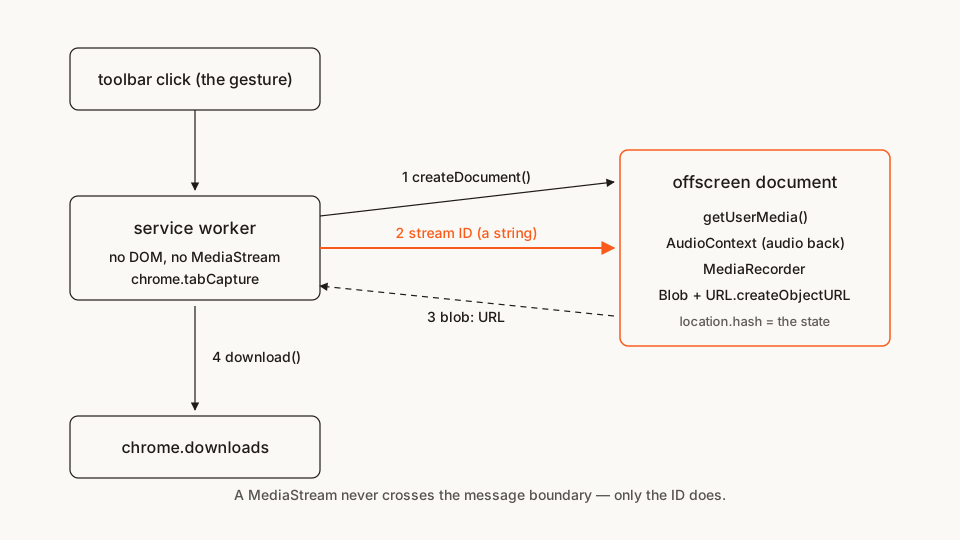
Two details from the chrome.tabCapture reference that will bite you if you skim past them:
- The ID is single-use and expires within seconds if nothing consumes it. Get it late — after the offscreen document exists — not first thing in the handler.
- Since Chrome 116, an ID obtained in a service worker can be consumed in an offscreen document. Before that it couldn't, which is exactly why the old tutorials build something else.
The file tree
Four files, no build step, no dependencies:
rec-tab/
├── manifest.json        # permissions + the service worker
├── service-worker.js    # the orchestrator: gesture, stream ID, saving
├── offscreen.html       # the hidden page that has a DOM
└── offscreen.js         # getUserMedia + MediaRecorder live here
Rather clone than type? The finished extension lives in our public samples repo — load it, then read on with this tutorial as the guided tour.
Make a folder called rec-tab and let's fill it in.
Step 1: the manifest
manifest.json
{
  "manifest_version": 3,
  "name": "Rec Tab",
  "version": "1.0",
  "description": "Records the current tab's video and audio to a .webm file.",
  "minimum_chrome_version": "116",
  "permissions": ["tabCapture", "offscreen"],
  "background": {
    "service_worker": "service-worker.js"
  },
  "action": {
    "default_title": "Start / stop recording this tab"
  }
}
minimum_chrome_version isn't decoration. Google's own tabCapture recorder sample (Apache-2.0) declares the same floor, because on Chrome 115 this extension installs cleanly and then silently refuses to record. Declaring it turns a mystery bug into an install-time message.
Two permissions to start with. "downloads" gets added in Step 5, when there's a file to save — adding permissions before the code earns them is how listings end up asking for things nobody can justify in review. (If you write manifests often, our free in-browser Manifest V3 generator scaffolds this block, no sign-up.)
Worth knowing what "tabCapture" costs you: it grants access to the contents of a tab, which is about as sensitive as extension permissions get. It's also invocation-gated in the same way activeTab is — the docs are explicit that it "can only be called after the user invokes an extension." Frisbie makes the same point about the screenshot API in his tutorials chapter: reaching for the invocation-scoped permission instead of the broad one is what lets you skip "tabs" entirely. We do, and this extension never declares a host permission.
Step 2: the hidden page
offscreen.html
<!doctype html>
<html>
  <head>
    <meta charset="utf-8" />
    <title>Rec Tab — recorder</title>
  </head>
  <body>
    <script src="offscreen.js"></script>
  </body>
</html>
That's genuinely all of it. Nobody ever sees this page; it exists because it has navigator.mediaDevices and the service worker doesn't. If offscreen documents are new to you, I wrote up the general pattern and its lifecycle traps separately — here I'll stay on the capture-specific parts.
Step 3: the service worker
The worker's job is small: catch the click, make sure there's a document to record in, get the stream ID, hand it over.
service-worker.js
// Rec Tab — background service worker.
// Nothing here touches media. It brokers a string.

const OFFSCREEN_PATH = "offscreen.html";

async function findOffscreenDocument() {
  // No documentUrls filter on purpose: the offscreen page writes its state
  // into its own location.hash, so a filter matching the plain path would
  // stop matching the moment recording starts.
  const contexts = await chrome.runtime.getContexts({});
  return contexts.find((c) => c.contextType === "OFFSCREEN_DOCUMENT");
}

chrome.action.onClicked.addListener(async (tab) => {
  if (!tab.id) return;

  const existing = await findOffscreenDocument();

  // Already rolling? This click means stop.
  if (existing?.documentUrl.endsWith("#recording")) {
    chrome.runtime.sendMessage({ target: "offscreen", type: "stop-recording" });
    return;
  }

  if (!existing) {
    await chrome.offscreen.createDocument({
      url: OFFSCREEN_PATH,
      reasons: ["USER_MEDIA", "BLOBS"],
      justification:
        "Record the captured tab with MediaRecorder and build the resulting file."
    });
  }

  // Late on purpose: the ID is single-use and expires in seconds.
  let streamId;
  try {
    streamId = await chrome.tabCapture.getMediaStreamId({ targetTabId: tab.id });
  } catch (err) {
    // chrome:// pages, the Web Store, the PDF viewer — not capturable.
    console.error("Could not capture this tab:", err);
    return;
  }

  chrome.runtime.sendMessage({
    target: "offscreen",
    type: "start-recording",
    data: streamId
  });

  chrome.action.setBadgeBackgroundColor({ color: "#FB5B1A" });
  chrome.action.setBadgeText({ text: "REC" });
});
The reasons array is two entries because the document does two things Chrome tracks separately: USER_MEDIA for getUserMedia(), BLOBS for URL.createObjectURL(). Per the offscreen reference, only AUDIO_PLAYBACK sets an automatic lifetime — everything else stays open until you close it, which becomes Step 5's problem.
And notice where the state lives. Not in a variable — in documentUrl. The worker asks the document what it's doing, because the worker can be terminated between two clicks and a boolean wouldn't survive that. Google's sample uses the same trick, and it's the cheapest correct answer I know for "one bit of state that outlives the worker."
Step 4: turning the string back into a stream
offscreen.js
// Rec Tab — the offscreen document.
// chrome.runtime is the only extension API available in here.

let recorder;
let chunks = [];

chrome.runtime.onMessage.addListener((message) => {
  if (message.target !== "offscreen") return;

  switch (message.type) {
    case "start-recording":
      startRecording(message.data);
      break;
    case "stop-recording":
      stopRecording();
      break;
    default:
      console.warn(`Unexpected message type: '${message.type}'.`);
  }
});

async function startRecording(streamId) {
  if (recorder?.state === "recording") return;

  // The mandatory/chromeMediaSource constraints are the documented way to
  // redeem a tabCapture stream ID. They are not standard getUserMedia
  // constraints and they only work with an unexpired ID.
  const media = await navigator.mediaDevices.getUserMedia({
    audio: {
      mandatory: { chromeMediaSource: "tab", chromeMediaSourceId: streamId }
    },
    video: {
      mandatory: { chromeMediaSource: "tab", chromeMediaSourceId: streamId }
    }
  });

  // Capturing a tab MUTES it for the user. Route the captured audio back
  // out to the speakers or they hear silence for the whole recording.
  const output = new AudioContext();
  output.createMediaStreamSource(media).connect(output.destination);

  recorder = new MediaRecorder(media, { mimeType: "video/webm" });
  recorder.ondataavailable = (event) => chunks.push(event.data);
  recorder.onstop = () => {
    const blob = new Blob(chunks, { type: "video/webm" });

    chrome.runtime.sendMessage({
      target: "service-worker",
      type: "recording-stopped",
      // The blob stays alive in THIS document; only the URL travels.
      data: { url: URL.createObjectURL(blob) }
    });

    recorder = undefined;
    chunks = [];
    window.location.hash = "";
  };

  recorder.start();
  window.location.hash = "recording";
}

function stopRecording() {
  if (recorder?.state !== "recording") return;

  const stream = recorder.stream;
  recorder.stop();
  // Stopping the tracks is what clears the "recording" indicator on the tab.
  stream.getTracks().forEach((track) => track.stop());
}
The AudioContext block is the bug every tab recorder ships once. The tabCapture docs say it plainly: once a stream is obtained for a tab, that tab's audio stops playing to the user — the same behaviour as getDisplayMedia() with suppressLocalAudioPlayback. Three lines of AudioContext route it back to the speakers. Leave them out and your recording is fine while your user sits in silence wondering what broke.
 Chrome marks the captured tab itself — the badge is ours, the tab indicator is the browser's.
Step 5: getting the file out
The blob lives in the offscreen document. The downloads API doesn't exist there — chrome.runtime is the only extension API an offscreen document gets — so the URL goes back to the worker and the worker saves it. Chrome's own service-worker migration guide points at this exact shape: when you need an object URL, make it in an offscreen document and pass it back for the download.
Add the permission that earns:
"permissions": ["tabCapture", "offscreen", "downloads"]Then the finished worker — Step 3's half plus the saving half, in one file:
service-worker.js (complete — replaces the Step 3 version)
// Rec Tab — background service worker.
// Nothing here touches media. It brokers a string, then saves a file.

const OFFSCREEN_PATH = "offscreen.html";

// Which downloads are ours, and therefore which blob URLs are still needed.
const pending = new Set();

async function findOffscreenDocument() {
  // No documentUrls filter on purpose: the offscreen page writes its state
  // into its own location.hash, so a filter matching the plain path would
  // stop matching the moment recording starts.
  const contexts = await chrome.runtime.getContexts({});
  return contexts.find((c) => c.contextType === "OFFSCREEN_DOCUMENT");
}

chrome.action.onClicked.addListener(async (tab) => {
  if (!tab.id) return;

  const existing = await findOffscreenDocument();

  // Already rolling? This click means stop.
  if (existing?.documentUrl.endsWith("#recording")) {
    chrome.runtime.sendMessage({ target: "offscreen", type: "stop-recording" });
    return;
  }

  if (!existing) {
    await chrome.offscreen.createDocument({
      url: OFFSCREEN_PATH,
      reasons: ["USER_MEDIA", "BLOBS"],
      justification:
        "Record the captured tab with MediaRecorder and build the resulting file."
    });
  }

  // Late on purpose: the ID is single-use and expires in seconds.
  let streamId;
  try {
    streamId = await chrome.tabCapture.getMediaStreamId({ targetTabId: tab.id });
  } catch (err) {
    // chrome:// pages, the Web Store, the PDF viewer — not capturable.
    console.error("Could not capture this tab:", err);
    return;
  }

  chrome.runtime.sendMessage({
    target: "offscreen",
    type: "start-recording",
    data: streamId
  });

  chrome.action.setBadgeBackgroundColor({ color: "#FB5B1A" });
  chrome.action.setBadgeText({ text: "REC" });
});

// Both listeners below sit at the TOP LEVEL. Chrome runs one turn of the
// event loop after waking the worker and only then fires the queued event —
// a listener attached inside a function can be missed entirely.
chrome.runtime.onMessage.addListener((message) => {
  if (message.target !== "service-worker") return;
  if (message.type !== "recording-stopped") return;
  saveRecording(message.data.url);
});

async function saveRecording(url) {
  chrome.action.setBadgeText({ text: "" });

  const id = await chrome.downloads.download({
    url,
    filename: `tab-recording-${Date.now()}.webm`,
    saveAs: false
  });

  pending.add(id);
}

chrome.downloads.onChanged.addListener(async (delta) => {
  if (!pending.has(delta.id)) return;
  if (delta.state?.current !== "complete") return;

  pending.delete(delta.id);

  // Closing the document destroys its blob URLs — which is why we wait for
  // "complete" first. Kill it mid-write and you get a truncated .webm.
  if (pending.size === 0) {
    try {
      await chrome.offscreen.closeDocument();
    } catch {
      // Already gone.
    }
  }
});
The ordering at the bottom is the part worth remembering. A blob URL is only valid while the document that created it is alive, and Chrome is still reading from it after download() resolves — that promise resolves when the download starts, not when it finishes. Close early and you get a zero-byte file, or a .webm that plays for two seconds and stops. The Recall.ai walkthrough of the same architecture flags the identical trap.
One honest caveat: if Chrome tears down the worker between download() and the complete event, that listener is gone and the offscreen document lingers. Nothing breaks — the next click finds the existing document and reuses it — but it's memory you didn't mean to hold. For a recorder where that matters, write the blob to IndexedDB from the offscreen document instead of passing a URL around; Google's sample notes the same upgrade path.
Load it and try it
- Open
chrome://extensions. - Flip on Developer mode (top right).
- Click Load unpacked and pick your
rec-tabfolder. - Open a normal page with sound — a video, anything playing audio.
- Click the extension icon. The badge turns to REC and Chrome marks the tab as being captured.
- Let it run a few seconds, then click the icon again. A
tab-recording-<timestamp>.webmappears in your downloads.
Play it back. You should have video of the tab and its audio — and you should have heard that audio the whole time it was recording.
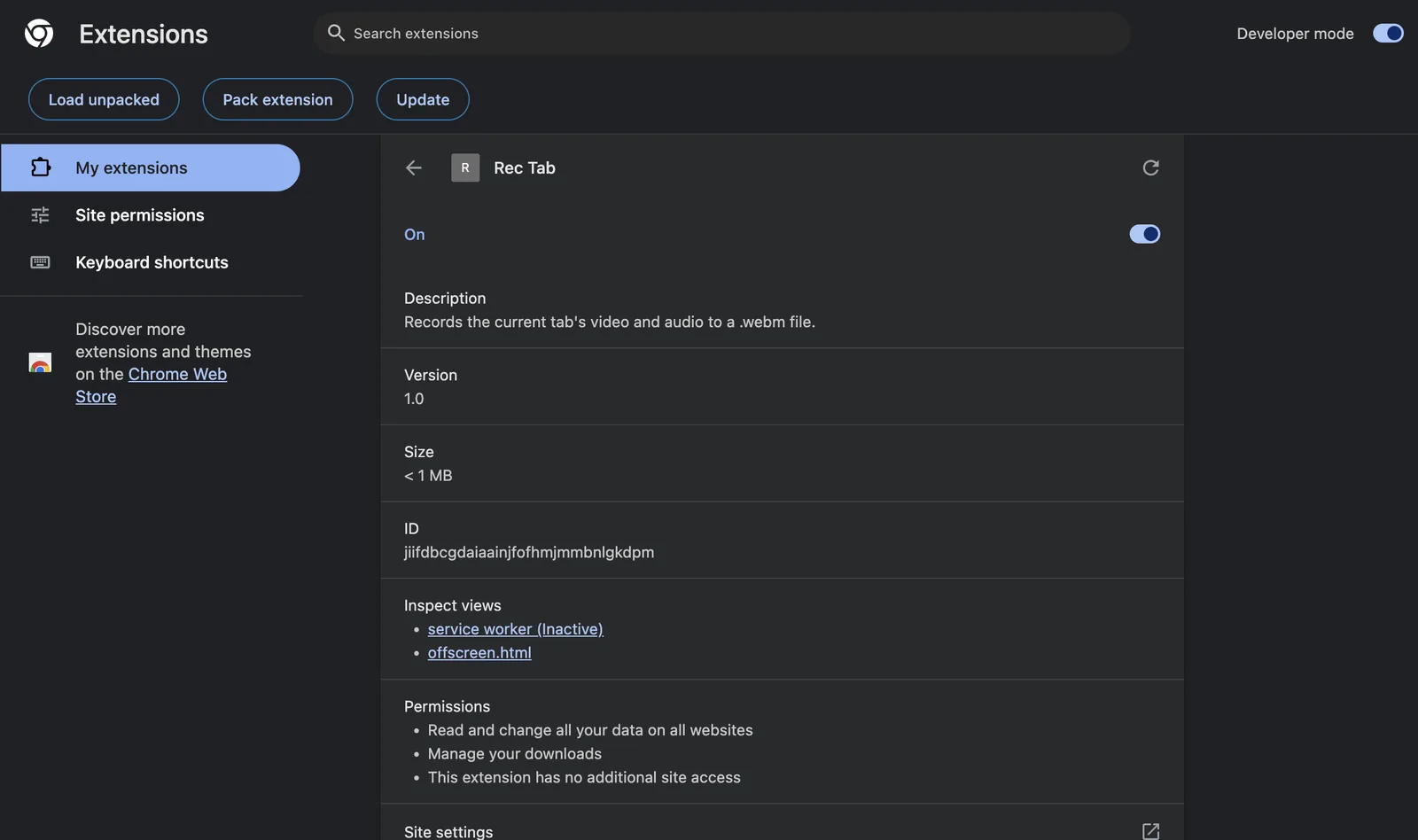 While recording, the offscreen document shows up under Inspect views — that's where the MediaRecorder actually lives.
If it doesn't work, check these first:
Cannot read properties of undefined (reading 'getUserMedia'). The capture code is still in the service worker. It has to be inoffscreen.js.Invalid stream id, or a stream that never opens. The ID was already used, or it expired while you awaited something between getting it and consuming it. Get it last, send it immediately.- The click does nothing on some pages.
chrome://pages, the Chrome Web Store and the PDF viewer can't be captured. Try an ordinary site — thecatchin the click handler turns that rejection into a log line. - The tab goes silent while recording. The
AudioContextreroute is missing. - The
.webmis empty or truncated. Something closed the offscreen document before the download reportedcomplete. - Nothing at all, on Chrome 115 or older. A stream ID from a service worker can't be redeemed in an offscreen document there. That's the floor, not a bug.
Cross-browser note
This one doesn't port, and I'd rather say so than hand you a polyfill that pretends otherwise.
chrome.tabCapture is Chromium-only, and so is chrome.offscreen. Edge inherits both. Firefox implements neither: its MV3 background is an event page with a real DOM, so it has no need for offscreen documents, and it has no tabCapture equivalent for streams at all — tabs.captureTab gives you a still image, not a stream. If you need recording on Firefox, the path is getDisplayMedia() from an extension page, with the browser's own picker asking the user what to share — a different UX, not a different implementation of the same one.
So gate the feature rather than shimming it:
if (!chrome.tabCapture?.getMediaStreamId) {
  // Firefox: fall back to getDisplayMedia from an extension page.
}
Before you publish
Look at what this extension ends up asking for: tabCapture, offscreen, downloads. No host permissions, no <all_urls>, no tabs. That's about as lean as a recorder gets — and it still lands in the category reviewers read most carefully, because "can see the contents of a tab" is the sentence users react to. Skimming what comparable recorders actually declare in the Extenshi catalog is a fast way to calibrate before you write your listing.
Then scan your own build:
npx @extenshi/cli scan ./rec-tabThe CLI flags permission bloat, risky API usage and known-bad patterns before a reviewer does. You get 3 scans and 10 reads free, one-time; past that, prepaid credit packs cover it and never expire. It's the same analysis behind the public security report on a listing — better you read yours first.
Wrapping up
The recording part of a tab recorder is fifteen lines of MediaRecorder. Everything else is plumbing around two MV3 facts, and if you keep these four straight you're done:
- Move the string, not the stream.
getMediaStreamId()in the worker,getUserMedia()in the offscreen document. - Get the ID last. Single-use, expires in seconds, and every
awaitbefore it is a chance to waste it. - Give the audio back. Capturing mutes the tab;
AudioContextun-mutes it. - Keep state outside the worker. The document's own URL is a fine place for one bit of it.
Swap MediaRecorder for a WebSocket and you have a live-streaming extension. Swap it for a canvas pipeline and you have a thumbnailer. The hand-off above doesn't change.
Shipping something on top of this? Once it's live, installs, retention and the reviews landing on your listing become their own problem. Explore extension analytics → and claim your extension to get verified data next to the security scan.
Sources
- chrome.tabCapture API reference — Chrome for Developers (Google)
- chrome.offscreen API reference — Chrome for Developers (Google)
- Audio recording and screen capture — Chrome for Developers (Google)
- Migrate to a service worker — Chrome for Developers (Google)
- chrome.downloads API reference — Chrome for Developers (Google)
- functional-samples/sample.tabcapture-recorder — GoogleChrome/chrome-extensions-samples (Apache-2.0)
- api-samples/tabCapture — GoogleChrome/chrome-extensions-samples (Apache-2.0)
- MediaRecorder — MDN Web Docs (Mozilla)
- MediaStream — MDN Web Docs (Mozilla)
- AudioContext — MDN Web Docs (Mozilla)
- MediaDevices.getDisplayMedia() — MDN Web Docs (Mozilla)
- tabs.captureTab — MDN Web Docs (Mozilla)
- How to build a Chrome recording extension using the tabCapture API — Recall.ai (vendor walkthrough; corroborated against the official screen-capture how-to above)
Further reading
📚 Building Browser Extensions, 2nd Edition by Matt Frisbie — Amazon | Apress. Chapter 6 covers the service-worker lifecycle this whole architecture works around; Chapter 12 walks through capture-flavoured tutorials, including the screenshot extension whose permission choices I borrowed above.
This article is a hands-on tutorial based on the official Chrome Extensions documentation and Google's Apache-2.0 sample code. Code is provided as-is for educational purposes; verify API behavior against the current developer.chrome.com reference before shipping. If you believe anything here is inaccurate, contact [email protected] and we'll review and update.
Related Articles
Offscreen documents in Chrome extensions: how to use the DOM from an MV3 service worker
MV3 service workers have no DOM. Build a Chrome extension that parses HTML and writes to the clipboard from an offscreen document — runnable code, ~25 min.
chrome.alarms in Manifest V3: background jobs that outlive the service worker
MV3 kills setInterval. Build a Chrome extension background job with chrome.alarms that survives service worker termination — full runnable code, ~20 min.
Runtime script injection in Chrome extensions: ISOLATED vs MAIN world
chrome.scripting.executeScript end to end: inject on click with activeTab, pass args safely, and choose ISOLATED or MAIN world. Full MV3 code, ~25 min.
Screen recorder extensions reviewed: the permissions they hold, the Screencastify webcam bug & safer picks
Screen recorder extensions can reach your camera, mic and every tab. Here's the permission breakdown, the Screencastify webcam bug, and how to record safely.