Message passing in browser extensions: how your content script, service worker and popup actually talk
Build a page highlighter and learn Chrome extension message passing: runtime.sendMessage, the return true rule, tabs.sendMessage and long-lived message ports.
"The message port closed before a response was received."
If you have built extensions for more than a week, you have met this one. You stare at the console, you swear the listener is right there, and the response is undefined anyway. Message passing is the most-searched, most-misunderstood part of extension development — and not because the API is hard. It is because the mental model is missing. Your extension is not one program. It is at least three programs running in different places with different privileges, and the only thing they share is a message channel.
So let's build the model out of working code. We will make Marker, a tiny extension that highlights any word on the page you are looking at — and while building it, wire up every messaging pattern you will actually need: one-time commands, async responses, the reverse direction, and long-lived ports for streaming events.
Three contexts, one extension
Per MDN's anatomy of an extension, the pieces that matter for messaging are:
- The content script runs inside the web page. It sees the whole DOM and almost nothing else — no
chrome.tabs, nochrome.action, just a shortlist of APIs (runtimemessaging,storage,i18n). It lives in an isolated world, so page JavaScript cannot touch its variables — I covered ISOLATED vs MAIN worlds in an earlier piece. - The service worker is the opposite: every privileged
chrome.*API, but no DOM at all. Nodocument, nowindow. It is also mortal — Chrome puts it to sleep after roughly 30 seconds of idleness and wakes it when an event arrives. - The popup (or options page, or side panel) is a real extension page with API access, but it exists only while the user keeps it open. Close it mid-request and the request's UI is gone.
None of these can do the job alone. The content script can find every occurrence of a word on the page but cannot flash the toolbar badge. The service worker can do anything except see the page. The popup can ask, but dies before it can listen. Messaging is how they cover for each other:
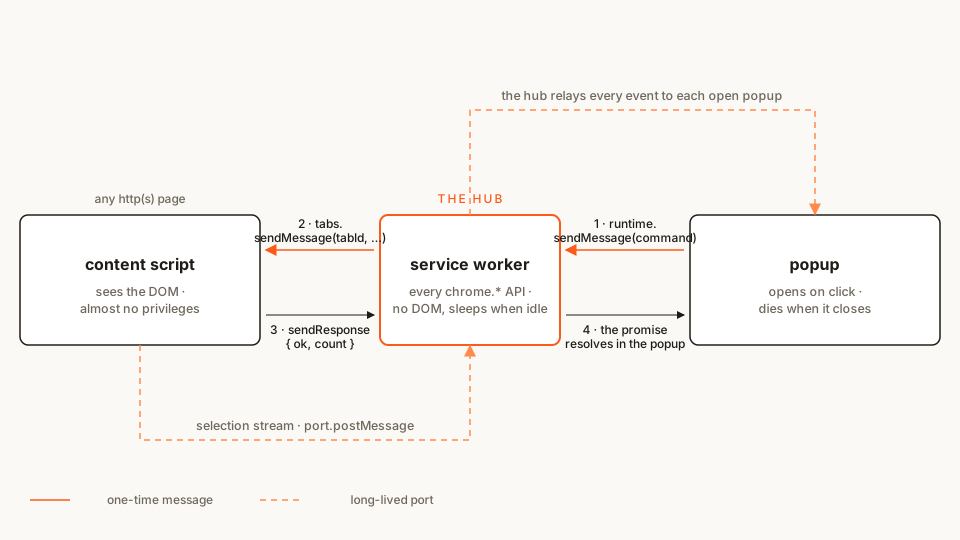 Every message has a sender, a receiver, and — if you are lucky — a response. The hub in the middle is the only part guaranteed to wake up.
Here is the whole extension:
marker/
├── manifest.json
├── sw.js
├── content.js
├── popup.html
├── popup.css
└── popup.js
Rather clone than type? The finished extension lives in our public samples repo — load it, then read on with this tutorial as the guided tour.
By the end you will have a word highlighter driven from the popup, a badge that flashes the match count, and a live feed of whatever text you select on the page. Difficulty: beginner — plain JavaScript and async/await, no build step. Time: ~25 minutes with Chrome and a text editor.
Step 1: the manifest — messaging needs no permissions
manifest.json
{
	"name": "Marker",
	"description": "Highlight any word on the page — a hands-on tour of extension message passing.",
	"version": "1.0",
	"manifest_version": 3,
	"background": {
		"service_worker": "sw.js"
	},
	"action": {
		"default_popup": "popup.html",
		"default_title": "Marker"
	},
	"content_scripts": [
		{
			"matches": ["http://*/*", "https://*/*"],
			"js": ["content.js"]
		}
	]
}
Look at what is not here: no "permissions" key at all. Messaging itself is free — runtime.sendMessage, runtime.onMessage, runtime.connect and tabs.sendMessage require no permission entries. You pay for what you do with messages, not for sending them.
The cost hides elsewhere. "matches": ["http://*/*", "https://*/*"] is host access, and it buys the scary install warning — "Read and change all your data on all websites." For a highlighter that works everywhere, the warning is honest. To inject only when the user clicks the toolbar icon instead, use the activeTab + chrome.scripting pattern from the injection tutorial — smaller warning, but the content script then exists only where you inject it.
One behavior to remember, because it bites everyone once: declared content scripts are injected into pages loaded after the extension installs. Tabs that are already open get nothing. That is the number-one cause of the "Could not establish connection" error you will meet in step 3.
Scaffolding a real project instead of typing along? The manifest generator assembles an MV3 manifest in your browser and previews the install prompt each key triggers — handy for decisions like this one.
Step 2: the content script — the end that sees the page
The content script is the worker bee: it does ordinary DOM work on request and reports back. Ours walks the page's text nodes, wraps every match of a word in a <mark>, and can undo all of it.
content.js
// Marker — content script. Sees the page, holds almost no privileges.
// It answers commands from the extension; it never initiates privileged work.

function highlightWord(word) {
	const needle = word.trim().toLowerCase();
	if (!needle) return 0;

	const walker = document.createTreeWalker(document.body, NodeFilter.SHOW_TEXT, {
		acceptNode(node) {
			const el = node.parentElement;
			if (!el || el.closest('script, style, textarea, mark[data-marker]')) {
				return NodeFilter.FILTER_REJECT;
			}
			return node.nodeValue.toLowerCase().includes(needle)
				? NodeFilter.FILTER_ACCEPT
				: NodeFilter.FILTER_REJECT;
		}
	});

	const nodes = [];
	while (walker.nextNode()) nodes.push(walker.currentNode);

	let count = 0;
	for (const node of nodes) {
		const text = node.nodeValue;
		const lower = text.toLowerCase();
		// Rare Unicode case folding changes string length and shifts offsets — skip those nodes.
		if (lower.length !== text.length) continue;
		// Wrap matches from the end backwards: each split keeps earlier offsets valid.
		let start = lower.lastIndexOf(needle);
		while (start !== -1) {
			const range = document.createRange();
			range.setStart(node, start);
			range.setEnd(node, start + needle.length);
			const mark = document.createElement('mark');
			mark.dataset.marker = 'hit';
			range.surroundContents(mark);
			count += 1;
			const nextFrom = start - needle.length;
			start = nextFrom >= 0 ? lower.lastIndexOf(needle, nextFrom) : -1;
		}
	}
	return count;
}

function clearHighlights() {
	const marks = document.querySelectorAll('mark[data-marker="hit"]');
	for (const mark of marks) {
		const parent = mark.parentNode;
		while (mark.firstChild) parent.insertBefore(mark.firstChild, mark);
		mark.remove();
		parent.normalize();
	}
	return marks.length;
}

chrome.runtime.onMessage.addListener((message, sender, sendResponse) => {
	// Accept commands from our own extension only — never from the page.
	if (sender.id !== chrome.runtime.id) return;
	console.log('[Marker] content script got:', message?.type);

	if (message?.type === 'highlight') {
		sendResponse({ ok: true, count: highlightWord(String(message.word ?? '')) });
	} else if (message?.type === 'clear') {
		sendResponse({ ok: true, cleared: clearHighlights() });
	}
	// Both answers are ready synchronously, so no `return true` is needed here.
});
The DOM plumbing is deliberately boring — the last part is the lesson. Every onMessage listener gets the same three arguments: the message (any JSON-serializable value), the sender (who sent it, and from which tab if it was a content script), and sendResponse (a function that fires the answer back). This listener answers synchronously: by the time highlightWord() returns, the response is ready, so we just call sendResponse and let the listener end. Hold that thought — step 3 is where it gets async, and where the famous error comes from.
Google's own quick-api-reference sample (Apache-2.0) uses this exact shape: a content script asks the worker for a tip of the day; the worker's onMessage listener answers from storage.
Step 3: the service worker — the hub that routes
Now the privileged end. As Matt Frisbie explores in Building Browser Extensions (Apress, 2025), the background service worker is the only component guaranteed to receive and handle every message exactly once — which is why an array of content scripts and popups naturally treats it as a message hub. Ours routes popup commands to whichever tab the user is looking at:
sw.js
// Marker — service worker, the hub. Holds the privileged chrome.* APIs,
// sees no page. Commands from the popup are routed from here to the right tab.

chrome.runtime.onMessage.addListener((message, sender, sendResponse) => {
	// Commands must come from our own extension's pages (the popup).
	// A content-script message would carry sender.tab; a web page could
	// only reach us via onMessageExternal, which we never register.
	if (sender.id !== chrome.runtime.id || sender.tab) return;

	if (message?.type === 'highlight' || message?.type === 'clear') {
		routeToActiveTab(message)
			.then(sendResponse)
			.catch((error) => sendResponse({ ok: false, error: error.message }));
		return true; // the response comes after awaits — keep the channel open
	}
});

async function routeToActiveTab(message) {
	const [tab] = await chrome.tabs.query({ active: true, currentWindow: true });
	if (!tab?.id) return { ok: false, error: 'Could not find the active tab.' };
	console.log('[Marker] hub routing', message.type, '→ tab', tab.id);
	try {
		const result = await chrome.tabs.sendMessage(tab.id, message);
		if (message.type === 'highlight' && result?.ok) flashBadge(String(result.count));
		return result;
	} catch {
		return {
			ok: false,
			error: 'No content script there. Reload the tab — and chrome:// pages never get one.'
		};
	}
}

function flashBadge(text) {
	chrome.action.setBadgeBackgroundColor({ color: '#fb5b1a' });
	chrome.action.setBadgeText({ text });
	setTimeout(() => chrome.action.setBadgeText({ text: '' }), 1500);
}
Three things in this file are the whole tutorial:
return true. The listener cannot answer immediately — it needs two awaits first (tabs.query, thentabs.sendMessage). Returningtruetells Chrome: keep the response channel open, I will callsendResponselater. Forget it and the channel closes the moment the listener returns — the sender gets The message port closed before a response was received. The official messaging guide documents this under responses; it is the most common messaging bug in existence.tabs.sendMessage(tabId, …)is the reverse direction.runtime.sendMessagebroadcasts to your extension's other contexts; it can never reach a content script. To talk into a tab you needchrome.tabs.sendMessagewith the tab's id — and a content script there that is actually listening. If there is none, the promise rejects with Could not establish connection. Receiving end does not exist. The official tabs/screenshot sample (Apache-2.0) pushes data that direction: the worker captures a screenshot and hands it to a waiting tab.senderis your bouncer. Messages from the popup carry nosender.tab; messages from content scripts do. Ours accepts commands only from extension pages, so a setsender.tabmeans "not the popup" — dropped.sender.id !== chrome.runtime.idcan only happen through exotic paths, but the check costs one comparison and teaches the right reflex.
Also notice what we did not need: the "tabs" permission. tabs.query always reveals id, index and windowId; only url, pendingUrl, title and favIconUrl are gated behind permissions. We route by id, so we ask for nothing.
Step 4: the popup — asking and awaiting
The popup is a plain extension page. Its whole job is to send a command and render the answer.
popup.html
<!doctype html>
<html lang="en">
<head>
	<meta charset="utf-8" />
	<title>Marker</title>
	<link rel="stylesheet" href="popup.css" />
</head>
<body>
	<form id="marker-form">
		<input id="word" type="text" placeholder="Word to highlight" autocomplete="off" />
		<button type="submit">Highlight</button>
	</form>
	<p id="status" role="status">Type a word, then hit Highlight.</p>
	<button id="clear" type="button">Clear highlights</button>
	<section id="live" hidden>
		<h1>Live from the page</h1>
		<ul id="feed"></ul>
	</section>
	<script src="popup.js"></script>
</body>
</html>
popup.css
body {
	width: 300px;
	margin: 0;
	padding: 12px;
	font: 13px/1.45 system-ui, sans-serif;
	color: #1f1b16;
	background: #faf9f5;
}
#marker-form {
	display: flex;
	gap: 6px;
}
#word {
	flex: 1;
	padding: 7px 8px;
	font: inherit;
	border: 1px solid #d8d2c6;
	border-radius: 6px;
	background: #fff;
}
button {
	padding: 7px 10px;
	font: inherit;
	font-weight: 600;
	color: #fff;
	background: #fb5b1a;
	border: 0;
	border-radius: 6px;
	cursor: pointer;
}
button:hover {
	background: #e5500f;
}
#clear {
	width: 100%;
	margin-top: 8px;
	font-weight: 500;
	color: #1f1b16;
	background: #fff;
	border: 1px solid #d8d2c6;
}
#status {
	min-height: 2.6em;
	margin: 10px 0 0;
}
#live {
	margin-top: 10px;
	padding-top: 8px;
	border-top: 1px solid #e4e0d8;
}
#live h1 {
	margin: 0 0 6px;
	font-size: 12px;
	letter-spacing: 0.04em;
	text-transform: uppercase;
	color: #6f675c;
}
#feed {
	margin: 0;
	padding: 0;
	list-style: none;
}
#feed li {
	padding: 4px 0;
	border-bottom: 1px solid #eee9df;
}
popup.js
const form = document.getElementById('marker-form');
const wordInput = document.getElementById('word');
const statusEl = document.getElementById('status');
const clearButton = document.getElementById('clear');

async function send(command) {
	try {
		const result = await chrome.runtime.sendMessage(command);
		if (result?.ok) return result;
		return {
			ok: false,
			error: result?.error ?? 'The service worker did not answer — reload the extension.'
		};
	} catch (error) {
		return { ok: false, error: error.message };
	}
}

form.addEventListener('submit', async (event) => {
	event.preventDefault();
	const word = wordInput.value.trim();
	if (!word) return;
	statusEl.textContent = 'Highlighting…';
	const result = await send({ type: 'highlight', word });
	statusEl.textContent = result.ok ? `Marked ${result.count} × “${word}”.` : result.error;
});

clearButton.addEventListener('click', async () => {
	const result = await send({ type: 'clear' });
	statusEl.textContent = result.ok ? `Cleared ${result.cleared} highlight(s).` : result.error;
});
chrome.runtime.sendMessage returns a promise in modern Chrome, so the popup just awaits it. One rule Frisbie hammers in the same book: use the promise form or the callback form, never both in one call — and check the runtime reference before assuming an older API has a promise form at all.
The #live section stays hidden for now. Step 5 wakes it up.
Load it and try it
- Put the six files in a
marker/folder. - Open
chrome://extensions, flip Developer mode on (top right), click Load unpacked, pick the folder. - Open any article — and reload the tab. Content scripts are only injected into pages loaded after install, and your open tabs predate the extension.
- Click the Marker icon, type a word from the article, hit Highlight. The status says
Marked 7 × "the", every match on the page turns yellow, and the toolbar badge flashes the count. - Try Clear highlights — the page goes back to normal, and the status tells you how many marks it removed.
- Now try it on
chrome://extensionsitself: a graceful "No content script there…" instead of a console fire. Chrome never injects content scripts into its own pages.
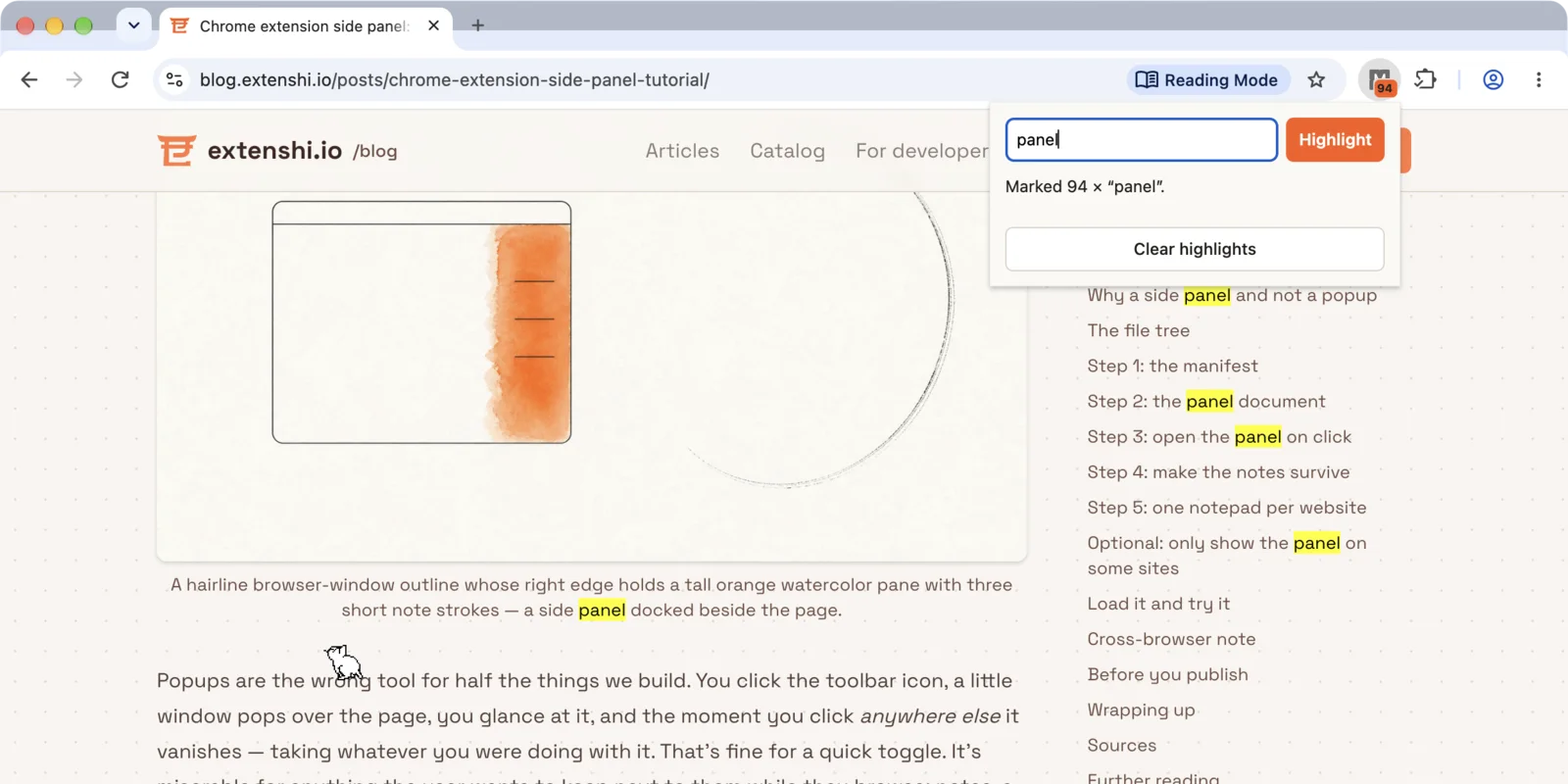 One command, three contexts: the popup asked, the worker routed, the content script marked
Step 5: long-lived ports — when one message is not enough
One-time messages are request/response: you ask, you get answered, the channel dies. Fine for commands, wrong for streams. If the page must report every selection as it happens, a sendMessage round trip per event is wasteful — and a popup cannot subscribe at all, since runtime.sendMessage answers the sender, not some third window.
For streams, the messaging guide points at long-lived connections: runtime.connect() opens a Port that both ends keep — port.postMessage() out, port.onMessage in, onDisconnect when the other end dies. Our content script will push selections into a port; the hub relays them to every open popup.
Each file below replaces its earlier version — the new part is at the bottom of each file, marked.
content.js
// Marker — content script. Sees the page, holds almost no privileges.
// It answers commands from the extension; it never initiates privileged work.

function highlightWord(word) {
	const needle = word.trim().toLowerCase();
	if (!needle) return 0;

	const walker = document.createTreeWalker(document.body, NodeFilter.SHOW_TEXT, {
		acceptNode(node) {
			const el = node.parentElement;
			if (!el || el.closest('script, style, textarea, mark[data-marker]')) {
				return NodeFilter.FILTER_REJECT;
			}
			return node.nodeValue.toLowerCase().includes(needle)
				? NodeFilter.FILTER_ACCEPT
				: NodeFilter.FILTER_REJECT;
		}
	});

	const nodes = [];
	while (walker.nextNode()) nodes.push(walker.currentNode);

	let count = 0;
	for (const node of nodes) {
		const text = node.nodeValue;
		const lower = text.toLowerCase();
		// Rare Unicode case folding changes string length and shifts offsets — skip those nodes.
		if (lower.length !== text.length) continue;
		// Wrap matches from the end backwards: each split keeps earlier offsets valid.
		let start = lower.lastIndexOf(needle);
		while (start !== -1) {
			const range = document.createRange();
			range.setStart(node, start);
			range.setEnd(node, start + needle.length);
			const mark = document.createElement('mark');
			mark.dataset.marker = 'hit';
			range.surroundContents(mark);
			count += 1;
			const nextFrom = start - needle.length;
			start = nextFrom >= 0 ? lower.lastIndexOf(needle, nextFrom) : -1;
		}
	}
	return count;
}

function clearHighlights() {
	const marks = document.querySelectorAll('mark[data-marker="hit"]');
	for (const mark of marks) {
		const parent = mark.parentNode;
		while (mark.firstChild) parent.insertBefore(mark.firstChild, mark);
		mark.remove();
		parent.normalize();
	}
	return marks.length;
}

chrome.runtime.onMessage.addListener((message, sender, sendResponse) => {
	// Accept commands from our own extension only — never from the page.
	if (sender.id !== chrome.runtime.id) return;
	console.log('[Marker] content script got:', message?.type);

	if (message?.type === 'highlight') {
		sendResponse({ ok: true, count: highlightWord(String(message.word ?? '')) });
	} else if (message?.type === 'clear') {
		sendResponse({ ok: true, cleared: clearHighlights() });
	}
	// Both answers are ready synchronously, so no `return true` is needed here.
});

// --- Step 5: the stream. A long-lived port pushes page events to the hub.
// One connection, many small messages — the case where a port beats a
// sendMessage round trip.
let hubPort = null;

function connectHub() {
	hubPort = chrome.runtime.connect({ name: 'page-stream' });
	hubPort.onDisconnect.addListener(() => {
		hubPort = null; // the worker restarted or the extension reloaded
	});
}

document.addEventListener('mouseup', () => {
	const selected = window.getSelection()?.toString().trim();
	if (!selected) return;
	if (!hubPort) connectHub(); // reconnect lazily — only when there is something to say
	hubPort.postMessage({
		type: 'selection',
		text: selected.slice(0, 120),
		url: location.href
	});
});
sw.js
// Marker — service worker, the hub. Holds the privileged chrome.* APIs,
// sees no page. Commands from the popup are routed from here to the right tab.

chrome.runtime.onMessage.addListener((message, sender, sendResponse) => {
	// Commands must come from our own extension's pages (the popup).
	// A content-script message would carry sender.tab; a web page could
	// only reach us via onMessageExternal, which we never register.
	if (sender.id !== chrome.runtime.id || sender.tab) return;

	if (message?.type === 'highlight' || message?.type === 'clear') {
		routeToActiveTab(message)
			.then(sendResponse)
			.catch((error) => sendResponse({ ok: false, error: error.message }));
		return true; // the response comes after awaits — keep the channel open
	}
});

async function routeToActiveTab(message) {
	const [tab] = await chrome.tabs.query({ active: true, currentWindow: true });
	if (!tab?.id) return { ok: false, error: 'Could not find the active tab.' };
	console.log('[Marker] hub routing', message.type, '→ tab', tab.id);
	try {
		const result = await chrome.tabs.sendMessage(tab.id, message);
		if (message.type === 'highlight' && result?.ok) flashBadge(String(result.count));
		return result;
	} catch {
		return {
			ok: false,
			error: 'No content script there. Reload the tab — and chrome:// pages never get one.'
		};
	}
}

function flashBadge(text) {
	chrome.action.setBadgeBackgroundColor({ color: '#fb5b1a' });
	chrome.action.setBadgeText({ text });
	setTimeout(() => chrome.action.setBadgeText({ text: '' }), 1500);
}

// --- Step 5: the relay. 'page-stream' ports come from content scripts,
// 'popup-stream' ports from open popups. The hub forwards every page event
// to every listening popup.
const popupPorts = new Set();

chrome.runtime.onConnect.addListener((port) => {
	if (port.name === 'popup-stream') {
		// A popup-stream port must come from one of OUR pages, never from a tab.
		if (port.sender?.id !== chrome.runtime.id || port.sender.tab) {
			port.disconnect();
			return;
		}
		popupPorts.add(port);
		port.onDisconnect.addListener(() => popupPorts.delete(port));
		return;
	}
	if (port.name === 'page-stream') {
		// A page-stream port must come from a content script of THIS extension.
		if (!port.sender?.tab || port.sender.id !== chrome.runtime.id) {
			port.disconnect();
			return;
		}
		port.onMessage.addListener((message) => {
			for (const popupPort of popupPorts) {
				try {
					popupPort.postMessage(message);
				} catch {
					popupPorts.delete(popupPort);
				}
			}
		});
	}
});
popup.js
const form = document.getElementById('marker-form');
const wordInput = document.getElementById('word');
const statusEl = document.getElementById('status');
const clearButton = document.getElementById('clear');

async function send(command) {
	try {
		const result = await chrome.runtime.sendMessage(command);
		if (result?.ok) return result;
		return {
			ok: false,
			error: result?.error ?? 'The service worker did not answer — reload the extension.'
		};
	} catch (error) {
		return { ok: false, error: error.message };
	}
}

form.addEventListener('submit', async (event) => {
	event.preventDefault();
	const word = wordInput.value.trim();
	if (!word) return;
	statusEl.textContent = 'Highlighting…';
	const result = await send({ type: 'highlight', word });
	statusEl.textContent = result.ok ? `Marked ${result.count} × “${word}”.` : result.error;
});

clearButton.addEventListener('click', async () => {
	const result = await send({ type: 'clear' });
	statusEl.textContent = result.ok ? `Cleared ${result.cleared} highlight(s).` : result.error;
});

// --- Step 5: the other end of the stream. While this popup is open, its
// port receives whatever the page reports. Closing the popup disconnects
// the port — and the hub's onDisconnect drops it from the relay list.
const liveSection = document.getElementById('live');
const feedEl = document.getElementById('feed');

function openStream() {
	const stream = chrome.runtime.connect({ name: 'popup-stream' });
	stream.onMessage.addListener((message) => {
		if (message?.type !== 'selection') return;
		liveSection.hidden = false;
		const item = document.createElement('li');
		// Page text is untrusted input — textContent only, never innerHTML.
		item.append(document.createTextNode(message.text));
		feedEl.prepend(item);
		while (feedEl.children.length > 6) feedEl.lastElementChild.remove();
	});
	stream.onDisconnect.addListener(() => {
		// The worker went to sleep and took the port with it. Reconnecting wakes
		// it up — acceptable while someone is watching, and it ends with the popup.
		setTimeout(openStream, 500);
	});
}

openStream();
popup.html and popup.css do not change — the feed markup has been sitting there hidden since step 4.
Look at the two onDisconnect handlers, because they answer the same event differently. An open port does not keep the worker awake: per the service worker lifecycle docs, Chrome terminates it after 30 seconds of inactivity, and since Chrome 114 only a message crossing the port resets that timer. When the worker goes, every port it held disconnects. The content script shrugs and reconnects the next time it has something to say. The popup reconnects right away, because a listener that waits for the other side to speak has no later moment to do it in.
Try the stream
- Reload the extension at
chrome://extensions(you changed three files) and reload the article tab. - Here is the catch: a toolbar popup closes as soon as you click anywhere else, and you are about to click on the page. So pin it open the way you would to debug it: right-click the Marker icon → Inspect popup. While that DevTools window is open, the popup stays up.
- Select a sentence on the page. The popup's Live from the page section appears with your selection in it. Select another — it stacks on top, six items deep.
- Close the DevTools window and the popup goes with it. Select more text, then open the popup the normal way: the feed is empty. Ports die with their endpoints; that is the contract, not a bug.
- Now watch the wires. Right-click the page → Inspect → console shows the content script's log. Then go to
chrome://extensions→ Marker → click the service worker link — a separate console shows the hub's routing logs. Count the popup's DevTools from step 2 and that is three consoles for one extension. Knowing which one you are looking at is half of debugging messaging.
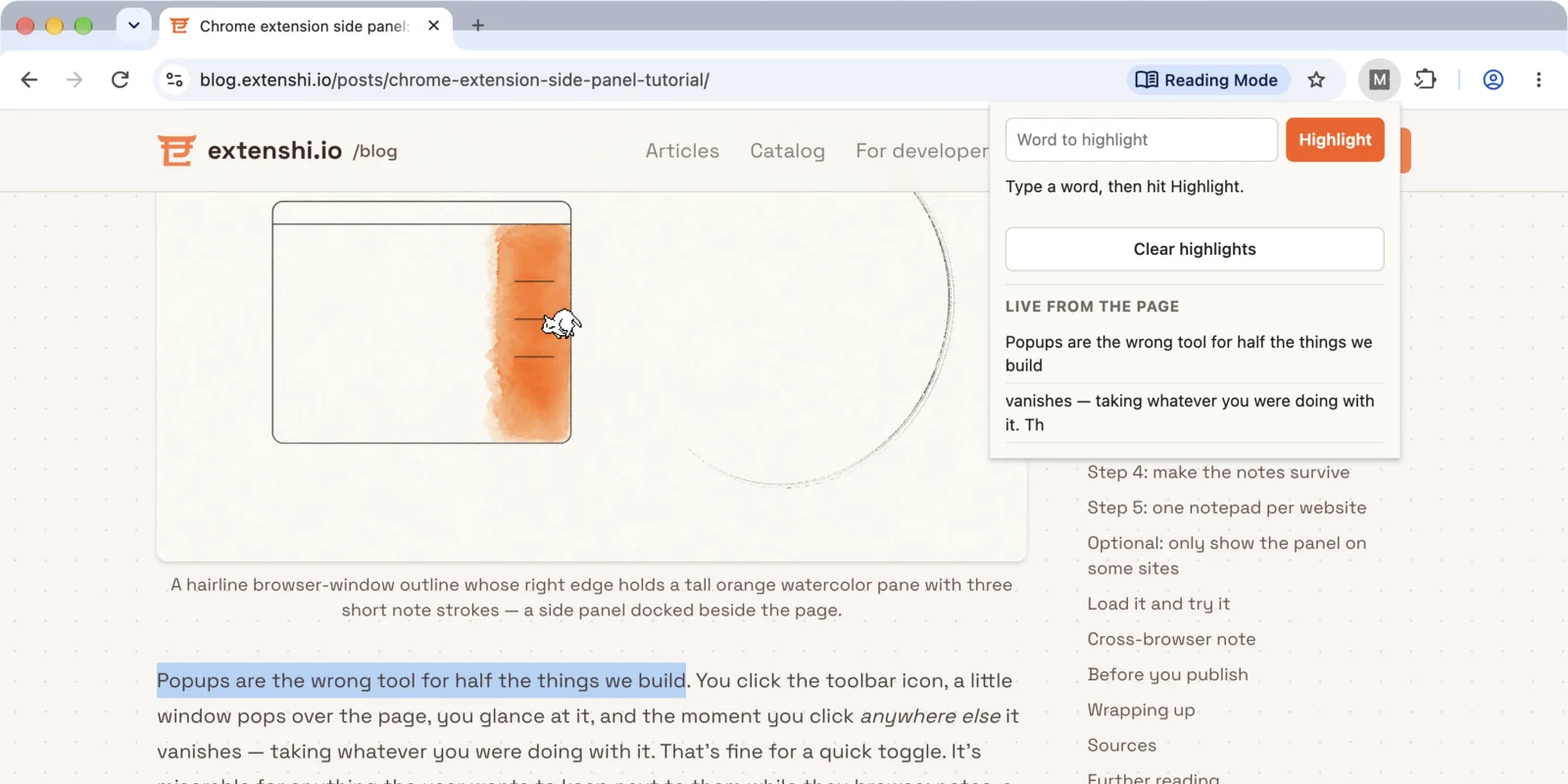 The stream path: page selection → content script port → hub → popup port
 The hub has its own console — chrome://extensions → service worker
If it doesn't work
- Could not establish connection. Receiving end does not exist. → No content script is listening in that tab: it was open before you installed (reload it), it is a
chrome://, Web Store or PDF page (never eligible), or a single-page app navigated away from the document your script was injected into — my SPA navigation piece covers staying alive through those. - The message port closed before a response was received. → The
return truedisappeared from the worker's listener, or the listener returned before anything calledsendResponse. And the boring check: after editingsw.js, hit reload on the extension card — Chrome keeps running the old worker otherwise. - Popup says "did not answer" but the page highlights fine → you are reading the wrong console; the worker's console lives behind the service worker link on
chrome://extensions. Also, a listener registered inside a promise callback may never exist in time to catch anything: register listeners synchronously at the top level. Chrome 154 added an opt-in manifest key that relaxes this rule, and my piece on async listener registration explains why you should not lean on it yet.
Three recent changes worth knowing
Messaging is old API surface, but it moved three times recently:
- Chrome 148 added opt-in structured clone serialization. Put
"message_serialization": "structured_clone"in the manifest and messages can carryMap,Set,BigInt,Date,Error,FileandBlobinstead of being flattened through JSON; omit the key and nothing changes. Before that, exotic types needed a hand-rolledJSON.stringifywrapper with the type stitched back on (Chrome Developers blog). - A listener can answer by returning a promise. The messaging guide now lists two ways to respond asynchronously:
return true, or, from Chrome 148, return a promise whose resolved value becomes the response. The guide says the promise form is rolling out gradually and may not be in every user's browser yet, whilereturn truekeeps working either way. That is why this tutorial usesreturn true. onMessageExternalstopped forgiving a missingreturn true. Listeners for external messages (web pages or other extensions, viaexternally_connectable) used to keep the channel open even without it. In an April 2026 PSA to the Chromium Extensions group, the Chrome team called that a bug and announced the fix: from Chromium 145, an external listener that answers asynchronously withoutreturn truegives the sender the same port-closed error. The rule now guards both doors of your extension.
Do not trust the other end
The messaging guide's security section is blunt about it: content scripts are less trustworthy than your service worker — they run beside, and exchange data with, arbitrary web pages. Treat everything arriving from a tab as user input:
- Validate
senderin every listener, like both ends above do. In the worker, decide which contexts may send which commands — ours accepts one-time commands and popup-stream ports only from extension pages, and page-stream ports only from content scripts. - Never render a message payload as HTML.
innerHTMLwith text that originated in a web page is an XSS running with your extension's privileges.textContent/createTextNode, like the feed above. - Leave
externally_connectableoff unless a web page genuinely must talk to your extension — and then match the narrowest patterns you can. Every origin you list can wake your worker and probe your listeners.
Cross-browser: same channel, different prefix
Firefox implements the same messaging API — browser.runtime.sendMessage, browser.tabs.sendMessage, browser.runtime.connect, ports — with promises as the native return style rather than a retrofit. This tutorial ports over unchanged apart from the namespace prefix, and since Chrome 148 ships browser.* as an alias, one codebase can use browser. everywhere across Chrome and Firefox. Safari's WebExtensions support includes the same messaging surface; MDN's anatomy page maps the Firefox side.
Common pitfalls, collected
- One-time messages for commands, ports for streams. If you catch yourself sending the same
sendMessageevery few hundred milliseconds, you wanted a port. If you open a port to ask one question, you wantedsendMessage. - The popup is a fair-weather friend. It closes mid-request without warning. Anything that must survive — routing, badges, storage writes — belongs in the worker. Need a UI that stays open? That is the side panel's pitch.
- Messages are data, not objects. JSON by default: functions, DOM nodes and class instances do not survive the trip. Send plain objects and rebuild on the other side — or opt into structured clone (above).
- An open port does not make the worker immortal. Messages crossing the port reset the worker's idle timer; the open port alone does not. Marker's hub also keeps its list of popup ports in a plain variable, which is fine only because a restarted worker has no ports left to remember. Anything that must outlive the worker goes through
chrome.storage, as my cookies tutorial does with its watch target. - A port's
onDisconnectis your only warning. Handle it on both ends — reconnect lazily like the content script does, or right away like the popup does. Silent death is how messaging bugs become "it just stopped working."
Before you ship it
Marker asks for no permissions and reaches no network — but your version might. A message handler that skips the sender check, or an externally_connectable list grown to *://*/*, is exactly the finding that should surface before store review, not after. Run the packaged build through the Extenshi CLI (npx @extenshi/cli scan): security findings, the manifest signals stores reject for, and a store-review prediction in one report. You get 3 scans and 10 reads free with a free account (one-time); after that, prepaid credit packs that never expire.
Curious what competing highlighters ask for? Browse them in the catalog and compare their permission lists with Marker's zero — and before installing one to study it, check it first.
Sources
- Message passing — Chrome Extensions developer guide — Chrome for Developers (one-time messages, the
return truerule, long-lived connections, serialization, security) - chrome.runtime API reference — Chrome for Developers (
sendMessage,onMessage,connect,onConnect,Port) - chrome.tabs API reference — Chrome for Developers (
tabs.sendMessage,tabs.query, permission-free tab properties) - Unlock Structured Clone for Chrome Extension Messaging — Chrome Developers blog (the Chrome 148
message_serializationopt-in) - PSA: Change to onMessageExternal asynchronous responses — Chromium Extensions Google Group (April 2026, explicit
return truefor external async responses from Chromium 145) - The extension service worker lifecycle — Chrome for Developers (the 30-second idle timeout; ports and the idle timer since Chrome 114)
- Add a popup — Chrome for Developers (popups close when focus leaves them)
- Anatomy of a WebExtension — MDN Web Docs (the context map, Chrome and Firefox side)
- functional-samples/tutorial.quick-api-reference — GoogleChrome/chrome-extensions-samples (Apache-2.0); content script asks, worker answers
- api-samples/tabs/screenshot — GoogleChrome/chrome-extensions-samples (Apache-2.0); the
tabs.sendMessagedirection
Further reading
📚 Building Browser Extensions, 2nd Edition by Matt Frisbie — Amazon | Apress. Chapter 6 makes the case for the service worker as the extension's message hub, and chapter 9 maps the full messaging surface — one-off messages, ports, native messaging and the promises-vs-callbacks split.
This article is a hands-on tutorial based on the official Chrome extension documentation and Google's Apache-2.0 sample code. Code is provided as-is for educational purposes; verify API behavior against the current developer.chrome.com reference before shipping. Extenshi does not independently verify all claims made by third-party authors, and references to specific products reflect cited documentation, not accusations of wrongdoing. If you believe any information is inaccurate, contact [email protected] and we will review and update.
Related Articles
Content scripts in single-page apps: how to survive a route change in MV3
Your content script runs once on YouTube and never again. Fix Chrome extension SPA navigation with webNavigation — or without a new permission. Full MV3 code.
Read, write and watch cookies from an MV3 extension
Use the Chrome cookies API in Manifest V3 to read, edit and watch cookies. Fix empty getAll results, host permissions and duplicate cookies with runnable code.
Runtime script injection in Chrome extensions: ISOLATED vs MAIN world
chrome.scripting.executeScript end to end: inject on click with activeTab, pass args safely, and choose ISOLATED or MAIN world. Full MV3 code, ~25 min.

Chrome 154 landed MV3's lost-event fix — for up to 276,820 Chrome extensions that can't use it yet
Chrome 154 shipped the async_listener_registration manifest key for MV3 service workers. Here's what landed, who it covers, and why you shouldn't switch yet.