chrome.action in browser extensions: badges, icons, and toolbar state that survives the service worker
Build a chrome extension badge with chrome.action in MV3: per-tab badge text, a code-drawn icon, and state that survives worker teardown. Hands-on tutorial.
In 2020, Chrome moved extension icons behind a new puzzle-piece menu: unless the user deliberately pinned an extension, its icon stayed out of sight (the team announced the experiment in March 2020). Six years later, that may be reversing. As of August 2026, the Chrome Extensions team says it is experimenting — in Canary, with no ship commitment — with pinning an extension's action icon to the toolbar by default, starting in Chrome 153 (official What's New page).
If that lands, your toolbar icon becomes the one piece of your extension everyone sees all day, and the badge, tooltip and icon state become your front door. chrome.action takes five minutes to learn and a few afternoons to understand, because three things trip nearly everyone: per-tab versus global state, the popup that silently eats your click handler, and the service worker that dies mid-session with your counter inside it.
Today I'm building all three lessons into one small extension.
What we're building
Tab Pulse, a four-file extension that asks for exactly one permission:
- A toolbar button you click — each click counts a "tap" for that tab.
- The count wears itself as a badge: per-tab, colored, capped at
99+, and put back after the page navigates. - The icon itself is drawn in code with
OffscreenCanvas— an orange dot when the tab has taps, a gray ring when idle. No image files to ship. - The count lives in
chrome.storage.session, so it survives the service-worker teardown that silently resets in-memory variables to zero. - In step 3, a popup arrives and steals
onClicked— then hands it back at runtime, no reload required.
Difficulty: beginner — one manifest, three small files, no build step, no icons. Time: ~20 minutes.
How chrome.action actually works
The action manifest key is the toolbar button: an icon, a tooltip (default_title), an optional popup (default_popup), and a badge overlay (text, background color, and since Chrome 110 the text color too). It needs no permission to exist. Clicking it does exactly one of two things: if a popup is set, the popup opens; if not, chrome.action.onClicked fires in your service worker. Never both — remember that, it's step 3.
Every setter — setBadgeText, setBadgeBackgroundColor, setIcon, setTitle, setPopup — takes an optional tabId, and this is the part that surprises people. Without tabId you set the global state; with it you set a per-tab override that wins over the global value. The API reference says the override resets when the tab closes. It leaves out the other reset: Chrome also clears every per-tab value (badge, colors, icon, tooltip, popup) whenever the tab loads a new document, reloads included. That happens in ExtensionActionRunner::DidFinishNavigation in Chromium's source, and I watched it happen while testing this tutorial. Firefox documents the same reset. One API, two layers of state, and a leak in your badge if you mix them up.
The other half of the mental model is lifetime. Chrome holds your badge pixels across service-worker restarts — but it does not hold your bookkeeping. As Matt Frisbie explores in Building Browser Extensions (Apress, 2025), the extension's UI surfaces are transient by design: a popup is destroyed the moment it loses focus, and under MV3 the worker itself is killed when idle. State has to live somewhere that outlives both — which, for a per-tab count, means chrome.storage.session: memory-backed, shared with the worker's next incarnation, and cleared on browser restart. That last part is a feature here, not a bug: tab IDs are meaningless after a restart anyway, so the storage lifetime matches the data's real lifetime exactly.
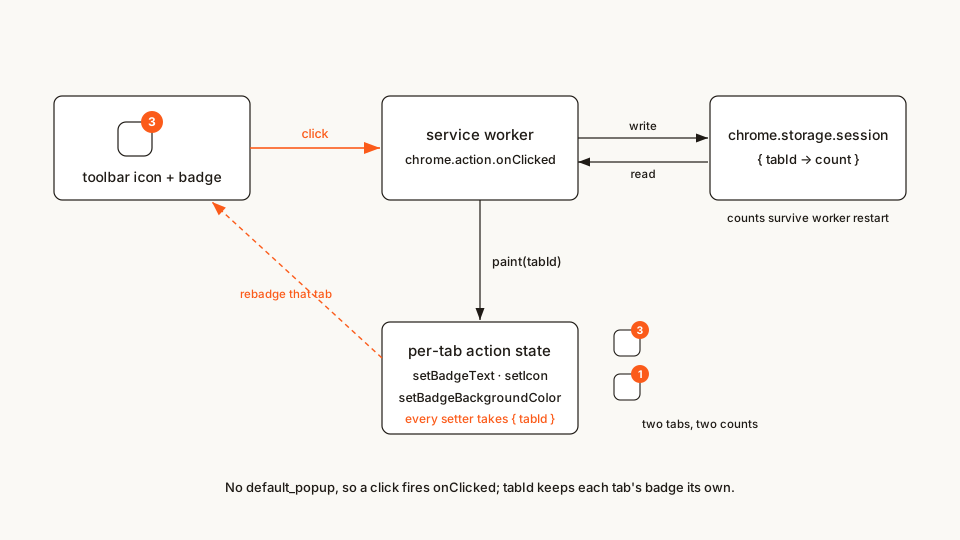 The whole loop: click → worker → session storage → per-tab repaint. Chrome keeps the badge across worker restarts; only storage keeps the count.
tab-pulse/
├── manifest.json
├── background.js
├── popup.html    (added in step 3)
└── popup.js      (added in step 3)
Rather clone than type? The finished extension lives in our public samples repo — load it, then read on with this tutorial as the guided tour.
Step 1: the manifest — no icons, no popup, one permission
manifest.json
{
	"name": "Tab Pulse",
	"description": "Counts taps per tab and wears the count as a badge — a tour of the chrome.action API.",
	"version": "1.0",
	"manifest_version": 3,
	"background": {
		"service_worker": "background.js"
	},
	"action": {
		"default_title": "Tab Pulse — click to count"
	},
	"permissions": ["storage"]
}
Three deliberate absences. No default_icon: step 2 draws the icon in code, which is both a legit production technique and a way to keep this tutorial file-only — Chrome shows its default icon until the first setIcon call lands. No default_popup: with a popup set, onClicked never fires, and clicks are the whole input here. And no tabs permission: onClicked hands you a tabs.Tab whose id is always present even without it (only url/title get redacted), and a tab ID is all a per-tab badge needs. The tabs.onUpdated and tabs.onRemoved events used in step 2 fire without it too; they just leave the URL out. The moment your badge depends on what the page is — counting items on a site, flagging the current URL — you'll need activeTab or tabs, and the polite way to ask is at runtime, which is exactly what my optional-permissions tutorial covers. storage is the one real permission, and it buys chrome.storage.session.
Scaffolding a real project instead of following along? My manifest generator builds an MV3 manifest from the kind of extension you pick and fills in the permissions each piece needs.
Step 2: a badge that survives the service worker
Here's the bug this whole design exists to avoid. You keep let counts = {} at the top of the worker, increment it on click, paint the badge. It works — for about 30 seconds of idleness. Then Chrome kills the worker, the next click respawns it with a fresh counts = {}, and a badge that read 5 suddenly reads 1. The pixels survived; the bookkeeping didn't.
The fix is to never own the count in worker memory: read it from chrome.storage.session, increment, write it back, paint. Listeners register at the top level so a freshly spawned worker is listening on its very first turn.
Two more things only showed up once I ran it. First, reload the page and the badge disappears, because Chrome drops per-tab state on every navigation, so the worker repaints from storage when the new page finishes loading. Second, two quick clicks can both read the old count before either write lands. In my test two simultaneous taps stored 1, not 2. A small promise chain puts every read-modify-write in line.
background.js
// Tab Pulse — the service worker.
//
// Two MV3 rules keep this file honest:
// 1. Register listeners top-level and synchronously. Chrome kills this
// worker when it goes idle, and a freshly spawned worker only receives
// events whose listeners were attached on the script's first turn.
// 2. Never trust a module-level variable to survive. The tap count lives in
// chrome.storage.session, so the next tap still increments the real
// number after the worker has been torn down and respawned.
const ACTIVE_COLOR = '#FB5B1A'; // badge background + "tapped" icon
const IDLE_COLOR = '#8A857E'; // hollow ring when a tab has no taps
// Clicking the toolbar icon is the whole input: bump this tab's count.
// This fires only because the manifest sets no default_popup.
chrome.action.onClicked.addListener((tab) => {
if (typeof tab.id === 'number') {
serial(() => bump(tab.id));
}
});
// Give the action its idle look when the extension loads or the browser
// starts. No tabId means this sets the GLOBAL default, so every tab without
// an override of its own, including tabs opened later, shows the ring.
chrome.runtime.onInstalled.addListener(paintDefault);
chrome.runtime.onStartup.addListener(paintDefault);
// Chrome wipes a tab's badge, icon and title every time the tab loads a new
// document, reloads included. The count is still in storage, so put it back
// once the new page has finished loading.
chrome.tabs.onUpdated.addListener((tabId, changeInfo) => {
if (changeInfo.status === 'complete') {
serial(() => repaint(tabId));
}
});
// Per-tab action state dies with the tab; drop its count to match.
chrome.tabs.onRemoved.addListener((tabId) => {
serial(() => forget(tabId));
});
// Two quick clicks can both read the old count before either write lands,
// and one tap is lost. Chaining every read-modify-write prevents that. This
// is the one module-level variable that is safe here: it only orders work
// that is still in flight, and holds nothing worth keeping.
let queue = Promise.resolve();
function serial(task) {
queue = queue.then(task, task);
return queue;
}
async function bump(tabId) {
// Read-modify-write against session storage, never a local variable.
const { counts = {} } = await chrome.storage.session.get('counts');
counts[tabId] = (counts[tabId] || 0) + 1;
await chrome.storage.session.set({ counts });
await paint(tabId, counts[tabId]);
}
// One function paints every piece of the action for ONE tab: badge text,
// badge color, tooltip, icon. Passing tabId is what keeps the state from
// leaking across tabs — drop it and every setter becomes global.
async function paint(tabId, count) {
const text = count > 99 ? '99+' : count > 0 ? String(count) : '';
await chrome.action.setBadgeText({ text, tabId });
await chrome.action.setBadgeBackgroundColor({ color: ACTIVE_COLOR, tabId });
await chrome.action.setTitle({
title: count > 0
? `Tab Pulse — ${count} tap${count === 1 ? '' : 's'} on this tab`
: 'Tab Pulse — click to count',
tabId
});
await setDotIcon(tabId, count > 0);
}
// The icon is drawn in code — no PNG files to ship. OffscreenCanvas works in
// the service worker, and setIcon accepts raw ImageData keyed by size.
async function setDotIcon(tabId, active) {
try {
const imageData = {};
for (const size of [16, 32]) {
const canvas = new OffscreenCanvas(size, size);
const ctx = canvas.getContext('2d');
const pad = Math.max(2, Math.round(size / 12));
ctx.beginPath();
ctx.arc(size / 2, size / 2, size / 2 - pad, 0, Math.PI * 2);
if (active) {
ctx.fillStyle = ACTIVE_COLOR;
ctx.fill();
} else {
ctx.strokeStyle = IDLE_COLOR;
ctx.lineWidth = pad;
ctx.stroke();
}
imageData[size] = ctx.getImageData(0, 0, size, size);
}
await chrome.action.setIcon({ imageData, tabId });
} catch (err) {
// The icon is cosmetic — never let it take the counter down with it.
console.warn('setIcon failed', err);
}
}
async function paintDefault() {
await setDotIcon(undefined, false);
}
async function repaint(tabId) {
const { counts = {} } = await chrome.storage.session.get('counts');
if (counts[tabId]) {
await paint(tabId, counts[tabId]);
}
}
async function forget(tabId) {
const { counts = {} } = await chrome.storage.session.get('counts');
if (tabId in counts) {
delete counts[tabId];
await chrome.storage.session.set({ counts });
}
} The badge is per-tab state, and it survives service-worker restarts because the count never lived in the worker
Worth lingering on four details:
tabIdis the whole per-tab trick — watch it leak. Editpaint()to droptabIdfrom thesetBadgeTextcall, reload, open two tabs, tap one a few times: both tabs now show that number, because the setting went global. RestoretabIdand they're independent again. Per-tab overrides win over global values and reset when the tab closes or navigates; global values persist until you change them.- Four characters, roughly. The badge renders about four characters before Chrome clips;
99+is the community convention for "many", and the API reference recommends keeping it short. Clear a badge withsetBadgeText({ text: '' }), notnullgames. - Colors take two shapes.
setBadgeBackgroundColoraccepts a CSS string ('#FB5B1A','orange','#F008') or an RGBA array ([251, 91, 26, 255]). Chrome picks black or white badge text automatically for contrast;setBadgeTextColor(Chrome 110+) overrides that. Firefox has had a text-color setter for longer — one of those small cross-browser asymmetries. setIconhas three inputs and one trap. A path map ({16: 'icon16.png', ...}— real PNG files, SVG is not supported), rawImageDataas above, or nothing to reset to the manifest icon. The trap: paths are per-size, and if you skip sizes Chrome scales what you gave it, which is how blurry icons are born. Drawing at 16 and 32 likesetDotIcon()does keeps it crisp on HiDPI screens.
One more icon-state tool lives in the same API: chrome.action.disable(tabId) grays the icon but keeps it on the toolbar. A click then neither fires onClicked nor opens the popup; Chrome shows the extension's context menu instead. It's the MV3 descendant of the old pageAction show/hide dance, and the canonical use is the declarativeContent pattern from the API reference: rules that disable your action everywhere and re-enable it on sites you can actually help, re-evaluated on every navigation so nobody gets stranded. (Stranded is the failure mode to fear: a popup button that disables its own action, then closes, leaves the user a grayed icon with no way back. If you build "pause on this site", build the un-pause first.)
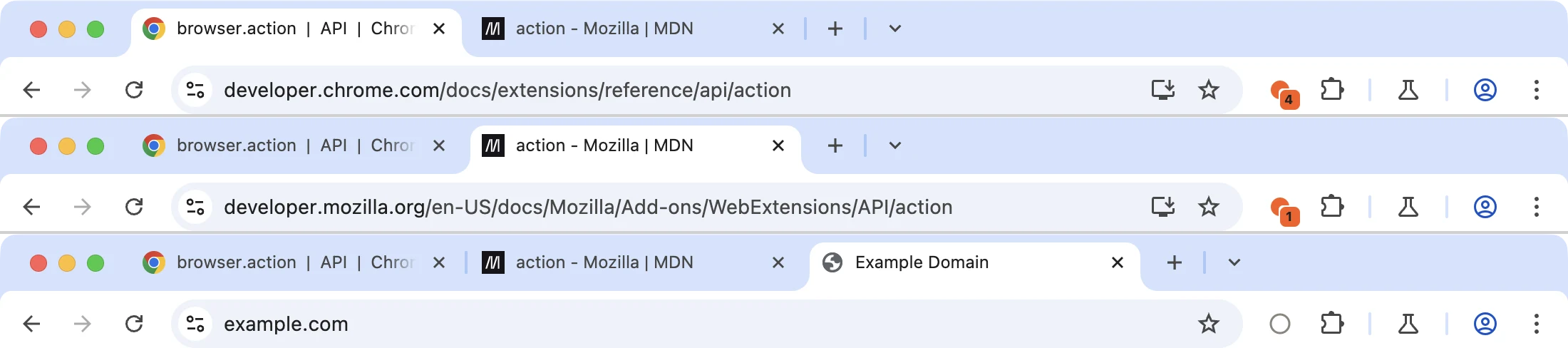 One window, three tabs: 4 taps, 1 tap, and a fresh tab that falls back to the global idle ring. Drop tabId from the setters and one number leaks across all of them
Step 3: popup or click — you don't get both
The single most common chrome.action bug: an extension ships with a click handler, someone adds default_popup to "show a little panel", and the click handler mysteriously stops firing. It's not mysterious — a popup is the click handler now. Google's Page Redder sample is the pure-click extreme: "action": {} in the manifest, one onClicked listener that reddens the page. No popup, no badge, ten lines.
Let's cross to the other side on purpose. Add a popup to the manifest — merge this into your action key:
"action": {
	"default_title": "Tab Pulse — click to count",
	"default_popup": "popup.html"
}
Now the two popup files. Keep the golden rule in mind: a popup dies on blur, so it reads state and issues commands — it never owns anything.
popup.html
<!doctype html>
<html lang="en">
<head>
	<meta charset="utf-8" />
	<title>Tab Pulse</title>
	<style>
		body {
			width: 260px;
			margin: 0;
			padding: 14px;
			font-family: system-ui, sans-serif;
			color: #1f1b16;
			background: #ffffff;
		}
		h1 { margin: 0 0 8px; font-size: 15px; }
		p { margin: 0 0 12px; font-size: 13px; line-height: 1.5; }
		button {
			width: 100%;
			padding: 8px 10px;
			border: 1px solid #fb5b1a;
			border-radius: 8px;
			background: #ffffff;
			color: #fb5b1a;
			font-size: 13px;
			font-weight: 600;
			cursor: pointer;
		}
		button:hover { background: #fb5b1a; color: #ffffff; }
		code { font-size: 12px; }
	</style>
</head>
<body>
	<h1>Tab Pulse</h1>
	<p id="count">…</p>
	<button id="click-mode">Back to click mode</button>
	<p><code>setPopup({ popup: '' })</code> hands the button back to <code>onClicked</code> — no reload.</p>
	<script src="popup.js"></script>
</body>
</html>
popup.js
// With default_popup set, chrome.action.onClicked no longer fires — that IS
// the lesson of this step. So the popup is a control surface: it shows the
// count and hands the toolbar button back to click mode.
const countEl = document.getElementById('count');
const clickModeBtn = document.getElementById('click-mode');
async function activeTabId() {
const [tab] = await chrome.tabs.query({ active: true, currentWindow: true });
return typeof tab?.id === 'number' ? tab.id : null;
}
async function init() {
const tabId = await activeTabId();
if (tabId === null) {
countEl.textContent = 'Open this on a normal tab.';
return;
}
const { counts = {} } = await chrome.storage.session.get('counts');
const n = counts[tabId] || 0;
countEl.textContent = n === 0
? 'No taps on this tab yet.'
: `${n} tap${n === 1 ? '' : 's'} on this tab.`;
}
clickModeBtn.addEventListener('click', async () => {
// Clearing the popup re-enables chrome.action.onClicked everywhere.
// Runtime setPopup overrides the manifest until the extension reloads.
await chrome.action.setPopup({ popup: '' });
window.close();
});
init();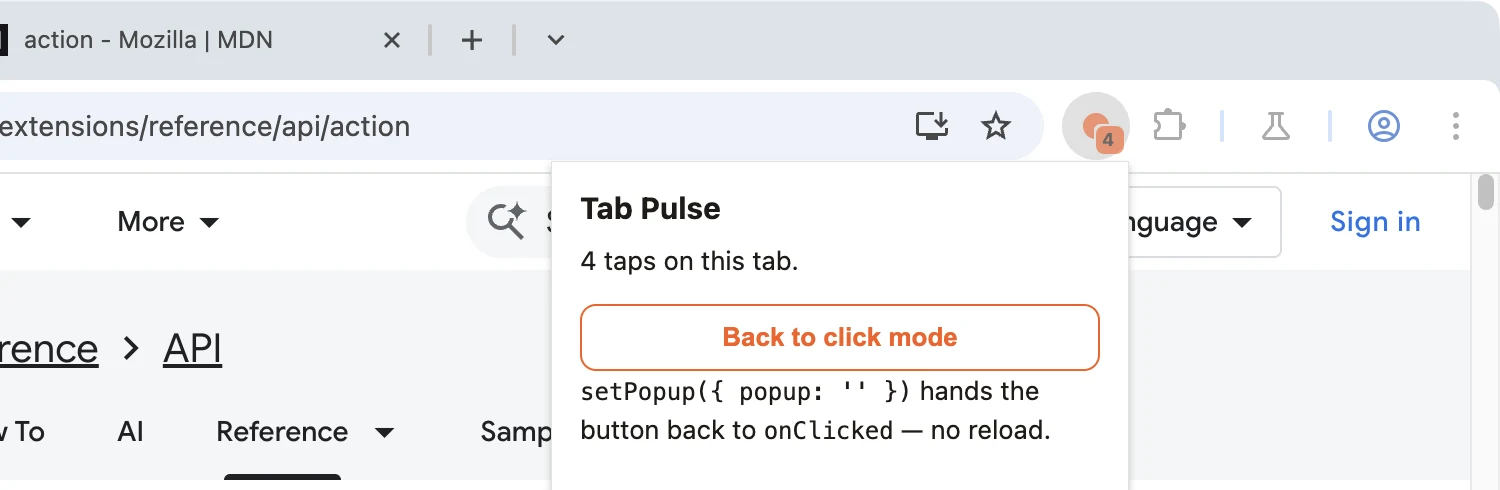 With a popup set, clicking the icon opens this instead of counting. onClicked is gone until setPopup clears it
Reload the extension and click: no counting anymore, just the panel — onClicked is dead while a popup is set. Hit Back to click mode and click again: counting resumes without reloading the extension, because setPopup({ popup: '' }) is a runtime override of the manifest value. That round trip is the entire relationship in miniature: the manifest declares the default, the runtime setters override it per tab or globally, and a reload resets everything back to the manifest.
Load it and try it
- Create a
tab-pulse/folder with the four files from steps 1–3 (skip the popup files for a pure click-mode build). - Open
chrome://extensions, flip Developer mode on (top right), click Load unpacked, pick the folder. - Pin Tab Pulse via the puzzle-piece menu so the badge is visible.
- On any normal page, click the icon. Badge reads
1, the drawn dot turns orange, hover shows the tooltip. Click three more times:4. - Open a second tab: gray ring, no badge, because nothing set per-tab state for it yet and it shows the global default. Tap once there:
1on this tab, and the first tab still shows4when you switch back. - Reload the first tab. The badge blinks away while the page loads, then
4comes back. Comment out thetabs.onUpdatedlistener, reload the extension and try again: the badge stays gone, though the count is still in storage. - The teardown test: leave Chrome alone for ~30 seconds, then check the extension card at
chrome://extensions— the "service worker" link should read inactive. Click the icon again. The count continues (5), it does not restart at1. That'sstorage.sessionearning its keep. - Add
default_popup(step 3), reload the extension, click: the popup opens instead of counting. Use its button to go back. - Bonus clipping demo: on the extension card, click service worker to open its console and run
chrome.action.setBadgeText({ text: '99999' })— Chrome renders about four characters and no more.
If it doesn't work, it's nearly always one of these:
- Clicks do nothing and there's no popup → a popup is set somewhere:
default_popupin the manifest, or a runtimesetPopupthat survived until reload. Remove it and reload the extension — runtime overrides reset. - The badge resets to 1 after a pause → you're incrementing a worker variable instead of storage, and the worker died in between. That's the exact bug this design avoids; check
bump(). - The badge vanishes when the page reloads or navigates → that's Chrome clearing per-tab state. Repaint from storage in
tabs.onUpdated. - Fast double-clicks count once → the read-modify-write isn't going through
serial(). chrome.storage.sessionis undefined → the"storage"permission is missing from the manifest (session storage also needs Chrome 102+).- The icon never changes → open the worker console from the extension card;
setIconwith a path needs real PNGs (SVG is not supported), andimageDatakeys must be the pixel sizes. - Every tab shows the same number → some setter lost its
tabIdand went global.
Cross-browser: same action, different worker
Firefox runs almost all of this unchanged under browser.action: badges, per-tab setters, onClicked and popups are all in MDN's action docs, and Firefox has storage.session too. It also resets per-tab badge text on navigation, and says so in its docs. The differences cluster in the background:
- Firefox has no extension service workers. Your background is an event page (
background.scripts), also torn down when idle — so the "don't keep the count in worker memory" lesson transfers verbatim, it just has a different corpse. - Test the drawn icon.
setIconwith rawImageDatafrom anOffscreenCanvasworks in Chrome's worker; re-verify in Firefox's event page before relying on it, or fall back to path-based PNGs, which work everywhere. - Firefox had
setBadgeTextColorlong before Chrome 110, and lets you set per-tab badge colors the same way — check MDN's compat table for the versions you target. - Edge is Chromium: Tab Pulse runs there byte-identical. The
chrome.*namespace also works in Firefox; if you'd rather writebrowser.*everywhere, Chrome has shipped it as a native alias since 148 — see my notes on the namespace going GA.
Common pitfalls and best practices
- Register
onClickedtop-level and synchronous. A listener added after anawaitmisses the event that woke the worker — the same async-registration bug that haunts every MV3 API. - A badge is state, not a notification. It sits there until you change it, and it's invisible when the icon isn't pinned. For something that interrupts and dismisses, use
chrome.notifications— which I built out in my notifications tutorial. - Check
getUserSettings().isOnToolbar(Chrome 91+). If the user never pinned you, your beautiful badge lives behind the puzzle piece — that's the moment for a gentle onboarding nudge. If the Chrome 153 pinning experiment ships, this call starts returningtrueby default for a lot of people. - Don't store per-tab state you need to keep. Per-tab action settings die on navigation and tab close,
storage.sessionon browser restart. That's right for ephemeral UI; for anything durable, key it by something stable instorage.local. - Wear honest numbers. A fake
1that never resolves trains users to ignore your badge forever. - Popup = transient, worker = logic, storage = truth. Let each own what it's good at and the API stops fighting you.
Before you ship it
Tab Pulse draws its action icon at runtime, but the Chrome Web Store still requires a real icons block (128px) before you submit anywhere. For more to play with, Google's api-samples/action exercises every setter on this page (Apache-2.0).
The badge is the visible half of the action; the click is the invisible half, and it pairs with the rest of the quick-action surface: context menus for right-click, keyboard shortcuts for the _execute_action command (which itself splits on the popup/click line you just learned), and the side panel when a popup isn't big enough.
And before the store sees it, run the same checks I run: the Extenshi CLI (npx @extenshi/cli) scans your manifest and permission footprint — three scans free with a free account, one-time, then prepaid credit packs that never expire. Curious how shipped extensions wear their badges? Browse tab-counter extensions in the catalog, or check any extension to see exactly what it declares.
Sources
- chrome.action API reference — Chrome for Developers
- Implement action in the toolbar — Chrome for Developers
- What's new in Chrome extensions — Chrome for Developers (Chrome 153 default-pinning experiment, August 2026)
- browser.action and action.setBadgeText() — MDN Web Docs (Mozilla)
- extension_action_runner.cc — Chromium source, pinned commit (per-tab action values cleared on navigation)
- api-samples/action — GoogleChrome/chrome-extensions-samples (Apache-2.0)
- functional-samples/sample.page-redder — GoogleChrome/chrome-extensions-samples (Apache-2.0)
- Changes to extension icons in the toolbar (2020) — chromium-extensions Google Group
Further reading
📚 Building Browser Extensions, 2nd Edition by Matt Frisbie — Amazon | Apress. Chapter 7 walks the full extension-UI surface — actions, popups, options pages — including why popup documents are transient and how the action fits the rest of the browser chrome.
This article is a hands-on tutorial based on the official Chrome and Mozilla extension documentation and Google's Apache-2.0 sample code. Code is provided as-is for educational purposes; verify API behavior against the current developer.chrome.com reference before shipping. Extenshi does not independently verify all claims made by third-party authors, and references to specific products reflect cited documentation, not accusations of wrongdoing. If you believe any information is inaccurate, contact [email protected] and we will review and update.
Related Articles
chrome.commands in browser extensions: keyboard shortcuts that make your extension feel native
Build chrome extension keyboard shortcuts into an MV3 manifest: declare commands, handle chrome.commands.onCommand, go global, and survive the 4-key cap.
chrome.contextMenus in browser extensions: build a right-click clip saver
Build a Chrome extension context menu with selected text, saved links and a popup. Get full MV3 code, real screenshots and fixes for missing or duplicate menus.
chrome.notifications in browser extensions: action buttons that survive the MV3 service worker
Build a Chrome extension whose notification buttons still work minutes later, after the MV3 service worker died. Full runnable code and the lifecycle rules.
Offscreen documents in Chrome extensions: how to use the DOM from an MV3 service worker
MV3 service workers have no DOM. Build a Chrome extension that parses HTML and writes to the clipboard from an offscreen document — runnable code, ~25 min.